October 15, 2026. LinkedIn Sales Navigator costs US$119.99 a month for the Core plan or US$1,079.88 a year, which works out to $89.99 a month. The Advanced plan costs US$159.99 a month or US$1,799.88 a year ($149.99 a month). Advanced Plus has no list price; LinkedIn quotes it based on team size, CRM integration and onboarding needs. Every plan includes the same 50 InMail credits a month, so the extra money buys team and CRM features, not more messages. Our lead generation service includes LinkedIn and email outreach, so this guide covers what each plan really adds and when the cheaper plan is enough.
Prices and features come from LinkedIn's compare-plans page, whose pricing answer was last updated on 27 September 2026, and from LinkedIn's help articles, read 15 October 2026. LinkedIn says the figures are estimates that may exclude VAT or GST and promotional discounts.
Key numbers
| Item | Number |
|---|---|
| Core, monthly billing | US$119.99 a month |
| Core, annual billing ($89.99 a month, 25% saving) | US$1,079.88 a year |
| Advanced, monthly billing | US$159.99 a month |
| Advanced, annual billing ($149.99 a month, 6% saving) | US$1,799.88 a year |
| Advanced Plus | custom quote |
| InMail credits per month, every plan (cap of 150, used within 90 days) | 50 |
| Free trial eligibility | no paid LinkedIn plan, no trial in 365 days |
| Refund window (14 days for EU consumers) | 7 days without Premium usage |
LinkedIn Sales Navigator compare-plans page (pricing answer updated 27 September 2026) and LinkedIn Help articles on InMail credits and refunds, read 15 October 2026.
Sales Navigator pricing at a glance
| Plan | Monthly billing | Annual billing | Per month on annual | Best for |
|---|---|---|---|---|
| Core | $119.99 | $1,079.88 a year | $89.99 (25% saving) | Individual sellers |
| Advanced | $159.99 | $1,799.88 a year | $149.99 (6% saving) | Sales teams |
| Advanced Plus | Custom quote | Custom quote | Custom | Teams that sync with a CRM |
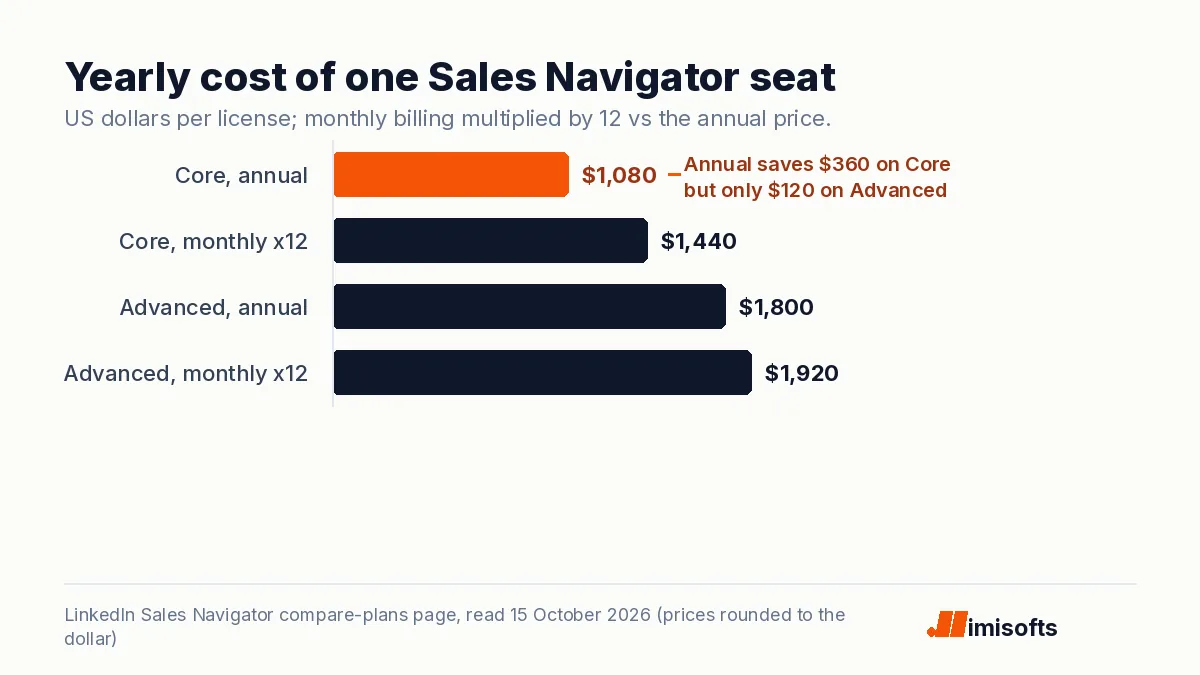
Two details stand out. Annual billing saves $360 a year on Core but only $120 on Advanced, so the case for paying a year up front is much stronger on Core. And the price is per license, so a team of five on Advanced pays about $9,000 a year on annual billing.
What each plan actually adds
LinkedIn's comparison table shows that the core prospecting tools are the same on every plan:
| Feature | Core | Advanced | Advanced Plus |
|---|---|---|---|
| 50+ advanced search filters | Yes | Yes | Yes |
| Account IQ and Lead IQ (AI research) | Yes | Yes | Yes |
| InMail credits | 50 a month | 50 a month | 50 a month |
| Relationship Explorer and Map, Alerts, Message Assist | Yes | Yes | Yes |
| Team seat management and central billing | No | Yes | Yes |
| Buyer Intent | No | Yes | Yes |
| TeamLink and Smart Links | No | Yes | Yes |
| Team reporting | No | Yes | Yes, plus custom ROI reporting |
| Upload your book of business | No | CSV upload | CSV upload and CRM import |
| Advanced CRM integrations (Salesforce, HubSpot, Microsoft Dynamics, Oracle and more) | No | No | Yes |
| Create leads and contacts in your CRM | No | No | Yes |
In plain terms: Core is a full prospecting tool for one person. Advanced is for teams that want warm introductions through colleagues' networks (TeamLink), buyer intent signals and one bill. Advanced Plus is for companies that want Sales Navigator writing into Salesforce, HubSpot or Dynamics.
InMail credits: what 50 a month really means
According to LinkedIn's InMail help article, every plan gets 50 credits on the first day of each month (UTC), and you cannot buy more. Unused credits roll over, but you can hold at most 150 and each must be used within 90 days. You get a credit back for every InMail that receives a response within 90 days, and auto replies count, including "Not interested". Credits do not move with you if you cancel or change plans.
So the real limit is roughly 50 InMails a month per seat, plus a credit back for each reply. That suits account-based selling but not volume prospecting, where Sales Navigator works better as a research tool, with outreach through other channels.
What a team pays in a year
- One rep on Core, annual: $1,079.88.
- One rep on Advanced, annual: $1,799.88.
- Five reps on Advanced, annual: $8,999.40.
- Ten reps on Advanced, annual: $17,998.80.
- Five reps on Core, monthly: $7,199.40 a year, but without central billing or seat management.
LinkedIn also publishes local prices. It lists Core at £94.99 a month or £959.88 a year in the UK, €120.99 or €1,088.88 in the euro area, A$154.99 or A$1,499.88 in Australia and C$144.99 or C$1,199.88 in Canada. Advanced is £130.00 or £1,499.88, €148.21 or €1,693.88, A$189.99 or A$2,159.88 and C$179.99 or C$2,039.88.
Free trial and refunds
LinkedIn offers free trials to members who are not on any paid LinkedIn subscription and have not used a LinkedIn free trial in the past 365 days. Availability varies by plan and region. On refunds, LinkedIn's policy says Sales Navigator may be refundable within 7 days of the charge if you have not used the Premium features, consumers in the European Union get 14 days, and after cancelling, features including InMail expire at the end of the billing cycle. Set a reminder before the trial converts.
Four checks before you buy
- Start on monthly billing if you are unsure. Annual billing pays off on Core only if you keep the seat at least nine months, and on Advanced only for close to the full year, and LinkedIn's refund window is short.
- Pick the plan before you build up credits. LinkedIn says InMail credits are not transferred when you cancel or change subscription type, so switching from Core to Advanced later resets your balance.
- Check who owns the seat. Advanced includes team seat management and centralized billing, which makes it easier for a company to manage licenses when people join or leave. Core, which LinkedIn positions for individual sellers, does not include those team features.
- Budget for data. LinkedIn's plan comparison lists no email addresses or phone numbers, so plan a separate line for verified contact data.
Is Sales Navigator worth it for outbound?
For finding the right people, yes: 50-plus filters, account research and alerts are hard to replace. But LinkedIn's plan comparison does not list email addresses or phone numbers, and 50 InMails a month will not fill a pipeline. One common setup is Sales Navigator for targeting, a verified data source for contact details, and email sent from properly configured sending infrastructure, with LinkedIn used for connection requests and follow-up. Keep the platform rules in mind: LinkedIn limits how many connection requests you can send, which our guide to LinkedIn connection request limits covers, and our LinkedIn plus email playbook shows how the two channels fit together.
If the price is the sticking point, our comparison of Sales Navigator alternatives covers cheaper data tools, and our guide to whether cold email laws apply to LinkedIn messages covers the compliance side.
Which plan to choose
- Founder or single rep: Core on annual billing, at $89.99 a month equivalent.
- A team of reps selling into the same accounts: Advanced, for TeamLink, Buyer Intent and central billing.
- A team that lives in Salesforce, HubSpot or Dynamics: ask for an Advanced Plus quote and compare it with Advanced plus your own CRM workflow.
- A company that wants meetings rather than tools: our done-for-you lead generation includes the targeting, data, infrastructure and outreach.
Frequently Asked Questions
Core costs US$119.99 a month or US$1,079.88 a year per license. Advanced costs US$159.99 a month or US$1,799.88 a year. Advanced Plus is quoted by LinkedIn based on team size, CRM integration and onboarding needs. Prices may exclude VAT or GST.
Yes. Annual billing brings Core down to $89.99 a month, a 25 percent saving of $360 a year, and Advanced to $149.99 a month, a 6 percent saving of $120 a year.
Every plan, Core, Advanced and Advanced Plus, includes 50 InMail credits a month. You can hold up to 150, each must be used within 90 days, you get a credit back when a recipient replies within 90 days, and you cannot buy extra credits.
Both include the search filters, AI account and lead research, alerts and 50 InMails a month. Advanced adds team seat management and central billing, Buyer Intent, TeamLink, Smart Links, team reporting and CSV upload of your book of business.
Yes, if you are not on any paid LinkedIn subscription and have not used a LinkedIn free trial in the past 365 days. Availability varies by plan and region.
LinkedIn's plan comparison does not list email addresses or phone numbers among Sales Navigator's features; it is built to find and research people and to send InMails. To email prospects, you need a separate contact data source and your own sending setup.