 SPF, DKIM & DMARC Checker by imisofts
Check SPF, DKIM and DMARC in one click
Type a domain or paste an email address. The checker reads its live SPF, DKIM, DMARC and MX records, gives each one a Pass, Check or Fix, and tells you in plain English what to change.
- No sign-up
- No permissions to grant
- imisofts receives no data
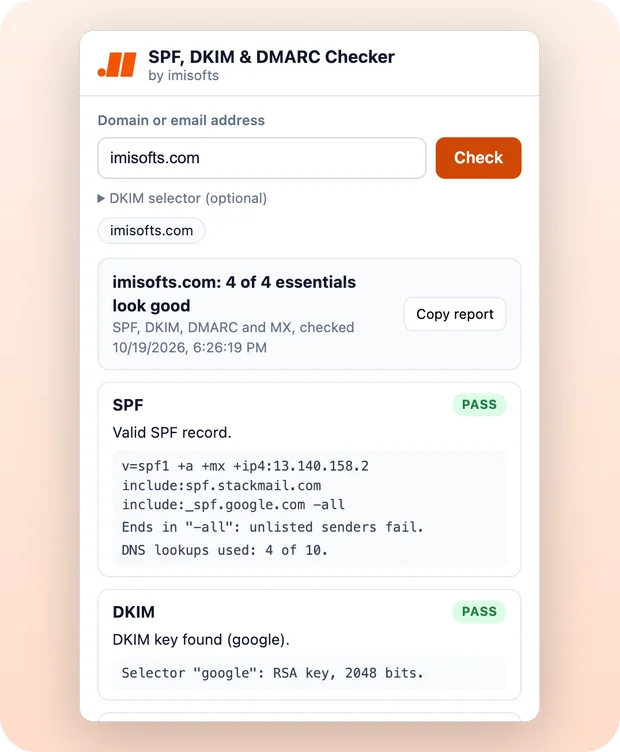
- 4 records SPF, DKIM, DMARC and MX in one check
- 28 DKIM selectors tried, plus your own
- 0 permissions requested
- Free no account, no sign-up
A full check in under a minute
Type a domain, press Check, read the fixes. This is the whole flow, start to finish.
Read the video transcript
How to run a check
Are your emails landing in spam? Your DNS records could be the reason. Click the checker in your toolbar, type your domain or an email address, and press Check. In seconds, each record gets Pass, Check or Fix, so you know exactly what needs work. Here's what good looks like.
What good SPF, DKIM, DMARC and MX look like
SPF: one record, ending in ~all or -all, with ten DNS lookups or fewer. DKIM: a key is found, ideally 2048 bits. Custom selector? Add it here. DMARC: set to quarantine or reject, with a reporting address for daily reports. And MX should point to your email provider's mail servers.
Fixes and Copy report
Anything off comes with a plain-English fix and a free guide. Copy report copies it all for whoever runs your DNS. It's free, with no sign-up and no permissions. SPF, DKIM and DMARC Checker, by imisofts.
Three steps, no setup
No account to create and nothing to configure.
-
1
Add it to Chrome
Click Add to Chrome, then pin it from the puzzle-piece menu so the orange icon sits in your toolbar.
-
2
Enter a domain
Type a domain like
yourcompany.com, or paste an email address. Add your DKIM selector if you know it, then press Check. -
3
Fix what it flags
Each record gets a Pass, Check or Fix. Anything marked Check or Fix comes with a short How to fix note and a free guide, and Copy report puts the full results on your clipboard for whoever manages your DNS.
Every check, record by record
The rules come from the SPF, DKIM and DMARC RFCs and Google's email sender guidelines.
SPF RFC 7208
- Finds your SPF record and flags more than one record
- Counts DNS lookups against the 10-lookup limit
- Catches syntax errors, such as a misspelled mechanism or an invalid IP range
- Catches
include:andredirect=names with no SPF record, and terms placed afterall, which receivers ignore - Marks
+allas a Fix, and warns about?alland the outdatedptrmechanism
DKIM RFC 6376
- Looks for keys on 28 common selectors, including the ones used by Google Workspace, Microsoft 365, Mailchimp, SendGrid and Fastmail
- Lets you enter your own selector, or paste it straight from a DKIM-Signature header
- Reads the exact key size, and flags damaged, revoked and too-short keys
DMARC RFC 7489
- Reads your policy: none, quarantine or reject
- Checks that the report addresses in
rua=are validmailto:addresses - Explains
pct=when only part of your failing mail gets the policy - Checks the parent domain when a subdomain has no record of its own, including its subdomain policy,
sp=
MX RFC 5321
- Lists your mail servers in priority order
- Recognizes common providers such as Google Workspace and Microsoft 365
- Flags a common mistake: MX points to Google Workspace or Microsoft 365, but SPF does not include it
- Flags a null MX, which can get mail from that domain rejected
Plus the extras: it shows whether BIMI and MTA-STS records are published.
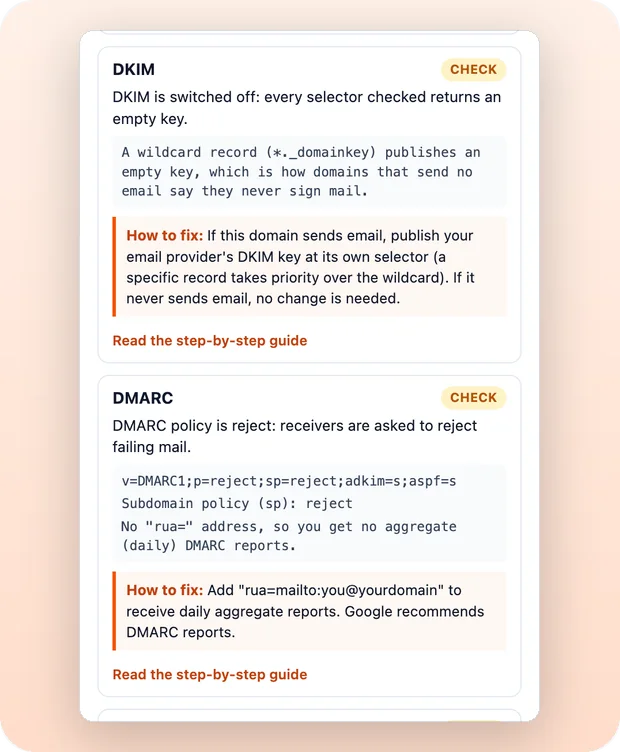
Plain-English fixes, not just red flags
Every problem comes with what to change and a link to a free step-by-step guide on imisofts.com, so you know exactly what to tell whoever manages your DNS.
- Flags Google Workspace or Microsoft 365 missing from SPF
- Tells you when
p=noneonly monitors, and when report addresses are missing - Names DNS errors in plain words, with their likely causes
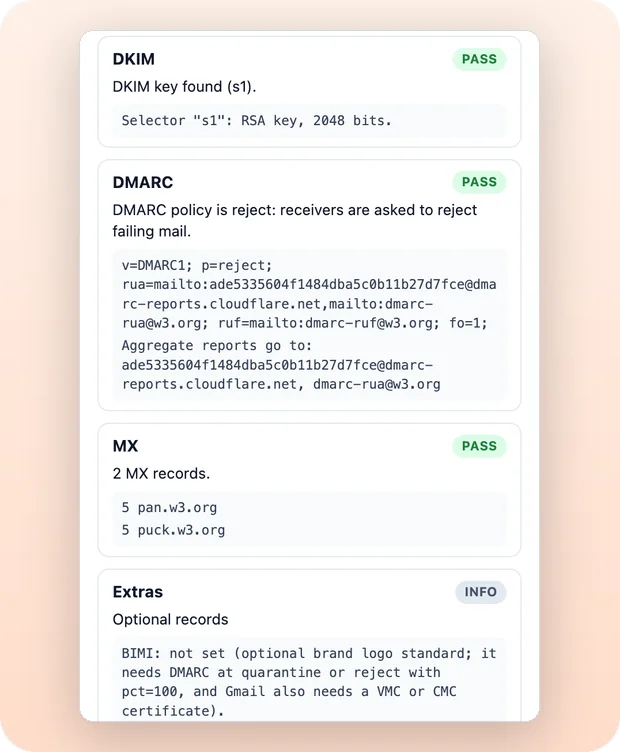
See exactly what is published
SPF, DMARC and MX records are shown in full under their results, and DKIM shows its selector and exact key size. Copy report puts the whole check on your clipboard.
- DKIM key strength in bits
- DMARC policy and report addresses
- BIMI and MTA-STS at a glance
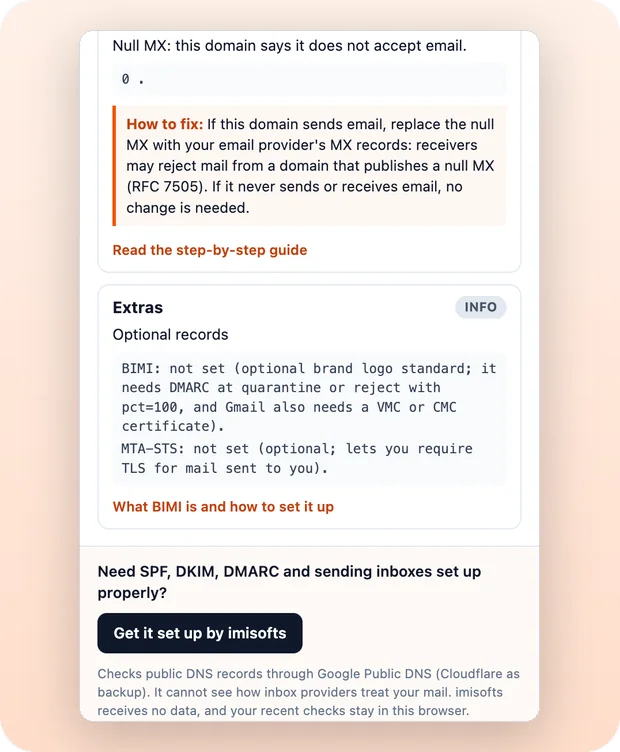
Nothing leaves your browser but the lookup
Lookups go straight to Google Public DNS over HTTPS, with Cloudflare DNS as a backup. There is no account, no analytics and no imisofts server in between.
- No permissions to grant and no sign-up
- imisofts receives no data
- Your last five checks stay in your browser
What good SPF, DKIM, DMARC and MX look like
If your domain matches all four, the essentials are in place.
- SPF
- One record, ending in
~allor-all, with 10 DNS lookups or fewer. The checker warns at 9 or 10, because one more sending service would break SPF. - DKIM
- A key is found, ideally 2048 bits. Not on a common selector? Enter yours under DKIM selector (optional).
- DMARC
p=quarantineorp=reject, with arua=mailto:address so you get daily reports.p=noneonly monitors.- MX
- Your email provider's mail servers.
Good to know: the checker reads public DNS records. It cannot see how a specific inbox provider treats your mail, so use it to get the foundations right, then watch your DMARC reports. Guides: DMARC failing, SPF over 10 lookups and MX records.
Questions about the checker
Is the SPF, DKIM & DMARC Checker free?
Yes. It is free, with no sign-up, no account and no paid plan.
What permissions does it need?
None. The extension asks for no browser permissions, so Chrome shows no permission warning when you add it, and it cannot read the pages you visit.
Does imisofts see the domains I check?
No. The lookups go straight from your browser to Google Public DNS over HTTPS, with Cloudflare DNS as a backup. imisofts receives no data, and your last five checks stay in your browser. The full details are in the extension privacy policy.
Why does it say no DKIM key was found?
The checker looks for keys on 28 common selectors. If your provider uses another one, find the s= value in the DKIM-Signature header of an email you sent, and enter it under DKIM selector (optional). You can also paste the whole header there.
How many DNS lookups can an SPF record use?
Ten. RFC 7208 limits SPF to 10 DNS lookups, and every include:, a, mx, ptr, exists and redirect= counts, including the ones inside your includes. Over the limit, SPF fails. The checker counts them for you. Our guide shows how to get back under 10.
What is a good DMARC policy?
p=quarantine or p=reject, with a rua=mailto: address so you get daily aggregate reports. p=none only monitors: receivers are not asked to treat failing mail any differently. See how to set up DMARC monitoring.
Can it tell me if my email will land in spam?
No tool that reads DNS can promise that. The checker reads your public DNS records, which inbox providers look at, but it cannot see how a specific inbox provider treats your mail. Correct SPF, DKIM and DMARC are the foundation the rest is built on.
Can I check a domain I do not own?
Yes. SPF, DKIM, DMARC and MX records are public DNS records, so you can check any domain, for example a client's or a competitor's.
Want SPF, DKIM, DMARC and your sending inboxes set up for you?
imisofts builds the domains, inboxes, SPF, DKIM, DMARC and warm-up for B2B teams, with sending in about 14 days.
Send any page to n8n, Make or Zapier
 Send to Webhook
Sends the page you are on, a link, an image or text you select to your own n8n, Make, Zapier or Clay webhook in one click, as clean JSON.
See Send to Webhook
Send to Webhook
Sends the page you are on, a link, an image or text you select to your own n8n, Make, Zapier or Clay webhook in one click, as clean JSON.
See Send to Webhook
Check your domain in the next minute
Free, no sign-up and no permissions. Add it to Chrome, type your domain and see what to fix.
- Reads live public DNS
- Plain-English fixes
- imisofts receives no data
Google, Google Workspace, Google Public DNS and Chrome are trademarks of Google LLC. Microsoft 365 is a trademark of Microsoft Corporation. imisofts is not affiliated with Google, Microsoft or Cloudflare.