October 15, 2026. LinkedIn does not publish its weekly connection request limit. What it does publish: a restriction usually lasts one week, free accounts can add a note to only three connection requests a month, you cannot re-invite someone for up to three weeks after withdrawing, and nobody can have more than 30,000 connections. One automation vendor, Waalaxy, works to about 200 invitations a week, but that is its working figure, not LinkedIn's. Our lead generation service includes LinkedIn and email outreach, so this guide separates what LinkedIn actually says from what the tools claim, and covers how to lower the risk of a restriction.
The limits below come from LinkedIn's own help articles and User Agreement, read 15 October 2026, with vendor figures labelled as vendor figures. Some of LinkedIn's help pages disagree with each other, which we point out where it matters.
Key numbers
| Item | Number |
|---|---|
| Weekly connection invitation limit (one vendor works to about 200) | not published by LinkedIn |
| Typical invitation restriction | one week |
| Personalized notes, free accounts (older help page says 5) | 3 a month, 200 characters |
| Re-invite after withdrawing | blocked for up to 3 weeks |
| Maximum first-degree connections | 30,000 |
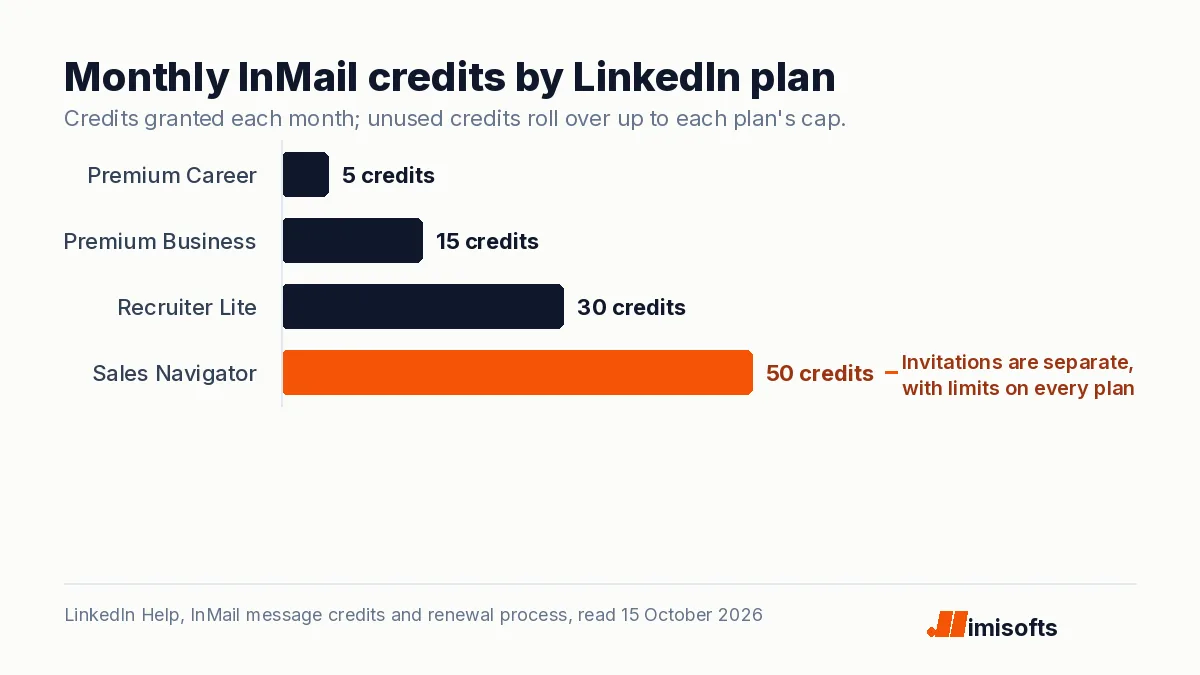
| InMail credits a month | 5 Career, 15 Business, 30 Recruiter Lite, 50 Sales Navigator |
| Commercial use limit reset | midnight Pacific on the 1st of each month |
LinkedIn Help articles on invitation limits, restrictions, personalized invitations, InMail credits and the commercial use limit, and the LinkedIn User Agreement, all read 15 October 2026. Vendor figure from Waalaxy's LinkedIn limits guide.
The limits LinkedIn actually documents
| Limit | What LinkedIn says | Applies to |
|---|---|---|
| Connection invitations | Limited, number not published; a restriction typically lasts one week | Every account, free and Premium |
| Personalized notes on invitations | Up to 3 a month, 200 characters each | Free accounts; Premium is unlimited |
| Re-inviting after a withdrawal | Blocked for up to three weeks | Every account |
| Network size | 30,000 first-degree connections | Every account |
| Commercial use limit on search | Monthly, number not shown, resets at midnight Pacific on the 1st | Free accounts |
| InMail credits | 5 to 50 a month depending on plan | Premium, Sales Navigator, Recruiter Lite |
One inconsistency is worth knowing. LinkedIn's newer article on personalizing invitations says free members can add a note to three connection requests a month, while its older invitation limit article still says five. We use the newer figure, but if your account allows five, that is why.
So how many connection requests can you send a week?
LinkedIn will not say. Its help page on types of invitation restrictions lists what triggers one instead of a number: sending many invitations in a short time, and having many of them ignored, left pending or marked as spam. LinkedIn also limits personalized invitations separately. The second trigger is easy to overlook. A small list of well-chosen people who accept is safer than a large list of strangers who ignore you.
The 200 figure comes from automation vendors. Waalaxy's LinkedIn limits guide, for example, works to 200 invitations a week, calls that figure widely confirmed, and describes "100 per week" as an older cap. It also notes that LinkedIn has never published a single page with these limits. Treat 200 a week as one vendor's working figure, not a safe ceiling: LinkedIn says ignored or pending invitations alone can trigger a restriction.
What happens when you hit the limit
- You cannot send invitations until the restriction lifts, which LinkedIn says is typically within one week.
- Withdrawing pending invitations does not remove the restriction.
- You cannot buy extra invitations, on any plan, and LinkedIn support cannot shorten the wait or tell you the reason.
- If LinkedIn suspects an automation tool, it may suspend or restrict the account, and repeated suspensions may lead to a permanent restriction. LinkedIn says an account suspended for automation is re-enabled at the time given in the notice, and it asks members to disable third-party apps or extensions that automate activity against its User Agreement.
LinkedIn says all members, Basic and Premium, are subject to invitation limits, and it does not say that paid plans get more. Premium removes the note limit, Premium Business, Recruiter Lite and Sales Navigator raise the commercial use limit on search, and paid plans add InMail credits.
The search limit on free accounts
Free accounts also have a monthly commercial use limit on searching and viewing profiles. LinkedIn does not display the exact number, cannot lift it on request, and resets it at midnight Pacific time on the first of each month. Premium Business, Recruiter Lite and Sales Navigator raise it.
InMail limits by plan
InMail lets you message people you are not connected to, and it runs on its own credits rather than your invitation allowance. LinkedIn's InMail credits article sets these allowances:
| Plan | InMail credits a month | Maximum you can hold |
|---|---|---|
| Premium Career | 5 | 15 |
| Premium Business | 15 | 45 |
| Recruiter Lite | 30 | 120 |
| Sales Navigator | 50 | 150 |
You get a credit back when the recipient accepts, declines or replies within 90 days, there is no unlimited InMail plan, and credits drop to zero if you cancel and are not carried over when you upgrade. Our breakdown of Sales Navigator pricing covers what the 50-credit plans cost.
Automation tools and LinkedIn's rules
LinkedIn's User Agreement, effective 3 November 2025, lists among its don'ts the use of bots or other unauthorized automated methods to add contacts or send messages, software or browser plug-ins that scrape the service, and anything that bypasses its use limits. Its help pages ask members to disable third-party tools that automate activity. Using unauthorized tools to send invitations or messages breaks the User Agreement at any volume, and LinkedIn says it may suspend or restrict accounts it suspects of automation, with repeated suspensions possibly leading to a permanent restriction. That risk sits with your account, not with the tool vendor.
How to get more conversations without more invites
- Target tighter. Fewer, better-matched invitations raise the acceptance rate and cut the ignored and pending invitations that LinkedIn lists as a restriction trigger.
- Clean up pending invitations. LinkedIn lists many pending invitations as a restriction trigger. Remember the three-week block on re-inviting anyone you withdraw.
- Use InMail on your shortlist. Fifty credits a month on Sales Navigator, with credits back on replies, is enough for account-based work.
- Add email as the second channel. Email has its own limits, set by your mailbox provider rather than LinkedIn, and with properly configured sending infrastructure it carries the volume LinkedIn never will. Our LinkedIn plus email playbook shows how to sequence the two.
- Check the rules for each channel. Our guide to whether cold email laws apply to LinkedIn messages covers the legal side.
A lower-risk weekly routine
On a new account, connect manually with people you actually know first and build a normal activity pattern before any outreach. Then send invitations in small daily batches rather than one burst, personalize only where a note adds something, withdraw requests that have sat unanswered for a few weeks, remembering that a withdrawal blocks a new invitation to that person for up to three weeks, and watch your acceptance rate more closely than your volume. If you are restricted, stop for the week and wait for it to lift rather than looking for ways around it.
If you would rather have the outreach done for you, our done-for-you lead generation runs LinkedIn and email together, with the infrastructure in your name.
Frequently Asked Questions
LinkedIn does not publish a number. Its help pages say every account, free or Premium, is subject to invitation limits and that a restriction typically lasts one week. One automation vendor, Waalaxy, works to about 200 invitations a week, but that is a vendor figure, not an official one.
LinkedIn's newer help article says free members can add a personalized message to up to three connection requests a month, each up to 200 characters. An older article still says five. Premium members can add notes to all their invitations.
LinkedIn does not say so. It says all members, Basic and Premium, are subject to invitation limits. Premium removes the limit on personalized notes, Premium Business, Recruiter Lite and Sales Navigator raise the commercial use limit on search, and paid plans add InMail credits.
LinkedIn says a restriction typically lasts one week and that most restrictions are removed within a week. LinkedIn cannot shorten it, and withdrawing pending invitations does not lift it.
Premium Career includes 5 InMail credits a month, Premium Business 15, Recruiter Lite 30 and Sales Navigator 50. You get a credit back when a recipient accepts, declines or replies within 90 days.
LinkedIn caps a member's network at 30,000 first-degree connections, according to its help page on invitation restrictions.