Short answer. Business process automation (BPA) means running a repeatable, rule-based process, such as routing a new lead, sending an invoice or onboarding a client, through software instead of by hand, with people stepping in only for exceptions and judgment calls. The paid plans are inexpensive: Zapier's Professional plan starts at $19.99 a month on annual billing, n8n's hosted Starter plan is $20 a month with 2,500 workflow executions, and Microsoft Power Automate Premium is $15 per user a month, paid yearly. The work they replace is not: the median bookkeeping, accounting and auditing clerk earned $24.36 an hour in 2025, according to the US Bureau of Labor Statistics. Start with the process that is high in volume, low in judgment and costly when it goes wrong, and measure the hours it takes before you build anything.
Key numbers
| Item | Number |
|---|---|
| Zapier Professional, entry price (annual billing; free plan has 100 tasks a month) | $19.99 a month |
| n8n Starter, hosted (2,500 workflow executions, billed annually) | $20 a month |
| n8n Pro, hosted (10,000 workflow executions) | $50 a month |
| Microsoft Power Automate Premium (paid yearly) | $15 per user a month |
| Microsoft Power Automate Process (paid yearly) | $150 per bot a month |
| Make Free plan (credits are Make's billing unit) | 1,000 credits a month |
| Median pay, bookkeeping and accounting clerks, 2025 (US Bureau of Labor Statistics) | $24.36 an hour |
| US work hours current technology could in theory automate (McKinsey Global Institute, November 2025) | about 57% |
| 400 invoices a month at 6 minutes each (at the BLS median wage, before benefits) | 40 hours, about $974 |
Prices read on 27 October 2026 from the Zapier, n8n, Make and Microsoft Power Automate pricing pages; wage from the BLS Occupational Outlook Handbook; McKinsey Global Institute report of 25 November 2025.
What counts as business process automation
A business process is a chain of steps with a start and an end: a lead arrives and becomes a booked call, or a deal closes and becomes a paid invoice. Automating one step, such as copying a form into a spreadsheet, is task automation. Business process automation connects the whole chain, so data moves from system to system, decisions follow written rules, and a person is pulled in only when a rule cannot decide.
Two related terms get mixed up with it. Robotic process automation (RPA) uses software robots that click through screens the way a person would, which helps with older systems that have no API. AI agents handle the steps that rules cannot, such as reading an email, a PDF or a voicemail and working out what it means. A modern automation often uses all three, with the business process as the frame.
The ceiling is high. The McKinsey Global Institute estimated in November 2025 that technologies already demonstrated could, in theory, automate activities that account for about 57% of US work hours today. McKinsey stresses that this is technical potential, not a forecast of job losses, and that the economic value depends on redesigning whole workflows rather than individual tasks. That is the case for thinking in processes rather than tools.
Business process automation examples by department
| Department | Process | What gets automated | Where a person stays |
|---|---|---|---|
| Sales | New lead to first meeting | Capture, enrich, assign an owner, send the first email and text, book the call | The qualification conversation |
| Marketing | Webinar or event | Registration into the CRM, reminders, replay links, follow-up by attendance | The content and the offer |
| Finance | Closed deal to paid invoice | Create the invoice, send reminders, record payment, flag overdue accounts | Disputes and credit decisions |
| Operations | Client onboarding | Contract signed, then project, tasks, welcome email and tool access created | The kickoff call |
| HR | New hire onboarding | Accounts, documents, equipment requests and a training schedule | Interviews and the first week |
| Support | Ticket triage | Categorize, route, answer common questions, escalate by priority | Complex or sensitive cases |
Client intake is a good first project for service firms. A law firm that answers every inquiry, screens it against its criteria, captures the facts, flags possible conflicts for review and books a consultation, without staff touching the routine cases, has automated its front door; our AI intake for law firms is built for that job.
How to pick the first process
Score each candidate from 1 to 3 on four questions and start with the highest total:
- Volume: how many times a month does it run?
- Minutes per run: how long does one run take a person?
- Rules: can the steps be written down, or does each case need judgment?
- Cost of an error: what happens when someone skips a step or types a wrong number?
Then put a number on it. A firm that sends 400 invoices a month at 6 minutes each spends 40 hours a month on invoicing; at the BLS median of $24.36 an hour for a bookkeeping clerk, that is about $974 a month in wages, before payroll taxes and benefits. A team routing 300 leads a month at 4 minutes each spends 20 hours, about $487 if you use the same clerk wage as a stand-in, and that ignores the larger cost of slow replies (see speed to lead). Against a platform fee of $15 to $69 a month, the business case usually rests on the cost of building and maintaining the automation, not on the subscription.
What the tools cost
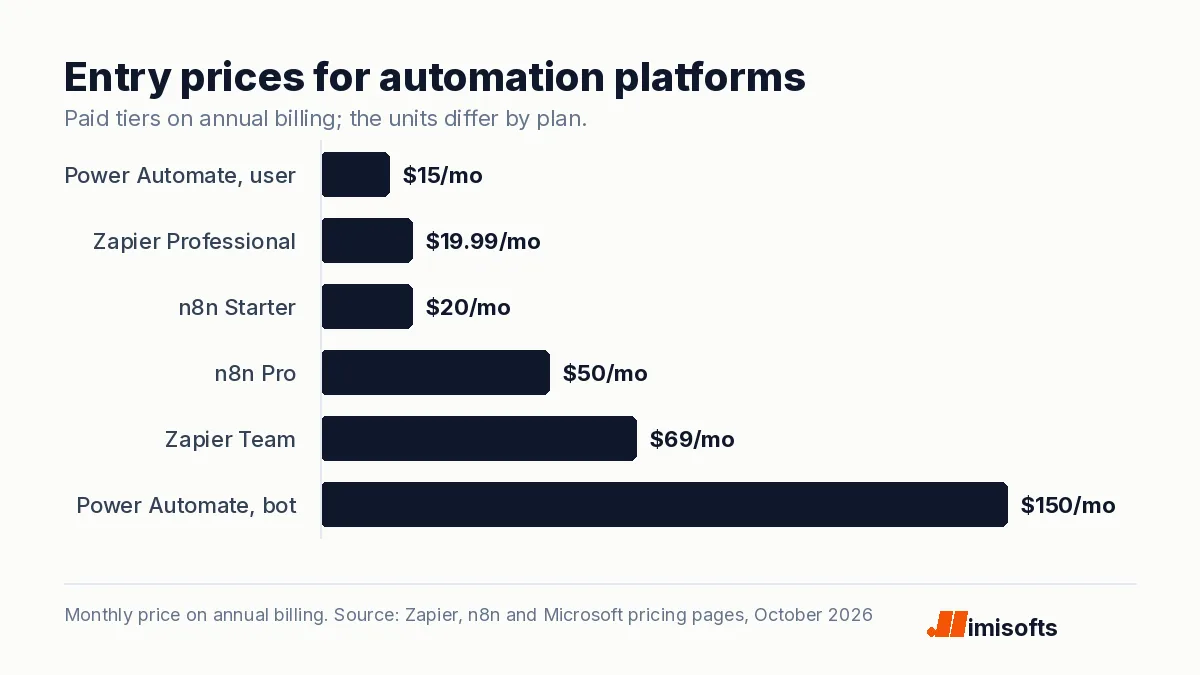
We read each vendor's pricing page on 27 October 2026. Prices are for the entry paid tier on annual billing unless noted.
| Platform | Entry price | How usage is counted | Notes |
|---|---|---|---|
| Zapier | $19.99 a month (Professional) | Tasks | Free plan with 100 tasks a month; Team plan from $69 a month |
| n8n, hosted | $20 a month (Starter) | Workflow executions, unlimited steps | 2,500 executions; Pro is $50 a month for 10,000; a self-hosted Community Edition is available on GitHub |
| Make | Free plan with 1,000 credits a month | Credits | Paid plan prices did not load when we checked, so see Make's pricing page |
| Microsoft Power Automate | $15 per user a month (Premium) | Per user | Process plan at $150 per bot a month for unattended automation |
The unit matters more than the price. Zapier counts tasks, and its help center says every successful action step counts as one, so a workflow with ten action steps uses ten times the tasks of a one-action workflow on each run. n8n says it charges only when a workflow runs from start to finish, with unlimited steps, which favors long workflows. Power Automate Premium is priced per user, and its Process plan, priced per bot, is the one Microsoft sells for unattended automation. Make bills in credits, and most actions use one credit.
The build costs more than the subscription
A platform fee of $20 a month is rarely the real cost. The real work is mapping the process, deciding what happens in every exception, connecting the systems, testing with real data and monitoring the result. Then the automation needs upkeep: apps change their APIs, fields get renamed and volumes grow past plan limits. We break down project pricing, from a single workflow to an AI agent, in how much AI automation costs, and the running cost of AI steps in what an AI agent costs to run.
A worked example: lead to invoice at a small agency
Here is how one chain could look for a hypothetical ten-person agency that automates it end to end, with the hand-offs to people marked:
- Lead arrives. A form or ad lead creates a contact in the CRM, enriches it with company size and industry, and assigns an owner by service line.
- First touch. The owner gets a phone alert and a call task; the lead gets a confirmation email with a booking link. Person: the discovery call.
- Proposal. When the deal moves to the proposal stage, a proposal is generated from a template with the scoped services and sent for e-signature. Person: the scope and the price.
- Signature. A signed proposal creates the project, its task list and a client folder, sends a welcome email and invites the client to the shared workspace.
- Invoice. The accounting tool raises the first invoice from the deal value, sends reminders on a schedule and records the payment. Person: any dispute.
- Report. Every Monday, a summary of new leads, signed deals and overdue invoices lands in the team channel.
None of those steps is clever on its own. The value is that nothing waits for someone to remember it, and every hand-off to a person arrives with the context attached.
Where business process automation goes wrong
- Automating a broken process. If the manual process has three versions depending on who does it, automation makes one of them permanent. Agree on the process first.
- No owner. Every automation needs a named person who receives the error alerts and fixes problems.
- Silent failures. Build alerts for failed runs and a daily check that the expected number of runs happened.
- Two sources of truth. Decide which system owns each record, such as the CRM for contacts and the accounting tool for invoices, and sync in one direction where you can.
- Automating judgment. Use rules for routine cases and send the rest to a person, or to an AI step with human approval for anything that commits money or makes a promise.
- Broad access. Connect apps with the narrowest permissions that work, and remove access when people leave.
Where AI agents fit
Rules handle structured data well: a form field, a deal stage, a date. They struggle with an email that says "can we move Thursday's call, and I also need a new quote". That is where an AI step earns its place: it reads the message, extracts the intent and the details, and hands a structured result back to the rule-based flow. Keep a person on approvals while you build trust in the output. Our explainer on agentic AI covers how agents differ from simple automations.
How imisofts can help
We map the process with you, build the automation on the platform that fits (Zapier, Make, n8n, Power Automate or GoHighLevel workflows), add AI steps where rules run out, and maintain it so it keeps working when your tools change. See our AI automation agency services, or hire an n8n developer for self-hosted builds.
Frequently Asked Questions
Business process automation means running a repeatable, rule-based business process, such as lead routing, invoicing or client onboarding, through software from start to finish, with people involved only for exceptions and judgment calls. It differs from task automation, which automates a single step.
Business process automation connects systems through their integrations or APIs so a whole process runs on rules. Robotic process automation uses software robots that click through screens like a person, which helps when an older system has no API. Many automations combine both, and add AI steps for unstructured inputs such as emails and documents.
Common examples are routing new leads and sending the first follow-up, creating and chasing invoices when a deal closes, onboarding a new client or employee, sending event registrations and reminders, and triaging support tickets. In each case software handles the routine steps and a person handles the conversation or decision.
The platforms are inexpensive: on 27 October 2026, Zapier Professional started at $19.99 a month on annual billing, n8n's hosted Starter plan was $20 a month for 2,500 workflow executions, and Microsoft Power Automate Premium was $15 per user a month, paid yearly. The larger cost is designing, building, testing and maintaining the automation.
Pick the process that scores highest on four questions: how often it runs, how many minutes each run takes, how far it follows written rules, and how costly an error is. Then estimate the hours it uses; for example, 400 invoices a month at 6 minutes each is 40 hours, about $974 a month at the 2025 BLS median wage for bookkeeping clerks.
Mostly it changes what people do. McKinsey estimated in November 2025 that technologies already demonstrated could in theory automate activities making up about 57% of US work hours, but it describes that as technical potential rather than a forecast of job losses, and says the value depends on redesigning workflows around people, agents and robots working together.