October 11, 2026. Google Analytics 4 now sorts visits from AI chat assistants into their own channel. Its default channel group includes an "AI Assistant" channel for visitors arriving from sources like ChatGPT, Gemini, DeepSeek, Copilot and Grok, and ChatGPT tags its own outbound links with utm_source=chatgpt.com. So for most sites the data is already there; the work is finding it, deciding what counts, and knowing what it misses. We set this up on imisofts.com on September 27, and the first two weeks taught us something every report on AI traffic should check first: of our 30 visits from AI assistants, 20 went to our careers page, and every conversion they produced was a job application, not a sales lead. This guide shows how to track AI traffic in GA4 step by step, using our own numbers as the worked example. It is part of how we measure results in our AI search optimization service.
Definitions come from Google's Analytics Help and OpenAI's publisher FAQ; our figures are from our own GA4 property for September 27 to October 10, 2026, all read 11 October 2026.
Key numbers
| Item | Number |
|---|---|
| AI assistant sessions, Sep 27 to Oct 10, 2026 (1.8 percent of all sessions) | 30 of 1,679 |
| Engagement rate, AI assistants vs organic search (imisofts.com GA4) | 66.7% vs 46.1% |
| Share of AI sessions from ChatGPT (chatgpt.com / ai-assistant) | 26 of 30 |
| AI sessions that landed on the careers page (all 8 AI key events were job-page actions) | 20 of 30 |
| Sessions recorded as Direct (8.4% engaged, mostly automated traffic) | 77.7% |
| GA4 AI Assistant channel excludes (Google Analytics Help) | AI Overviews and AI Mode |
| Parameter ChatGPT adds to outbound links (OpenAI publishers FAQ) | utm_source=chatgpt.com |
imisofts.com GA4 property (Traffic acquisition, Sep 27 to Oct 10, 2026), Google Analytics Help on the default channel group and OpenAI's publishers and developers FAQ, all read 11 October 2026.
Step 1: find it in a report you already have
Open Reports, then Acquisition, then Traffic acquisition. The table's first column is the session channel group. Look for a row called AI Assistant. Google defines it as "the channel by which users arrive at your site from sources like ChatGPT, Gemini, Deepseek, Copilot, or Grok", and notes that it "excludes Google's AI Overviews and AI Mode". Behind the scenes, GA4 sets the medium to ai-assistant and the campaign to (ai-assistant) when the referrer matches its list of AI assistants (GA4 default channel group).
To see which assistants, change the primary dimension to Session source / medium. On our property the rows read chatgpt.com / ai-assistant, perplexity.ai / ai-assistant, gemini.google.com / ai-assistant and claude.ai / ai-assistant. ChatGPT visits are the easiest to attribute, because OpenAI says ChatGPT automatically adds utm_source=chatgpt.com to the links it sends (OpenAI publishers FAQ).
Step 2: build your own channel group if you want control
The default group is a good start, but you cannot edit Google's list of AI sources. If you want to decide what counts, create a custom channel group in Admin, under Data display, then Channel groups. Copy the default group, add a channel for AI assistants, and set its condition to session source matching a regular expression. Ours, created on September 27, is:
chatgpt|openai|perplexity|claude\.ai|anthropic|gemini\.google|bard\.google|copilot|edgeservices\.bing|you\.com|phind|deepseek|grok|meta\.ai|mistral|poe\.com
Two settings matter. Order: GA4 assigns each session to the first channel whose rule it matches, so place the AI channel above Referral and Organic Search, or those channels will claim the traffic first. And primary status: setting the custom group as primary makes it the default in your acquisition reports, while Google's default group stays available as a dimension.
Step 3: separate buyers from job seekers
Here is what our first two weeks looked like by channel.
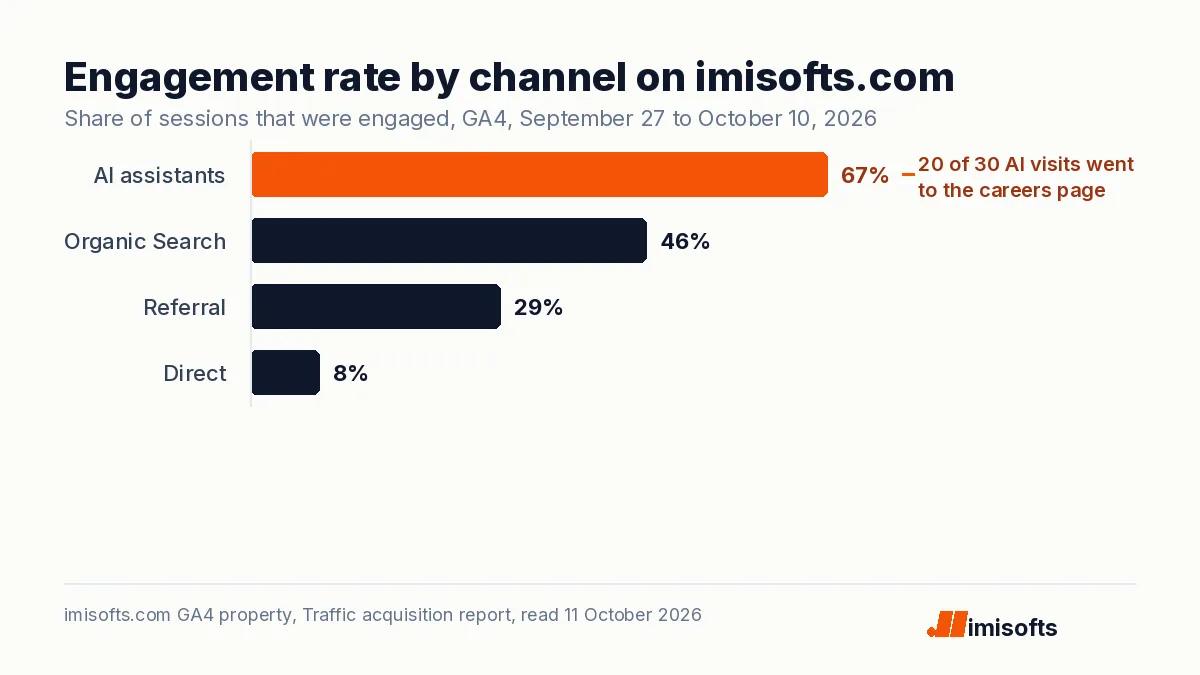
- AI assistants: 30 sessions, 1.8 percent of all sessions, 66.7 percent engaged, 41 seconds average engagement, 8 key events.
- Organic Search: 310 sessions, 46.1 percent engaged, 40 seconds, 4 key events.
- Referral: 24 sessions, 29.2 percent engaged, 3 key events.
- Direct: 1,305 sessions, 8.4 percent engaged, 7 seconds, which tells you most of it is automated traffic rather than people.
On those numbers, AI assistants look like the best channel we have: a 23.3 percent session key event rate against 1.3 percent for organic search. Then we added Page path as a secondary dimension. Twenty of the 30 AI sessions landed on our careers page, and all eight key events were people starting the application form or clicking to book a call from that page. ChatGPT was sending job seekers who had asked it about working here. Useful to know, and not pipeline.
The fix is in how you define conversions, not in the channel group. Track job applications as their own event, keep them out of your sales key events, and always break AI traffic down by landing page before you report a conversion rate. The same discipline applies to every small channel: 30 sessions is enough to spot a pattern and far too few to forecast from.
What GA4 cannot see
- Google's own AI answers. Clicks from AI Overviews and AI Mode are excluded from the AI Assistant channel and count as Organic Search. Search Console's generative AI features report is the place to look for them; we cover it in what the Search Console multimodal filter shows.
- Apps that strip the referrer. When someone clicks a link inside a desktop or mobile app that sends no referrer, the visit arrives as Direct. On October 9, a first-time visitor landed on one of our blog articles with no source at all, went straight to our contact page and booked a sales call. Whatever pointed them to us left no trace in GA4. Ask new leads how they found you; it is the only way to see this traffic.
- Answers that never send a click. Most AI answers mention brands without a visit. Bing Webmaster Tools reports Copilot citations, explained in the Bing AI performance report, and tracking whether assistants name you needs prompt testing, not analytics.
- Broken links the assistant invented. One of our AI-referred visits arrived on a URL with a fragment of markdown glued to the end. Check your 404 report for AI-referred paths and redirect the common ones.
Reading the numbers without fooling yourself
Compare AI assistants with organic search on engagement rate and conversion rate per landing page, not on raw sessions; AI traffic will be small for a long time. Watch the trend line weekly rather than daily. And remember that the channel only counts clicks: a brand that ChatGPT recommends by name, without a link, shows up later as branded search or Direct. That is why we measure AI visibility in two places, analytics for the clicks and citation tracking for the mentions, as described in AEO versus SEO and how to get ChatGPT to recommend your business.
A weekly AI traffic check in ten minutes
- Traffic acquisition, last 7 days, compared with the 7 before: AI Assistant sessions and engagement rate.
- Same report, Session source / medium: which assistants sent visits.
- Secondary dimension Landing page: which pages they landed on.
- Key events by landing page: are they sales actions or something else.
- Pages and screens report filtered to the 404 page title: any AI-invented URLs to redirect.
- One note in your log: what changed on the site that week.
The bottom line
Tracking AI traffic in GA4 takes five minutes now that Google labels it for you; reading it honestly takes a little longer. Separate job seekers and support visits from buyers, remember what lands in Direct and Organic Search instead, and judge the channel on landing pages and conversions rather than session counts. If you want your site cited and recommended by AI assistants, and measured properly when it is, that is the work of our AI search optimization team; the automation that routes those leads into your CRM is part of our AI automation agency work.
Frequently Asked Questions
Open Reports, Acquisition, Traffic acquisition and look for the AI Assistant row in the session channel group, then switch the primary dimension to Session source / medium. ChatGPT visits appear as chatgpt.com / ai-assistant, because GA4 sets the medium to ai-assistant for referrers on its AI assistant list and ChatGPT adds utm_source=chatgpt.com to its links.
Yes. GA4's default channel group includes an AI Assistant channel for users arriving from sources like ChatGPT, Gemini, DeepSeek, Copilot or Grok. It excludes Google's AI Overviews and AI Mode, whose clicks count as Organic Search.
If you want control over which sources count. You cannot edit Google's list in the default group, but a custom group lets you match sources with your own regular expression. Place the AI channel above Referral and Organic Search, because GA4 assigns a session to the first rule it matches.
Clicks from apps that send no referrer arrive without a source, so GA4 records them as Direct. A visitor who followed an AI recommendation inside a desktop or mobile app can land deep in your site with no trace of where they came from, which is why it helps to ask new leads how they found you.
No. Google's definition of the AI Assistant channel excludes AI Overviews and AI Mode, so those clicks are reported as Organic Search. Search Console's generative AI features report is the place to see that activity.
For most sites, still a small share. On imisofts.com from September 27 to October 10, 2026, AI assistants sent 30 of 1,679 sessions, 1.8 percent, with a 66.7 percent engagement rate against 46.1 percent for organic search; 26 of the 30 came from ChatGPT.