Short answer. A technical SEO audit checks whether Google can crawl and index your pages, and how fast they load for real visitors. Google's own minimum bar has three parts: Googlebot isn't blocked, the page returns an HTTP 200, and it has indexable content. Most of the checks run free in Search Console and PageSpeed Insights. Crawlers start free (Ahrefs Free, Screaming Frog up to 500 URLs), and the cheapest paid plans we found cost $216 to $279 a year on 13 November 2026.
This guide walks the checks Google's documentation describes, with the thresholds Google publishes, then sets out what the tools and an outside audit cost. If you want the wider picture of SEO fees first, our SEO pricing guide covers retainers and hourly rates.
Key numbers
| Item | Number |
|---|---|
| Google's minimum technical requirements (not blocked, HTTP 200, indexable content) | 3 |
| LCP target (within, Google) | 2.5 seconds |
| INP target (Google) | Under 200 ms |
| CLS target (Google) | Under 0.1 |
| Sitemap limit (or 50MB uncompressed per file) | 50,000 URLs |
| PageSpeed field data window (75th percentile of real visits) | 28 days |
| Screaming Frog free crawl ($279 a year to lift the cap) | 500 URLs |
| Clutch technical SEO rate (guide updated 21 Sep 2026) | $25 to $49/hr |
| Most popular SEO hourly rate (24% of 439 polled, Ahrefs, updated Aug 2024) | $75 to $100 |
Google Search Central, Search Console Help, PageSpeed Insights docs, Screaming Frog, Sitebulb, Ahrefs, Semrush and Clutch, read 13 November 2026.
What a technical SEO audit checks
An on-page review looks at words: titles, headings, copy. A technical audit looks at the plumbing underneath them. In practice it answers five questions:
- Can Google reach the page, or is it blocked?
- Does the page return a working status code?
- Is it indexed, and if not, which reason does Search Console give?
- Does the mobile version carry the same content as the desktop one?
- Do real visitors get a fast, stable page?
Google lists "Review of your site content or structure" and "Technical advice on website development: for example, hosting, redirects, error pages, use of JavaScript" among the useful services an SEO can provide, on its Do you need an SEO? page.
Google's three minimum technical requirements
Google's technical requirements page opens bluntly: "It costs nothing to get your page in search results, no matter what anyone tries to tell you." A page is eligible to be indexed when:
- Googlebot isn't blocked. Google only indexes pages that are public and that don't block its crawler.
- The page works. "Google only indexes pages that are served with an HTTP 200 (success) status code. Client and server error pages aren't indexed."
- The page has indexable content. The text is in a file type Google supports and does not break its spam policies.
Meeting all three makes a page eligible, nothing more. In Google's words, "indexing isn't guaranteed". So every audit should start here, because a fix further down the list is wasted on a page Google cannot reach.
Step 1: read the Page Indexing report
Google says to use both the Page Indexing report and the Crawl Stats report in Search Console, because "each report may contain different information about your URLs", and to test single pages with the URL Inspection tool. The Page indexing report gives a reason for URLs that are not indexed. Four statuses worth knowing:
| Status in Search Console | What Google says it means | Would we fix it? |
|---|---|---|
| Crawled, currently not indexed | Crawled but not indexed; Google says this is common and "doesn't necessarily indicate an issue" | Only for pages you need in Search |
| Discovered, currently not indexed | Found but not crawled yet; typically Google expected the crawl to overload the site and rescheduled it | Yes if it covers many pages |
| Duplicate without user-selected canonical | Google chose another page as canonical and "will not serve this page in Search" | Yes: set the canonical you want |
| Soft 404 | A "not found" message served without a 404 code | Yes: return a real 404 |
For a page you have just fixed, URL Inspection lets you request indexing. Google's help page says indexing "typically takes only a day or so, but can take much longer in some cases", that a request does not promise inclusion, and that there is a daily limit on requests. For many pages, it points you to a sitemap instead. We timed this on our own site in how long Google takes to index a page.
Step 2: robots.txt, noindex and status codes
One mix-up worth checking is using robots.txt to hide a page. Google's robots.txt guide says the file is "used mainly to avoid overloading your site with requests; it is not a mechanism for keeping a web page out of Google". Its technical requirements page adds that a blocked URL "might still appear in search results". To keep a page out, use noindex and let Google crawl the URL so it can see the tag, or put the page behind a password.
We would check three things here: that robots.txt does not block pages you want found, that noindex sits only on pages you mean to hide, and that pages you want indexed return 200 rather than a redirect chain or an error.
Step 3: sitemaps and duplicate pages
Google's sitemap guide sets hard limits: "All formats limit a single sitemap to 50MB (uncompressed) or 50,000 URLs", and the file "must be UTF-8 encoded". A larger site splits its list across several sitemaps, as Google requires.
An audit compares three lists: the URLs in the sitemap, the URLs a crawler finds by following links, and the URLs Search Console reports as indexed. Pages in the sitemap that are not linked from anywhere, and linked pages missing from the sitemap, are typical things to look for. Duplicates show up as the "Duplicate without user-selected canonical" status above; the fix is to tell Google which version you prefer.
Structured data is part of the same pass. Our schema markup guide lists which types Google still supports.
Step 4: Core Web Vitals thresholds
Google's Core Web Vitals page says it "highly recommend[s]" good scores for "success with Search", and gives three targets:
| Metric | What it measures | Google's target |
|---|---|---|
| Largest Contentful Paint (LCP) | Loading | Within 2.5 seconds |
| Interaction to Next Paint (INP) | Responsiveness | Less than 200 milliseconds |
| Cumulative Layout Shift (CLS) | Visual stability | Less than 0.1 |
Google announced INP as a Core Web Vital on 10 May 2023. Measure with PageSpeed Insights, which reports real users' experience "over the previous 28-day collection period" and shows the 75th percentile, chosen "so that developers can understand the most frustrating user experiences on their site". A page needs enough real-user data in CrUX to show field data at all. PageSpeed also shows Lighthouse lab results, which are a test run rather than real-user data.
Step 5: check mobile and desktop match
Google "uses the mobile version of a site's content, crawled with the smartphone agent, for indexing and ranking", per its mobile-first indexing guide. Google asks for the same content, the same structured data and the same robots meta tags on both versions.
When crawl budget matters (rarely)
Some audit reports include a crawl budget section. Google's crawl budget guide says many sites don't need it: if your pages are crawled the day they are published, "keeping your sitemap up to date and checking the Page Indexing report regularly is adequate". The guide is aimed at sites with 1 million+ unique pages that change weekly, sites with 10,000+ pages that change daily, or sites with a large share of URLs at the Discovered, currently not indexed status. Google adds that these "are not exact thresholds". For a 50-page business site, we would treat a crawl budget section in an audit as padding.
What technical SEO audit tools cost
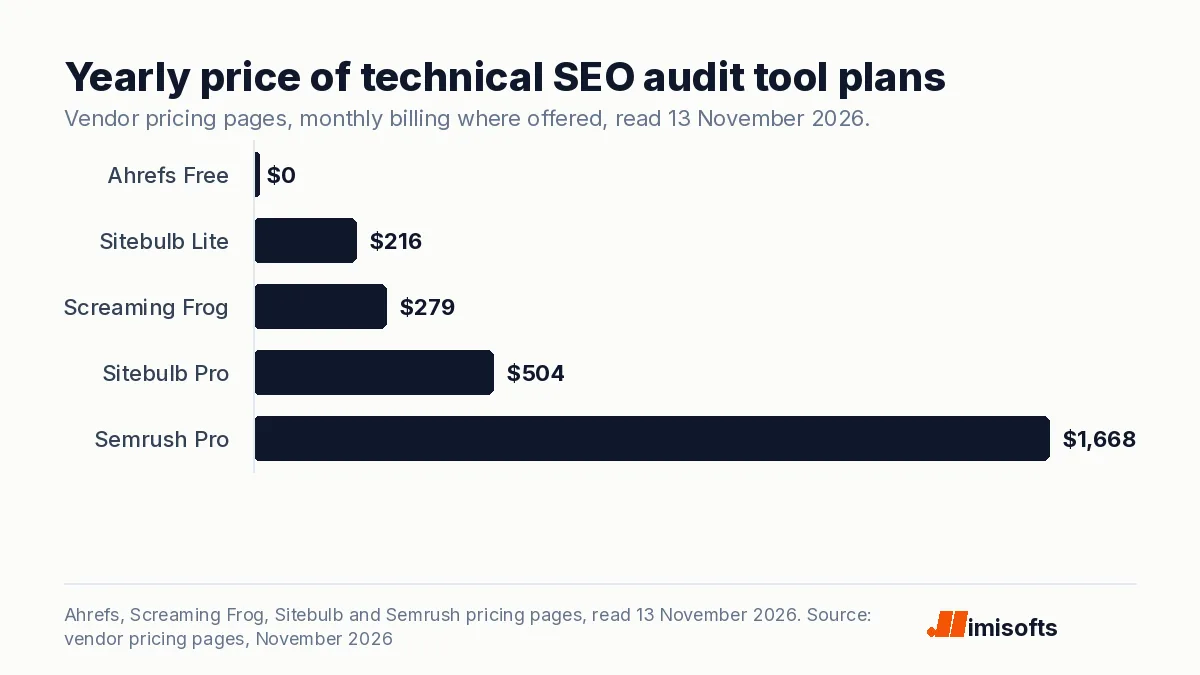
Search Console and PageSpeed Insights are free. A crawler adds a whole-site view: every status code, title, redirect and canonical in one list. Entry-level prices, read on each vendor's own page on 13 November 2026:
| Tool | Entry price | Audit limit at that price |
|---|---|---|
| Ahrefs Free (formerly Webmaster Tools) | $0, verified sites only | 5K crawl credits a month per project; 170+ issue checks |
| Screaming Frog SEO Spider | Free, or $279 a year | 500 URLs free; paid licence lifts the cap |
| Sitebulb Lite / Pro | $18 / $42 a month | 10,000 / 500,000 URLs per audit |
| Semrush Pro | $139 a month, or $117.33 a month billed yearly | Site Audit included; up to 5 websites |
Over a year that is $0, $279, $216 or $504, and $1,668 for Semrush Pro on monthly billing ($1,407.96 billed yearly). Screaming Frog works out to $23.25 a month. All four vendors sell SEO tools, and Google notes that it "doesn't evaluate or endorse third-party SEO tools, and these tools don't have access to Google's internal ranking data". We would treat a crawler's findings as the vendor's view and Search Console as Google's.
What an outside technical SEO audit costs
We found no neutral survey of technical audit fees on their own. Two published sources come close. Clutch's SEO pricing guide, updated 21 September 2026, lists technical SEO at $25 to $49 an hour and says most SEO agencies on Clutch charge $100 to $149 an hour. Clutch runs a paid directory. Ahrefs' poll of 439 people, updated 15 August 2024, found $75 to $100 the most popular hourly rate (24% of respondents) and $2,501 to $5,000 the most popular fee for one-off projects (21.2%), with 50.6% charging $2,000 or less per project. Ahrefs did not break out audits.
Applied to a hypothetical audit of 10 or 20 hours, those rates give:
| Hourly band (source) | 10 hours | 20 hours |
|---|---|---|
| $25 to $49 (Clutch, technical SEO) | $250 to $490 | $500 to $980 |
| $75 to $100 (Ahrefs, most popular) | $750 to $1,000 | $1,500 to $2,000 |
| $100 to $149 (Clutch, most agencies) | $1,000 to $1,490 | $2,000 to $2,980 |
The hours are an illustration, not a quote. In our view, scope drives the number: page count, JavaScript rendering, how many templates the site uses, and whether fixes are included or only listed.
What to ask before you hire an auditor
Google's hiring page has three rules for audits. Give an auditor read access to Search Console only: "at this stage, don't grant them write access". The report "should be about giving you realistic estimates of improvement, and an estimate of the work involved". And if anyone promises their changes will put you in first place, Google's advice is to "find someone else".
We would also ask for the findings ranked by effect, with the Search Console status or the Core Web Vitals reading behind each one, so you can check the work yourself. A running business site also needs someone to make the fixes; our website maintenance cost guide covers that side. A business with one location may want a local check too, which our local SEO guide covers.
How imisofts can help
imisofts offers SEO services and AI search optimization. For a technical audit we would start where this guide does: Search Console, Core Web Vitals and a crawl, with the fixes ranked. No one can promise a ranking. If an AI assistant on your site is also on the list, our AI chatbot cost guide sets out what those cost. Tell us your site and what you want it to show up for.
Sources: Google Search Central, technical requirements; Google Search Central, Core Web Vitals; Google Search Central, build a sitemap; Google Search Central, robots.txt; Google Search Central, mobile-first indexing; Google, crawl budget; Google Search Central, Do you need an SEO?; Search Console Help, URL Inspection tool; Search Console Help, Page indexing report; About PageSpeed Insights; Screaming Frog pricing; Sitebulb pricing; Ahrefs Webmaster Tools; Semrush pricing; Clutch, SEO Agency Pricing Guide 2026; Ahrefs, SEO pricing poll.
Frequently Asked Questions
A check of whether Google can crawl and index your pages and how they perform for real visitors. Google's minimum bar is three things: Googlebot isn't blocked, the page returns HTTP 200, and it has indexable content. Indexing still isn't guaranteed.
No neutral survey prices audits on their own. Clutch lists technical SEO at $25 to $49 an hour (guide updated 21 September 2026); An Ahrefs poll (article updated August 2024) found $75 to $100 the most popular hourly rate, and Clutch says most agencies charge $100 to $149. A hypothetical 10-hour audit comes to $250 to $1,490 across the three bands.
Mostly, yes. Search Console's Page Indexing report and URL Inspection tool, and PageSpeed Insights, are free. Screaming Frog crawls up to 500 URLs free, and Ahrefs Free gives verified sites 5K crawl credits a month per project.
Google's targets are LCP within 2.5 seconds, INP under 200 milliseconds and CLS under 0.1. PageSpeed Insights reports the 75th percentile of real visits over the previous 28 days.
We would use a chatbot to help read a crawl export or a Search Console download you give it, not as the audit itself. For third-party SEO tools, Google notes they don't have access to its internal ranking data, so we would check every finding against Search Console.
No. Google says robots.txt is not a mechanism for keeping a page out of Google, and a blocked URL might still appear in results. Use noindex and let Google crawl the page, or password-protect it.