October 2, 2026. OpenAI's dots, launched at DevDay on September 29, are always-on agents that run on GPT-6 Astra with their own cloud computer, and the first one costs nothing extra: it is included in ChatGPT Pro, which runs $100, $200 or $500 a month, and in a ChatGPT Business Premium seat at $100 a user a month billed annually or $125 monthly. Conversations with a dot do not count toward ChatGPT usage limits, and for the first month OpenAI says dots usage will not count toward eligible plan allowances at all. Two limits matter before you budget for one. Pro access excludes the UK, Switzerland and the European Economic Area at launch, while Business Premium covers every supported ChatGPT region. And OpenAI has not published what extra dots, or extra work from one dot, will cost.
Key numbers
| Item | Number |
|---|---|
| Dots launched (OpenAI DevDay) | September 29, 2026 |
| Model behind every dot | GPT-6 Astra |
| Apps a dot can reach through plugins | 4,000+ |
| ChatGPT Pro tiers that include a dot (Pro 100, Pro 200, Pro 500) | $100, $200 or $500 a month |
| Business Premium seat, billed annually ($125 billed monthly) | $100 a month |
| Business Standard seat on the dots plan list ($20 or $25 a month) | Not listed |
| Period when dots usage skips plan allowances | First month after launch |
| Price of extra dots or more work per dot (flat monthly fee planned) | Not published |
| Pro access excluded at launch (Business Premium covers all supported regions) | UK, Switzerland, EEA |
| Enterprise, Edu and Healthcare | Beta, off by default |
| Minimum age | 18 |
Read on 2 October 2026 from OpenAI's dots launch post, getting started guide, ChatGPT release notes, Pro tiers page and business pricing page, and from The Register's DevDay report.
What OpenAI launched on September 29
- An agent that keeps working. OpenAI's launch post describes dots as always-on agents powered by GPT-6 Astra, each with its own cloud computer and browser, that learn from feedback and can work toward your goals 24/7. Through plugins they can connect to more than 4,000 apps.
- Reachable where you already work. You can message or call your dot in ChatGPT on desktop, web and mobile, and message it in Slack and Microsoft Teams, with texting "coming soon". It carries the same context across every channel.
- Background research that cannot act. When you are not working with it, a dot looks for ways to help using the apps you connected, but OpenAI says those background tools are read-only: they cannot send messages, change app content or control your browser or computer.
- Rules, reviews and a log. Dots start with built-in rules for when to act and when to ask. Custom Rules let you allow an action, require approval for it or block it, an auto-review step checks actions that could affect your accounts or share information, and Activity View shows what the dot did in the background. Some tasks, such as changing a password, always stay with you.
- Company dots, in pilots only. OpenAI is previewing specialist dots with their own identity and credentials for defined jobs, naming procurement, invoice processing, email marketing, customer support and commercial contracting from its internal tests, and it is working with Microsoft to manage them through Agent 365. These start as focused enterprise pilots.
The Register's DevDay report adds the commercial detail: an OpenAI spokesperson said dots come with "an allowance for deeper work, with generous limits for the first month after launch," and that in future you will pay a flat monthly fee to add more dots or to increase the speed or amount of work a dot can take on.
What a dot costs, plan by plan
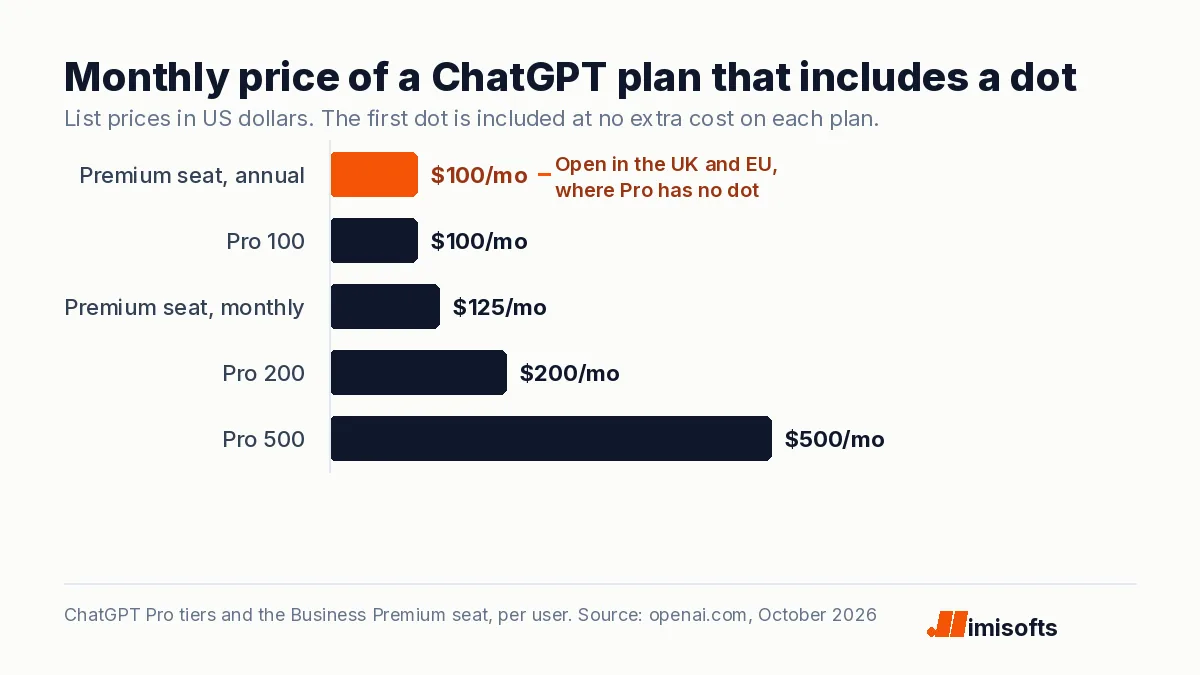
Two kinds of plan include a dot. On the personal side, OpenAI's Pro tiers page lists Pro 100 at $100, Pro 200 at $200 and Pro 500 at $500 a month, and the ChatGPT pricing page lists "Dot, your always-on agent" among the Pro features. On the business side, the business pricing page prices a Premium seat at $100 a month billed annually or $125 monthly, with five times the usage of a Standard seat and no five-hour limit. A Standard seat, at $20 or $25, is not on OpenAI's list of plans that include a dot. Business workspaces can mix seat types, so a company needs a Premium seat only for the people who will run a dot, not for everyone.
What is free, and what still meters, is set out in OpenAI's getting started guide and the launch post. Talking to your dot does not count toward your usage limits. When it starts or manages tasks in Codex or ChatGPT Work, those tasks count toward your limits as usual. The ChatGPT release notes say dots usage will not count toward eligible Pro, Business and Enterprise allowances for the next month, after which OpenAI will share usage terms for each plan. Dots are rolling out gradually to users aged 18 and older, and access can take several days to reach an account. So the month you can measure for free is the first one.
Where a dot fits in a small business
A dot is one person's assistant, not a customer-facing system. The examples OpenAI gives are internal: turning customer feedback into tested fixes, revising launch materials when scope changes, updating a sales proposal as requirements shift, and drafting clips and social posts from an interview transcript. The most useful line for a small business is about money. An early tester's dot noticed he had forgotten to invoice a publication, prepared the invoice and sent it after his approval. Inbox triage, invoice follow-up, CRM tidying and the weekly report are the natural first jobs.
It is not a phone line. You can call your own dot to talk something through, but nothing in OpenAI's description has a dot answering your customers' calls, and specialist dots for company roles are enterprise pilots. A business that needs every inbound call answered still needs a receptionist or a voice agent; our page on what after-hours call answering costs prices that separately.
The week's warning label
The day before DevDay, OpenAI decided not to release GPT-6.1 Astra after testing found it "didn't quite meet the bar in terms of staying within scope and authorization," in a statement from its head of safety systems reported by CBS News. Dots run on GPT-6 Astra, the released model, not the canceled one. But the failure OpenAI named, an agent doing more than it was authorized to do, is the risk that dots' rules and approvals exist to contain, and OpenAI's own post tells users to always review consequential work. Our note on the GPT-6.1 Astra cancellation covers what to run instead.
What it means for operators
- Pilot one seat in month one. Give a dot to the person with the most repetitive admin, on an existing Pro plan or one Business Premium seat, and keep notes on what it finished, what it asked about and what you corrected. The free first month is your only cheap measurement before usage terms arrive.
- Write the rules before you connect apps. Start with read access. Set Custom Rules so that sending email, changing CRM records, issuing invoices and anything touching payments needs your approval, and block what it should never touch. Access to your own computer starts turned off; leave it off until the rules are proven.
- Treat client data as permanent. OpenAI's guide says disconnecting an app does not delete what your dot already obtained from it; only deleting the dot does. OpenAI does not use Business, Enterprise or Edu content to train its models by default, while on personal plans you control that in settings, so agencies handling client data should run dots on Business Premium. Our note on client data in ChatGPT covers what to keep out.
- Build what must run for customers. A dot works for one person. Lead routing, intake and follow-up that must run at volume, with logs your team owns, still belong in a built system; our AI automation agency team scopes those, and our breakdown of what it costs to run an AI agent shows the metered alternative.
For UK and EU firms the route is simple: a Pro plan bought there does not get a dot at launch, but a Business Premium seat does, at the same $100 a month as Pro 100 on annual billing.
Frequently Asked Questions
Dots are always-on agents in ChatGPT that OpenAI launched at DevDay on September 29, 2026. Each runs on GPT-6 Astra with its own cloud computer, connects to apps through plugins, learns from feedback and keeps working between conversations. You reach your dot in ChatGPT, Slack or Microsoft Teams.
Your first dot is included at no extra cost in ChatGPT Pro (Pro 100, Pro 200 or Pro 500 at $100, $200 or $500 a month) and in a Business Premium seat ($100 a user a month billed annually or $125 monthly). OpenAI has not published prices for extra dots or for more speed or work per dot; a spokesperson said those will be a flat monthly fee.
Conversations with your dot do not. Tasks your dot starts or manages in Codex or ChatGPT Work count as usual. For the first month after launch, OpenAI says dots usage will not count toward eligible Pro, Business and Enterprise plan allowances, and it will share usage terms for each plan after that.
On Pro, no: OpenAI excludes the European Economic Area, Switzerland and the UK at launch. Business Premium users get dots across all supported ChatGPT regions, and Enterprise, Edu and Healthcare workspaces can try a beta that stays off until an admin enables it. The rollout is gradual, so access can take several days.
Only within the rules you allow. Dots start with built-in rules for when to act and when to ask, Custom Rules let you allow, require approval for or block specific actions, and an auto-review step checks actions that could affect your accounts. Background research uses read-only tools, and tasks such as changing a password always stay with you.
OpenAI does not describe that. You can call your own dot in ChatGPT, but it works on your behalf rather than answering customers, and specialist dots for company roles are in enterprise pilots. Inbound customer calls still need a receptionist or a voice agent.