October 11, 2026. Mission Inbox sells cold email infrastructure built on dedicated servers and dedicated IP addresses rather than Google Workspace or Microsoft 365 mailboxes, with an AI filter that screens every message before it leaves the network. Its outbound plans start at 50 dollars a month for 15 mailboxes and 5,000 sends. The short verdict: it is a sensible option for teams that want their own sending reputation and modest, steady volume, and the number to plan around is the monthly send allowance, which runs out before the mailbox count does at normal cold email pacing. Below are the plans, the math, the trade-offs and who should look elsewhere, including teams that would rather hand the whole setup to a done-for-you email infrastructure service.
Prices and terms are from Mission Inbox's own pricing, product and billing pages, read 11 October 2026. We have no commercial relationship with Mission Inbox and no affiliate link in this review.
Key numbers
| Item | Number |
|---|---|
| Lite plan (15 mailboxes, 5,000 sends per month) | $50 a month |
| Scale plan (30 mailboxes, 10,000 sends, then pay as you go) | $199 a month |
| Sends included per mailbox per month (both plans) | About 333 |
| Managed warmup (pricing calculator) | 4 credits per mailbox at $0.50 |
| Lite overage handling (pricing page) | Pause account and upgrade |
| Subscription refund window (usage charges never refundable) | 2 days |
| MI Shield check time, vendor figure (vendor also claims 32% lower blacklisting) | Under 50 ms per email |
missioninbox.com pricing, MI Shield, The Cubes and billing terms pages, all read 11 October 2026.
What each plan includes
- Lite, 50 dollars a month: 15 mailboxes, 5,000 sends per month, dedicated IP addresses, MI Shield protection, analytics and sending logs. Overage handling on this plan is listed as "Pause account and Upgrade".
- Scale, 199 dollars a month: 30 mailboxes, 10,000 sends per month, dedicated IPs, MI Shield and analytics, with additional mailboxes and sending volume added as you grow and charged as you go.
- Managed warmup: the pricing calculator prices it in credits, "4 credits per mailbox at $0.50 each", so about 2 dollars per mailbox.
The calculator also notes that final pricing depends on your sending profile, warmup schedule and dedicated IP allocation (Mission Inbox pricing). Mission Inbox lists integrations with the main sequencers and CRMs, including Instantly, Smartlead, Plusvibe, Emailbison, Outreach, Salesloft, Apollo, HubSpot and Salesforce, so the mailboxes plug into the sending tool you already use.
The send allowance, not the mailbox count, is the limit
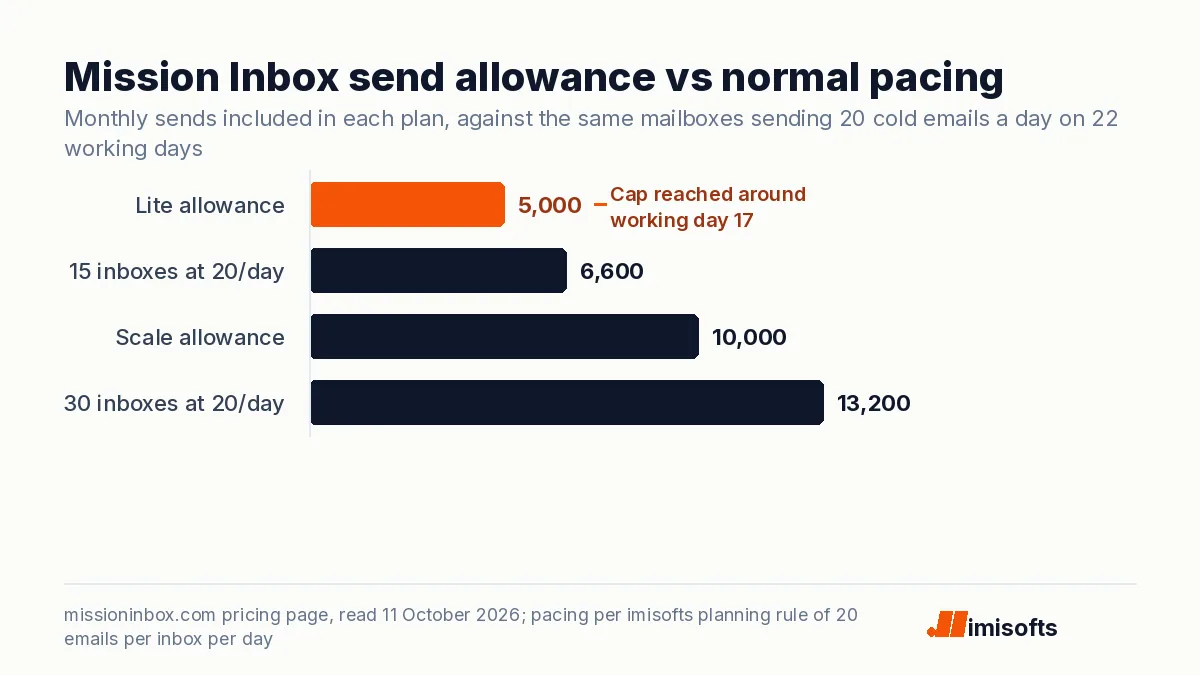
Our own planning rule for cold email is about 20 emails per inbox per day and no more than five inboxes per domain, which we explain in how many domains and inboxes you need. At that pace, 15 inboxes sending on 22 working days produce about 6,600 emails a month, against Lite's allowance of 5,000. Thirty inboxes produce about 13,200, against Scale's 10,000.
Put the other way, both plans include about 333 sends per mailbox per month: roughly 15 per mailbox per working day, or 11 per day if you send every day. That is a conservative pace, and for a team warming new infrastructure it is a reasonable one. But if you buy Lite expecting 15 inboxes at full cold email volume, you will hit the cap around day 17 of a 22-day month, and on Lite the documented overage behavior is a paused account and an upgrade. Size the plan on sends, then treat the mailbox count as a bonus.
Dedicated IPs versus Google and Microsoft mailboxes
Most cold email programs send from Google Workspace or Microsoft 365 mailboxes on separate domains, which share the reputation of those providers' huge sending networks. Mission Inbox's pitch is the opposite: your own server instances and IPs, which its product page describes as "Your own server. Not a slice of someone else's", with separate instances for sales, marketing and transactional mail (The Cubes).
That cuts both ways. A dedicated IP means no other sender can damage your reputation, and it also means only your behavior builds it: new IPs need warming, and an IP that sends a small, steady volume is judged on that volume alone. Which approach lands better depends on who you email; teams selling into companies on Microsoft 365 and Google Workspace should test both. We compare the two models in detail in private server versus Google Workspace for cold email, and the Microsoft side in Microsoft 365 sending limits.
MI Shield: a filter on your side of the network
MI Shield analyzes each outgoing email before it is handed to SMTP, looking for content, link, authentication and sending-pattern risks that could trigger spam filters, throttling or reputation damage. Mission Inbox says the check takes under 50 milliseconds per email, was trained on more than 100 million emails and lowers blacklisting by 32 percent across its fleet (MI Shield). Those are the vendor's own figures; we have not tested them.
A pre-send filter is useful for catching a broken link, a missing authentication record or a template that reads like spam. It cannot fix the things that decide most cold email results: a list of people who do not need what you sell, and a message that gives them no reason to reply.
Billing terms to read before you start
Mission Inbox bills a fixed subscription in advance, covering your included mailboxes, domains and sends, and bills usage above those allowances in arrears at the next renewal. The subscription fee is refundable only within a two-day grace period, and usage charges are never refundable (Billing terms, last updated January 1, 2026). Set sending limits in your sequencer so a campaign cannot run past your allowance unnoticed.
Who should buy it, and who should not
- A good fit: teams sending roughly 5,000 to 10,000 cold emails a month who want their own IP reputation, agencies that want sales mail separated from clients' other mail, and senders who value a pre-send filter as a safety net.
- A weaker fit: teams that plan to run many inboxes at full daily volume on the entry plan, programs aimed mainly at prospects whose filters favor Google and Microsoft senders, and anyone who does not want to manage warmup, domains and DNS themselves.
If the last point is you, compare the cost of running it yourself in what cold email infrastructure should cost with having it built and monitored for you.
How to test it in 14 days
- Buy Lite and connect five mailboxes to your existing sequencer.
- Warm them on the managed schedule before any campaign volume.
- Run the same campaign, to a split of the same list, from Mission Inbox and from your current setup.
- Compare bounce rate, spam complaints and positive replies, not open rates, which privacy features distort.
- Decide on plan size from the send volume you actually need.
The bottom line
Mission Inbox is a credible dedicated-IP option with fair entry pricing and a useful pre-send filter. Plan on the send allowance, test it against your current mailboxes on the same list, and read the refund terms before you scale. If you want infrastructure that is built, warmed and watched for you, with domains, DNS and placement testing included, that is what our email infrastructure service covers, and our cold email marketing team can run the campaigns on top of it. For the wider market, see our comparison of cold email infrastructure providers.
Frequently Asked Questions
Mission Inbox's outbound Lite plan is 50 dollars a month for 15 mailboxes and 5,000 sends per month, and its Scale plan is 199 dollars a month for 30 mailboxes and 10,000 sends, with more mailboxes and volume added as you go. Managed warmup is priced in credits, four credits per mailbox at 50 cents each. Prices were read on Mission Inbox's pricing page on 11 October 2026.
A cold email and email infrastructure provider that sends from dedicated server instances and dedicated IP addresses instead of Google Workspace or Microsoft 365 mailboxes, with an AI pre-send filter called MI Shield. Its mailboxes connect to sequencers such as Instantly and Smartlead.
Both outbound plans include about 333 sends per mailbox per month, which is roughly 15 emails per mailbox per working day. At a typical pace of 20 cold emails per inbox per day, the monthly send allowance runs out before you use every mailbox.
On Lite, the pricing page lists overage handling as pausing the account and upgrading. On Scale, additional volume is billed as you go. Usage above your allowances is billed in arrears at the next renewal and, under the billing terms updated January 1, 2026, is never refundable.
It depends on who you email and how much. Dedicated IPs protect you from other senders' behavior but must build reputation on your own volume, while Google and Microsoft mailboxes share those providers' networks. Test both on a split of the same list and compare bounces, complaints and positive replies.
Mission Inbox's AI filter that checks every outgoing email for content, link, authentication and sending-pattern risks before it is handed to SMTP. Mission Inbox says it takes under 50 milliseconds per email and lowers blacklisting by 32 percent across its fleet; those figures are the vendor's own.