A Microsoft 365 mailbox can send to 10,000 recipients a day, but every mailbox in the tenant shares one cap on outside recipients: 500 times the email license count to the power 0.7, plus 9,500, which Microsoft puts at 12,006 a day for 10 licenses. Since mid-September 2026 Microsoft has been rolling out a cut for young tenants: a tenant under 31 days old gets 10 percent of that cap and one aged 31 to 60 days gets 25 percent, and the rollout is expected to finish by the end of November 2026.
Multiply 25 Outlook inboxes by 10,000 and a cold email setup looks limitless. It is not. On 6 October 2026 I read Microsoft’s limits pages, four Exchange team posts and Message Center post MC1454397, and the meter that matters now runs per tenant, by license count and by age.
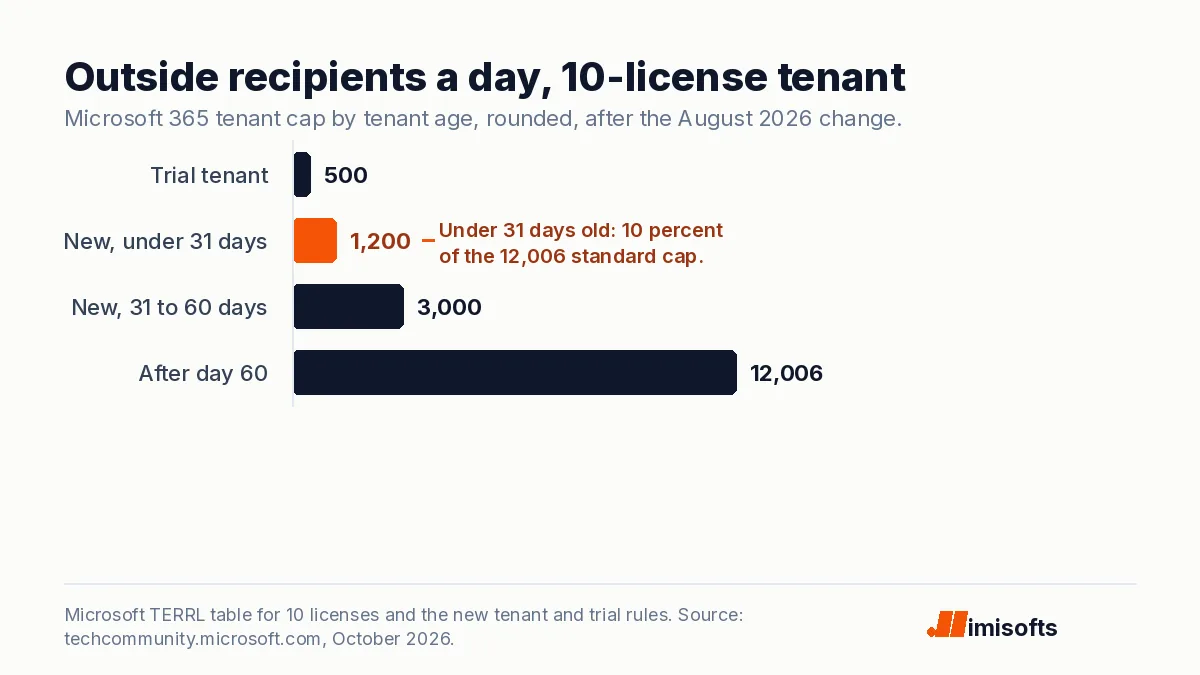
Ten licenses, one new tenant: about 1,200 outside addresses a day for the first month. Every follow-up and every warm-up email comes out of that.
Key numbers
| Item | Number |
|---|---|
| Recipients per mailbox per day (rolling 24 hours) | 10,000 |
| Messages per mailbox per minute | 30 |
| Recipients on one message, maximum | 1,000 |
| Tenant cap on outside recipients a day, 1 license | 10,000 |
| Tenant cap on outside recipients a day, 10 licenses | 12,006 |
| Tenant cap on outside recipients a day, 25 licenses | 14,259 |
| Share of the cap for a tenant under 31 days old | 10% |
| Share of the cap for a tenant 31 to 60 days old | 25% |
| Trial tenant cap on outside recipients a day (was 5,000) | 500 |
| Outside recipients a day from onmicrosoft.com addresses (per tenant) | 100 |
| New tenant rules expected fully rolled out | End of November 2026 |
| Google Workspace external recipients per user a day | 3,000 |
Read on 6 October 2026 from Microsoft’s Exchange Online limits page, the Exchange Team blog posts on tenant outbound email limits (updated 13 August 2026) and on onmicrosoft.com throttling, Message Center post MC1454397 (updated 29 September 2026) and Google’s Gmail sending limits page.
The mistake: multiplying inboxes by 10,000
The 10,000 is the recipient rate limit on Microsoft’s limits page. It is a per-mailbox number, measured over a rolling 24 hours, and it sits next to 30 messages a minute and up to 1,000 recipients on one message. No sane cold email plan sends 10,000 a day from one inbox, so the limit feels like headroom you will never touch. That part is right. The mistake is stopping there, because Microsoft also meters the tenant those inboxes live in.
Microsoft is blunt about the use case, too. Its limits page says customers who need to send legitimate bulk commercial email should use third-party providers that specialize in it. Twenty-five inboxes sending 40 emails each is not a newsletter blast, but the tenant meter counts every outside recipient the same way.
25 inboxes at 10,000 a day each is 250,000 sends.
A per-mailbox ceiling. The tenant cap arrives long before it.
25 licenses buy 14,259 outside recipients a day, about 1,426 while the tenant is under 31 days old.
Sends, follow-ups and warm-up all draw on that one number.
The cap that counts belongs to the tenant
Microsoft calls it the Tenant External Recipient Rate Limit. It counts every recipient whose domain is not an accepted domain in your tenant, over a 24-hour sliding window, and recipients in other Microsoft 365 tenants count. It does not track unique recipients: Microsoft’s FAQ says 1,000 messages to one address count as 1,000. It counts outbound mail whether it starts in an Exchange Online mailbox, on premises or from the Internet, so a sequencer sending through your inboxes is inside it.
The quota rises with licenses, slowly. Microsoft’s table gives 10,000 a day for one license, 12,006 for 10, 14,259 for 25 and 22,059 for 100, so going from 25 to 100 licenses adds 7,800 outside recipients a day, about 104 per license. It counts the email licenses you bought, so unlicensed shared mailboxes add nothing, and every extra license is a paid seat (the prices are in my email hosting cost breakdown). Go over the cap and outside mail bounces with 550 5.7.233 until the last 24 hours fall back under the line, which Microsoft says can take minutes or up to 24 hours.
Google draws the line per user instead. Workspace allows each user 2,000 messages and 3,000 external recipients a day, so every seat you add brings a full allowance with it. And if you remember a per-mailbox limit of 2,000 outside recipients a day on Microsoft, the Exchange team canceled that plan indefinitely on 6 January 2026 and said the tenant limit stays. What Outlook.com demands of senders who mail its users is a separate rule set, covered in my sender rules update.
New tenants run at 10 percent for 30 days
On 13 August 2026 the Exchange team announced new quotas for young tenants, rolling out from 14 September. Under 31 days old, a tenant gets 10 percent of its calculated quota; from day 31 to day 60, 25 percent; after day 60, all of it. Trial tenants drop from 5,000 outside recipients a day to 500, whatever their license count, and their bounces read 550 5.7.232. Message Center post MC1454397, last updated on 29 September, expects the rollout to finish by the end of November 2026. Microsoft’s main limits page still prints the old 5,000 trial figure, so check the date on whatever you read.
I have delivered 500+ projects, and the first number every outbound build needs is how much the setup can send on day one. On Microsoft that number now starts with the tenant’s age. For a 10-license tenant it is about 1,200 outside recipients a day in the first month and about 3,000 in the second.
A warm-up ramp of about 14 days, the length we plan in an email infrastructure build, fits entirely inside a new tenant’s 10 percent window, and warm-up mail to inboxes on other domains is external by Microsoft’s definition. A new 25-license tenant whose 25 inboxes each warm at 30 a day has spent 750 of its roughly 1,426 before one campaign email goes out.
Three smaller traps that bounce the same way
First, the onmicrosoft.com address every tenant starts with. Microsoft throttled it in stages from October 2025 to June 2026: mail from those default domains can reach 100 outside recipients per tenant in 24 hours, and the bounce reads 550 5.7.236. A tenant whose inboxes still send from that address gets 100 a day for all of them together.
Second, delegates. Microsoft’s limits page says mail sent from another mailbox through permissions is counted for the delegate, not for the mailbox it is sent from. One admin account sending as 25 inboxes shares one 10,000 allowance.
Third, restriction. An outbound spam policy can set its own hourly and daily limits, and its default action on a user who reaches one is a block on sending until the following day, by UTC. A restricted account gets 550 5.1.8, and Microsoft describes restricted entities as showing indications of compromise, which typically includes exceeding sending limits.
Four checks before a Microsoft tenant sends cold email
Read the tenant’s real quota
In the Exchange admin center open Reports, Mail flow, Tenant Outbound External Recipients Rate, or run Get-LimitsEnforcementStatus and read Threshold and ObservedValue. Microsoft’s FAQ still says there is no alert when you pass the quota, so put the check on a schedule.
Budget the tenant by its age
Add every send, follow-up and warm-up email across all inboxes and keep the total under the applied quota: 10 percent of the formula until day 31, 25 percent through day 60. For 10 licenses that is about 1,200 a day, then about 3,000.
Make a custom domain the primary address
Set a custom domain as the tenant default and as every mailbox’s primary SMTP address before any tool connects. From onmicrosoft.com the whole tenant gets 100 outside recipients a day.
Connect every inbox as itself
Sign each inbox into your sequencer with its own account, not one admin with send-as rights, and keep each one well under the limits your outbound spam policy sets.
The bottom line
Microsoft did not ban cold email from Outlook inboxes. It put a tenant meter above the mailbox one and put young tenants on a fraction of it until day 60. Plan the first two months around 10 and 25 percent, or send from a tenant that is already older than 60 days.