Each paid Google Workspace user can send 2,000 messages a day, to at most 10,000 recipients in total, 3,000 of them outside your primary domain and 2,000 of those unique, counted over a rolling 24 hours. A trial account gets 500 messages and 500 unique outside recipients a day, and Google’s limits page says a converted trial’s limits rise once the domain has paid at least $100 in total, which can take up to 75 days after that. I read every Google page quoted here on 20 October 2026.
It is tempting to start from the 2,000 and multiply it by seats. That is the wrong number to plan around. The inboxes we set up send 20 to 30 cold emails a day each, so the cap never comes close. What decides a Google build is the 500 a new account starts on, the rules for what counts against a user, and one sentence in Google’s acceptable use policy that can cost you the whole account.
Google gives each paid user 2,000 emails a day. It keeps the right to suspend the whole account.
Key numbers
| Item | Number |
|---|---|
| Messages a day per paid user (1,500 through mail merge) | 2,000 |
| Total recipients a day per user (1,500 through mail merge) | 10,000 |
| External recipients a day per user (your own domain aliases and alternate domains count) | 3,000 |
| Unique external recipients a day per user (of 3,000 unique recipients) | 2,000 |
| Messages a day on a trial account (and 500 unique external recipients) | 500 |
| Paid in total before a converted trial’s limits rise (plus the domain if bought from Google) | $100 |
| Wait after reaching $100, at most | 75 days |
| Free trial (up to 10 users) | 14 days |
| Recipients on one message (at most 500 external; 100 by SMTP through POP or IMAP) | 2,000 |
| SMTP relay messages per user a day (counted separately from Gmail limits) | 10,000 |
| Business Starter per user a month ($7 with a one-year commitment) | $8.40 |
| Sending blocked after hitting a limit | Up to 24 hours |
Read on 20 October 2026 from Google Workspace Help (Gmail sending limits, SMTP relay, free trial, spam and abuse policy), the Google Cloud acceptable use policy and the Google Workspace pricing page.
Google Workspace sending limits, per user per day
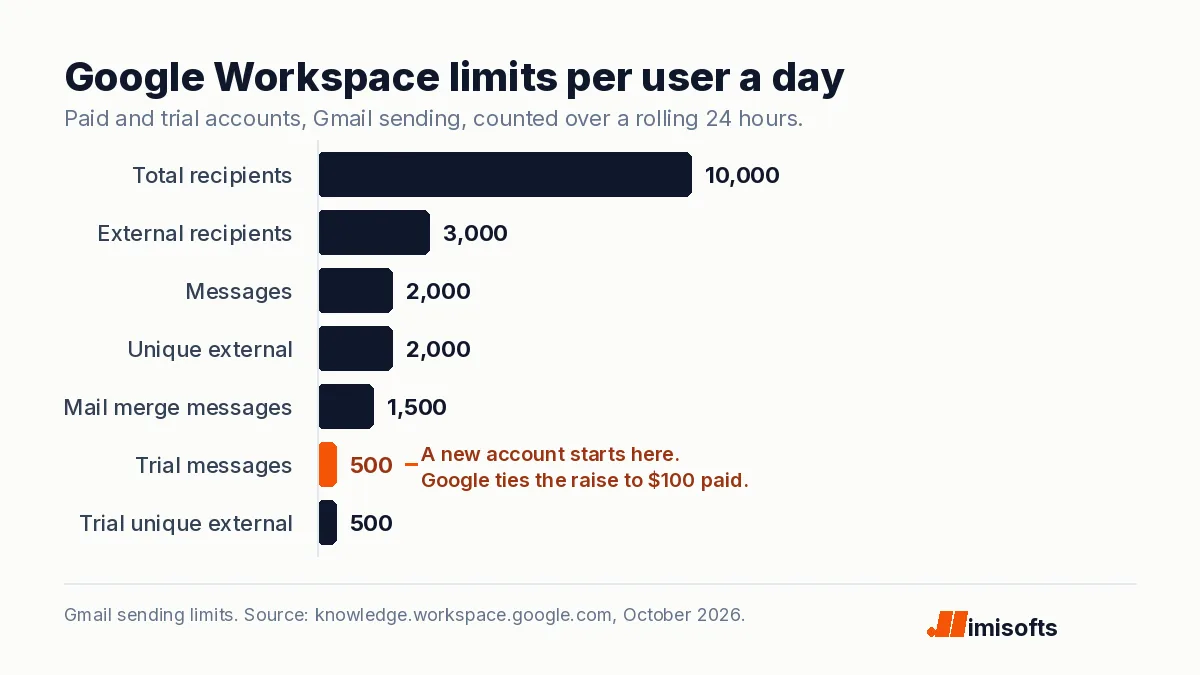
Google publishes the limits on one help page and says they can change without notice. For a paid account: 2,000 messages a day per user, or 1,500 through Gmail’s mail merge; 10,000 total recipients a day, where five messages to ten people count as 50; 3,000 external recipients; and 3,000 unique recipients, of which 2,000 can be external. One message can carry 2,000 addresses, no more than 500 of them external, and only 100 when the user sends by SMTP through POP or IMAP.
Hit any of them and the error reads like “You have reached a limit for sending email.” The user cannot send new messages for up to 24 hours but still receives mail. Google adds that a user who exceeds the limits might be suspended, and that accounts that send spam might be permanently restricted from sending.
A new account starts at 500
Every Workspace signup starts as a 14-day free trial for up to 10 users, and Google does not raise limits during it. Trial accounts get 500 messages a day and 500 unique external recipients. Adding an 11th user prompts you to end the trial, and the paid subscription starts for everyone.
Converting is not the trigger on Google’s Gmail limits page. It says limits increase automatically once your domain has paid at least $100 in total, plus the domain’s price if you bought it from Google, and that the increase can take up to 75 days after you reach it. Its SMTP relay page says Gmail limits can be raised by ending your trial. The two pages disagree, so plan for the stricter one.
At the $8.40 monthly list price for Business Starter ($7 with a one-year commitment), three seats bill $25.20 a month and need four bills to pass $100. One seat needs twelve; twelve seats pass it on the first bill. Google’s 10% introductory discount for new customers makes each wait longer, not shorter.
What counts against a user’s limits
Three counting rules matter for cold email setups. Google lists mail sent from a user’s alias, mail sent by delegated users and vacation replies among the messages that count toward user limits, so an alias is not a second allowance. External means any address outside your primary domain, including your own domain aliases and alternate domains, so mail between your own sending domains counts as external. And a day is a rolling 24 hours, not midnight to midnight.
None of that makes 2,000 the number to worry about. Thirty a day uses 1.5% of it.
Why SMTP relay is not a bigger allowance
Google’s SMTP relay service has its own limits, counted separately from Gmail’s: up to 10,000 messages and 10,000 unique recipients per user in 24 hours, 100 recipients per SMTP transaction, and 4.6 million recipients a day for the whole organization. That looks like five times the allowance.
Google’s setup page says the relay is intended for on-premise devices and applications, and for marketing or high-volume campaigns it recommends sending directly from the platform’s own mail servers. It also monitors relay mail and emails your super administrators when a user sends a significant amount of spam.
The line that can end the whole account
Google’s Workspace terms point to the Google Cloud acceptable use policy, last modified on 12 October 2026. It bars using the service “to generate, distribute, publish or facilitate unsolicited mass email, promotions, advertisements, or other solicitations”, and calls that spam. Neither the policy nor the limits page puts a number on mass. Google’s spam policy for Gmail says it may suspend a violating user immediately and, if the problem is domain-wide, “suspend the entire account and deny administrator access to all the Google Workspace services.”
The policy’s Workspace section adds two lines that matter for cold email setups. You may not give several people access to one account except through delegation, and you may not resell accounts, or parts of them, “as added into a commercial product offered to third parties.” That second line is worth reading before you buy Workspace inboxes as part of another company’s product.
Ten Workspace users at 2,000 a day each gives us 20,000 sends a day.
A new account starts at 500 per user, and a spam finding can suspend the whole account, not one inbox.
Keep prospecting in its own account, send 20 to 30 per inbox and budget the first months at trial limits.
Google ties the raise to $100 of payments and allows itself up to 75 days.
How I would set up Google Workspace for cold email
I have delivered 500+ projects, and on Google the setup decides more than the cap does. Four moves:
Keep cold email out of your company’s Workspace account
Google can suspend an entire account when it judges a problem domain-wide. Put prospecting domains in a separate account from the one your team’s real email runs on.
Budget the first months at trial limits
Plan on 500 a day per user until the domain has paid $100, and allow up to 75 days after that. Three seats at $8.40 need four monthly bills to get there.
Give every sender a seat
Alias and delegated mail counts toward user limits, and the policy bars several people sharing one account outside delegation. One person or one inbox, one licensed user.
Count Gmail traffic per primary domain
Messages to personal Gmail accounts from one primary domain count together. Reach about 5,000 in a day once and Google treats you as a bulk sender permanently.
That threshold adds DMARC, both SPF and DKIM, and one-click unsubscribe on marketing mail to the spam rate below 0.3% Google asks of every sender; the details are in Google and Microsoft’s sender rules. Microsoft meters the tenant instead and starts a new tenant at 10% of its cap, which is in Microsoft 365 sending limits, and what each seat costs on Google, Microsoft and the rest is in my email hosting cost breakdown.
This is the email infrastructure we build: sending domains and mailboxes in accounts you own, kept apart from your main domain, with authentication and warm-up done before the first campaign. If you would rather hand the whole program over, here is what cold email agencies charge each month.
The bottom line
Google’s caps are generous and per user: 2,000 messages a day on a paid seat and 500 on a trial, with the raise tied to $100 of payments and up to 75 days. At 20 to 30 a day per inbox, the cap is not what stops a cold email program. Plan the first months at 500, keep prospecting in its own account, and remember that Google, not the sending limit, decides what counts as spam. I am not a lawyer, and this is not legal advice.