Short answer. CRM implementation is the work of setting up a customer relationship management system so a team actually runs on it: deciding what it must do, choosing the software, configuring it, moving the data in, testing, training and going live. Salesforce's own guide breaks it into 9 steps. On 14 November 2026, the vendors' own sites put setup help at $1,500 one time for HubSpot Sales Hub Professional onboarding (from HubSpot's pricing guide) and $200 an hour (10 hours minimum, so $2,000 and up) for Zoho's Jumpstart service, while Pipedrive points to free migration through the Import2 partner tool for up to 1,000,000 records.
This guide walks through the steps in order, what each vendor publishes about setup and migration, and a worked first-year budget for a hypothetical five-person sales team. Every price below comes from the vendor's own site or the US Bureau of Labor Statistics, read on 14 November 2026, and is linked.
Key numbers
| Item | Number |
|---|---|
| Steps in Salesforce's guide (needs assessment to evaluation) | 9 |
| HubSpot Pro onboarding (one time, HubSpot guide updated 9 Sep 2026) | $1,500 |
| HubSpot Enterprise onboarding (one time) | $3,500 |
| Zoho Jumpstart (10 hour minimum) | $200/hour |
| Pipedrive Import2 free migration (paid above that) | 1,000,000 records |
| HubSpot rows per file (paid) (10,000,000 rows a day) | 1,048,576 |
| BLS systems analyst median (May 2025) | $50.89/hour |
| 5-seat HubSpot Pro, year one (hypothetical, incl. onboarding) | $6,900 |
| HighLevel Starter, year one ($97 a month, unlimited users) | $1,164 |
Salesforce, HubSpot, Zoho, Pipedrive, HighLevel and BLS pages, read 14 November 2026.
What CRM implementation means
Salesforce defines it plainly: "CRM implementation is the process of setting up and integrating your CRM system." Its guide adds that the work "can look like migrating data, adding new workflows, deploying AI agents, and training your team on the logistics."
In practice it is less about the software and more about decisions. Which stages does a deal move through? Who owns a lead when it arrives? Which fields are required before a deal can move forward? We suggest answering them before anything is configured. If you are still deciding between buying a CRM and building one, our custom CRM vs off-the-shelf comparison covers that choice first.
The 9 steps, in the order Salesforce lists them
Salesforce sells a CRM and runs a partner network, so it has a stake in how this work is framed. Its step list is still a useful skeleton, and Zoho's Jumpstart page lists a similar setup, training and sign-off sequence.
| Step | What happens | Output you should have |
|---|---|---|
| 1. Needs assessment | List the goals and the processes the CRM must support | A one-page list of must-haves |
| 2. Choose a CRM | Compare tools against that list | One tool and one plan |
| 3. Planning and strategy | Scope, resources and metrics | Owner, dates, success measures |
| 4. Customization and integration | Fields, pipelines, email, calendar and other tools | A configured test account |
| 5. Data migration | Move contacts, deals and history across | Clean, de-duplicated records |
| 6. Testing | Run real scenarios before launch | A fixed list of issues |
| 7. Training and support | Show each role what it must do daily | Every user able to log a deal |
| 8. Going live | Switch the team over | Old system read-only |
| 9. Evaluation and iteration | Check the metrics, adjust | A review date on the calendar |
The step names are Salesforce's. The third column is our suggestion for how to know a step is finished.
Steps 1 to 3: needs, choice and plan
We suggest writing the needs list before any demo. Keep it short: the pipeline stages you use today, the channels leads come from, the reports the owner reads each week, and the tools the CRM must connect to (email, calendar, phone, forms, billing).
In our view, the pricing model shapes the budget more than most features do. Per-seat tools charge for each user: HubSpot lists Sales Hub Professional from $90 per seat per month (the page also shows $100, depending on billing term) and Enterprise from $150 per seat per month. Flat-fee tools charge per account: HighLevel lists $97 a month (Starter, 3 sub-accounts) and $297 a month (Unlimited), and says every plan includes "unlimited contacts and unlimited users." A team that expects to add users should price both models at its planned headcount, not today's.
For step 3, Salesforce's guide says to define "scope of the project, allocate resources, and establish your metrics." One named owner inside the business matters here. A partner can configure the system, but someone on your side has to decide what a qualified lead is.
Step 4: configuration and integrations
Salesforce describes this step as "adjusting settings, creating custom fields, and integrating with other tools like email, calendar, automation tools, and customer service software."
The common mistake is adding every field someone asks for. We suggest starting with the fields your weekly report actually uses, then adding more after a month of real use. Automations follow the same rule: build the two or three that save the most manual work first, such as assigning a new lead, sending the first reply, and creating a follow-up task. Our guide to sales automation software covers which of those jobs software handles well and where it breaks.
Speed matters most on the first automation. If a web form lead waits a day for a reply, the CRM has not fixed the problem it was bought for; our speed to lead guide covers response time.
Step 5: data migration, with each vendor's limits
Salesforce defines migration as moving "customer details, sales records, customer interactions, support tickets, and other related information," with the goal that data arrives "without loss or corruption." The vendors publish concrete limits and tools:
| Vendor | Migration route | Published limit or price |
|---|---|---|
| HubSpot (free tools) | File import | 20MB files, 50 imports and 500,000 rows a day |
| HubSpot (paid or Smart CRM) | File import | 512 MB files, 500 imports and 10,000,000 rows a day, 1,048,576 rows per file |
| Pipedrive | Import2 partner tool | Free up to 1,000,000 records, paid above that |
HubSpot's figures come from its "Format import files" help article, last updated 12 November 2026. Pipedrive's come from its Import2 help article, last updated 3 September 2026, which lists GoHighLevel, HubSpot, Salesforce, Zoho CRM, Keap and others as supported sources.
Pipedrive's article also carries the most useful warning we found: "If the migration is initiated before users are invited and pipelines are created, your data will be owned by the user who initiated the migration." We suggest the same order in any CRM: create users and pipelines first, then import, so records land with the right owner. Pipedrive also notes the migration is "only available to global admin users," that it suggests "allowing 24 hours," and that you can "undo and redo the migration as needed at no extra cost."
Before any import, we suggest three clean-up passes on the export: remove duplicates by email, standardize phone formats, and drop contacts with no activity you can use. A smaller, clean import is easier to check than a large, messy one.
Steps 6 to 8: testing, training and go-live
Test with real scenarios, not feature lists: a new web lead arrives, a rep calls, a deal moves to proposal, a deal is lost. Each one should end with the record in the state your report expects.
Training works best by role. A rep needs to log a call and move a deal. A manager needs the pipeline view and the weekly report. An admin needs imports, users and permissions. Zoho's Jumpstart page lists "Product Setup", "User training and onboarding" and "Project sign-off" as separate steps.
On go-live day, we suggest making the old system read-only rather than deleting it. People will look up history there for a few weeks, and a read-only copy stops new data from being split across two tools.
Step 9: review after launch
Salesforce's last step is "Evaluation and iteration." Put a review date in the calendar 30 days after launch. Check three things: are reps logging activity, do the reports match what happened, and which fields nobody fills in. Remove or fix the unused fields. Then repeat at 90 days.
What CRM implementation costs, from vendor pages
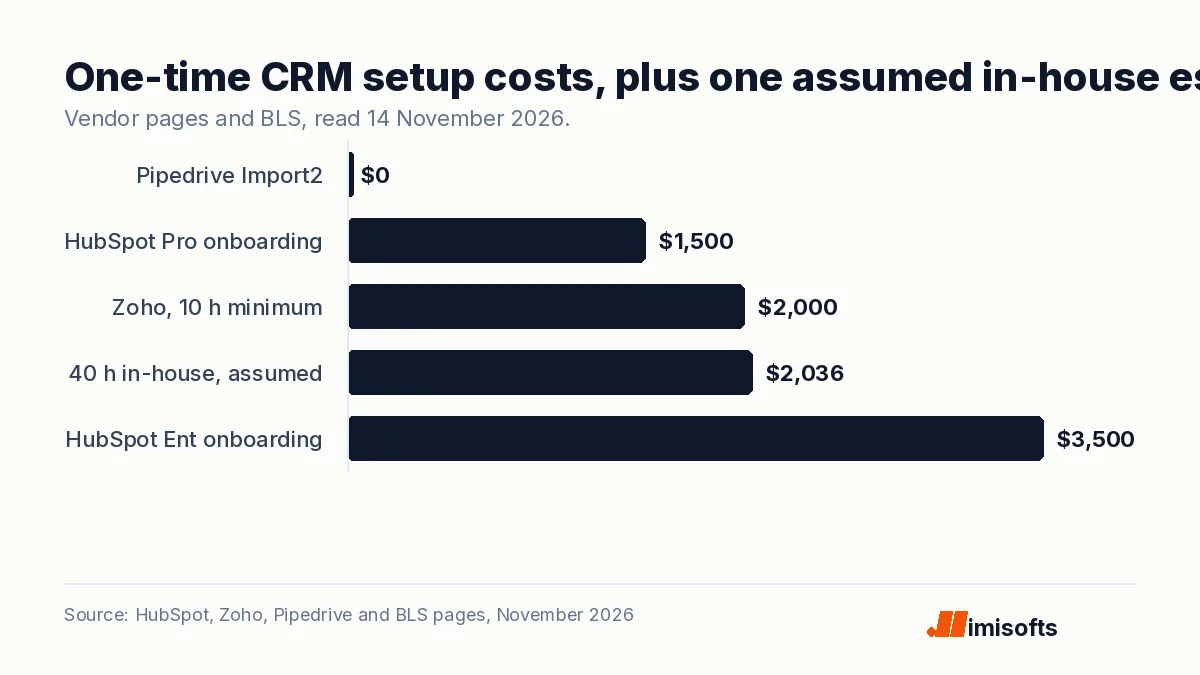
There are three ways to pay for setup: the vendor's own onboarding, a partner or freelancer, or your own staff's time. The published numbers on 14 November 2026:
- HubSpot onboarding: HubSpot's Sales Hub pricing guide, updated 9 September 2026, lists "one-time onboarding fees for Professional ($1,500) and Enterprise ($3,500) plans."
- Zoho Jumpstart: "$200 /hour" for "one dedicated implementation expert," with a "minimum of 10 hours," so $2,000 before local taxes.
- Pipedrive via Import2: free migration of up to 1,000,000 records; configuration and training are on you or a partner.
- Your own time: the US Bureau of Labor Statistics puts the median wage for computer systems analysts at $50.89 an hour ($105,850 a year) in May 2025. Using that median as a proxy for in-house setup staff, 40 hours is about $2,036 in wages and 80 hours about $4,071, before benefits.
Salesforce does not publish partner rates on its implementation guide, so we have left those out rather than estimate them.
A worked first-year budget for a 5-person team
This is a hypothetical example, not a client. Assume five users and the starting prices shown on 14 November 2026 ($90 is the lower of the two Professional prices HubSpot shows).
| Setup | Software, year one | Setup cost | Year-one total |
|---|---|---|---|
| HubSpot Sales Hub Professional, 5 seats from $90 | $5,400 | $1,500 onboarding | $6,900 |
| HubSpot Sales Hub Enterprise, 5 seats from $150 | $9,000 | $3,500 onboarding | $12,500 |
| HighLevel Starter, flat $97 a month | $1,164 | 40 hours in-house, about $2,036 | about $3,200 |
| HighLevel Unlimited, flat $297 a month | $3,564 | 40 hours in-house, about $2,036 | about $5,600 |
The HubSpot onboarding fee for Professional equals about 3.3 months of seat fees for five users at the $90 rate; paying $100 a seat instead would make the software $6,000 and the year-one total $7,500. In this example, on HighLevel Starter the assumed setup time costs more than a year of software. The HubSpot rows leave out internal staff time, which onboarding still needs, so add your own hours to every row before comparing. The 40 hours is an assumption for the example, not a published figure.
Five mistakes to avoid, drawing on vendor docs
- Importing before users and pipelines exist. Pipedrive says the data will then be owned by whoever started the import.
- Loading everything in one file. HubSpot caps paid accounts at 1,048,576 rows per file and 10,000,000 rows a day; plan large imports across days.
- Skipping the needs list. It is step 1 in Salesforce's guide, and we suggest finishing it before any demo.
- Training everyone the same way. Zoho lists training as its own step; we suggest splitting it by role.
- No review date. Salesforce ends with evaluation; we suggest putting the date in the calendar at launch.
How imisofts can help
imisofts builds white-label GoHighLevel setups for agencies that want a branded CRM they can resell; the details are on our GoHighLevel white-label SaaS page. For workflows and CRM automation around an existing CRM, see our AI automation agency page.
Sources (all read 14 November 2026): Salesforce, CRM Implementation: A Comprehensive 9 Step Guide; HubSpot Sales Hub pricing; HubSpot, Sales Hub pricing guide (updated 9 September 2026); HubSpot Knowledge Base, Format import files; Zoho Jumpstart; Pipedrive, Migrating data from a previous CRM using Import2; HighLevel pricing; BLS, Computer Systems Analysts.
Frequently Asked Questions
CRM implementation is setting up a customer relationship management system so a team runs on it: needs, software choice, configuration, data migration, testing, training, go-live and review. Salesforce's guide splits it into 9 steps.
On vendor pages read 14 November 2026: HubSpot charges a one-time $1,500 onboarding fee for Sales Hub Professional and $3,500 for Enterprise, Zoho Jumpstart costs $200 an hour with a 10 hour minimum, and Pipedrive's Import2 migrates up to 1,000,000 records free.
Salesforce lists 9: needs assessment, choosing a CRM, planning and strategy, customization and integration, data migration, testing, training and support, going live, and evaluation and iteration.
It depends on the volume. Pipedrive suggests allowing 24 hours for an Import2 migration. HubSpot's paid plans import up to 10,000,000 rows a day, with a limit of 1,048,576 rows per file.
We suggest a partner for configuration, integrations and training. In our view, data clean-up and deciding your pipeline stages still need someone inside the business. Zoho's own service starts at 10 hours at $200 an hour.
Create users and pipelines first. Pipedrive warns that if you import before users are invited and pipelines exist, the data will be owned by the user who started the migration. We also suggest removing duplicates and standardizing phone formats.