Short answer. OpenAI Daybreak is OpenAI's cybersecurity program: approved defenders get 2 tiers of model access, Daybreak Blue for defensive work and Daybreak Red for authorized offensive testing, plus agent tools that find vulnerabilities, write patches and check fixes. Access is by application and review, and we found no published fee for access itself; you pay for usage by the token, for example $20 per 1 million input tokens for GPT-6 Cyber on the API. The newest pieces, Daybreak Red Team and Daybreak Defense Factory, were shown at OpenAI's Cyber at the Frontier event on 12 November 2026.
On 16 November 2026 we read OpenAI's Daybreak pages, its Help Center articles, the Codex Security documentation and both OpenAI pricing pages, plus one independent report, from SecurityWeek, for the event date. imisofts sells cybersecurity services, so we have an interest in the subject.
Key numbers
| Item | Number |
|---|---|
| Daybreak access tiers (Daybreak Blue and Daybreak Red) | 2 |
| Published fee for Daybreak access (usage is billed by the token) | None found |
| GPT-6 Cyber API rate per 1M tokens (Red only, separate approval; API pricing page) | $20 input, $100 output |
| GPT-6 Sol API rate per 1M tokens (standard API rate; OpenAI lists no Blue API rate) | $2 input, $10 output |
| Daybreak Blue, credits per 1M tokens (GPT-5.6 Sol credit rates; ChatGPT Learn pricing) | 100 input, 500 output |
| Daybreak Red, credits per 1M tokens (ChatGPT Learn pricing) | 312.5 input, 1,875 output |
| Hardware keys for individual Blue access (synced passkeys do not count; Help Center) | At least 1 FIDO2 key |
| Subsidy pledged for frontline defenders (announced 3 September 2026) | $1 billion |
| Red Team and Defense Factory shown (Cyber at the Frontier event, per SecurityWeek) | 12 November 2026 |
| API project setting change takes effect (default API projects are not eligible) | Up to about 15 minutes |
Read on 16 November 2026 from OpenAI's Daybreak pages, Help Center, ChatGPT Learn and API pricing pages, with the event date from SecurityWeek.
What OpenAI Daybreak is
OpenAI describes Daybreak as a program that brings together AI models, security products, partners and support for defenders. It has five parts:
- Daybreak Access. The Help Center calls this OpenAI's Trusted Access for Cyber program. Approved users get fewer refusals on cyber tasks (Blue) or specialized cyber models (Red).
- Products. The Codex Security plugin, CLI and SDK, plus Daybreak Defense Factory for connected code repositories and Daybreak Red Team for authorized testing of web applications.
- Daybreak Defense Network. Partners that build OpenAI's cyber models into their own security products and managed services.
- Daybreak for Frontline Defenders. A $1 billion pledge of subsidized access, training and support, starting with the US, announced on 3 September 2026.
- Patch the Planet. A project with Trail of Bits, Calif and HackerOne that helps open-source maintainers validate findings and land patches.
It is not one app you buy: it combines approval-based model access with tools reached through Codex, ChatGPT or the API.
What changed this week
According to SecurityWeek's report of 13 November, OpenAI showed two agent products at its Cyber at the Frontier event on 12 November. OpenAI's own product pages describe them:
- Daybreak Red Team is in early access. A coordinated team of agents tests web applications using source code and app context, checks reports from scanners and bug bounty programs, and tests whether a patch stops the exploit. OpenAI says agents run in isolated environments with Guardian review, and you control which apps and endpoints they reach. Registering interest does not mean you will get access.
- Daybreak Defense Factory takes findings from your security tools and from Red Team, has agents trace each issue through your code and prepare a patch, and leaves engineers to review and test it before merge. The setup guide says it runs as the "Daybreak Defense Factory (Preview)" plugin in a ChatGPT workspace that has Daybreak access, scans a connected GitHub repository, and can import findings from Snyk, Endor Labs and Wiz.
A week before the event, on 5 November, OpenAI released GPT-6 Cyber to a select group of approved Red customers. OpenAI reports 81 previously unknown Firefox vulnerabilities that Mozilla classified as high severity.
Daybreak Blue and Daybreak Red compared
| Daybreak Blue | Daybreak Red | |
|---|---|---|
| Work it is for | Secure code review, vulnerability triage, malware analysis, detection engineering, incident response, patch validation | Authorized penetration testing, red teaming, exploit validation or development, controlled vulnerability research |
| Models | Fewer refusals on mainline models such as GPT-6 Sol, GPT-6 Luna and GPT-5.6 Sol; no cyber-specialized models | GPT-5.6 Cyber for every Red organization; GPT-6 Cyber with a separate approval; fewer refusals on mainline models including Astra |
| Who can apply | Organizations and individuals | For now, approved business and enterprise organizations only |
| Extra checks | Review of identity, use case and setup | Separate Red approval and stronger verification; IP allowlisting for API access by default |
OpenAI's access guide calls Blue the recommended starting point for security teams. Approval switches nothing on by itself: Daybreak ships turned off until an admin enables it for a user, role or API project. Astra keeps standard safeguards under Blue. The IP allowlisting rule comes from OpenAI's GPT-6 Cyber announcement.
What Daybreak does: find, validate, patch, verify
OpenAI's cybersecurity page lays out the loop its agents run: discovery of likely flaws from code context, validation of whether a finding is reachable and exploitable, prioritization by severity, assignment to the team that owns the code, remediation with a proposed patch and tests, and verification that the fix closes the demonstrated attack path.
The Codex Security docs list four ways to run that loop:
- Codex Security plugin in the ChatGPT desktop app or Codex CLI. It scans a local repository, leaves your source unchanged and keeps findings on your machine. OpenAI suggests gpt-5.6-sol with xhigh reasoning for the best scan quality, per the plugin quickstart.
- Codex Security CLI, the npm package @openai/codex-security, for terminal and CI scans. The CLI quickstart lists Node.js 24 or 26 (or 22.13.0 and later) and Python 3.10 or later.
- Codex Security SDK for scans inside TypeScript applications.
- Daybreak Defense Factory for cloud scans of a connected GitHub repository: one-off, continuous on new commits, or scheduled, plus pull request reviews.
Findings export as JSON, CSV or SARIF. A verify step returns fixed, still_vulnerable or inconclusive for each finding, according to the plugin changelog. Defense Factory does not deploy patches automatically: it saves a proposed patch, and its Create PR option opens a draft pull request on GitHub.
How to get OpenAI Daybreak access
The Help Center overview gives two application paths:
- Organizations use OpenAI's organization request form. Expect questions about your company and its security capability, the defensive workflows you want, the OpenAI organization or workspace you will use, and verification details.
- Individuals start at chatgpt.com/cyber. The checklist asks for an eligible paid plan, Advanced Account Security and at least 1 physical FIDO2 security key; a passkey saved on a phone, a computer or in a password manager does not count. You then verify your identity, and you must be at least 18.
Read the account-security part before you enroll. Turning on Advanced Account Security signs you out of every device and switches off password sign-in, email and SMS codes, and standard email recovery. The troubleshooting guide warns that if you lose every key and recovery key you may lose the account for good, and recovering with a recovery key involves a 48-hour waiting period. Being in a ChatGPT Business or Team workspace does not exempt an individual from these rules.
After approval, an admin turns Daybreak on. In the API that means a named project other than the default one, which is not eligible, and changes take up to about 15 minutes. In Codex it means a role setting, then the Codex app's Daybreak toggle, off by default. OpenAI also says approval is not automatic, support cannot override a verification decision, Daybreak is not available in every region, and a purchase or contract alone does not secure access.
What OpenAI Daybreak costs
Daybreak access is by approval only, and we found no published access fee; you pay for usage by the token. Red Team takes interest registrations and Defense Factory lists Contact sales; neither has a public price. The usage rates OpenAI publishes:
| Where and which model | Per 1M input tokens | Per 1M output tokens | Our example: 1M in, 200K out |
|---|---|---|---|
| ChatGPT or Codex credits, Daybreak Blue | 100 credits | 500 credits | 200 credits |
| ChatGPT or Codex credits, Daybreak Red | 312.5 credits | 1,875 credits | 687.5 credits |
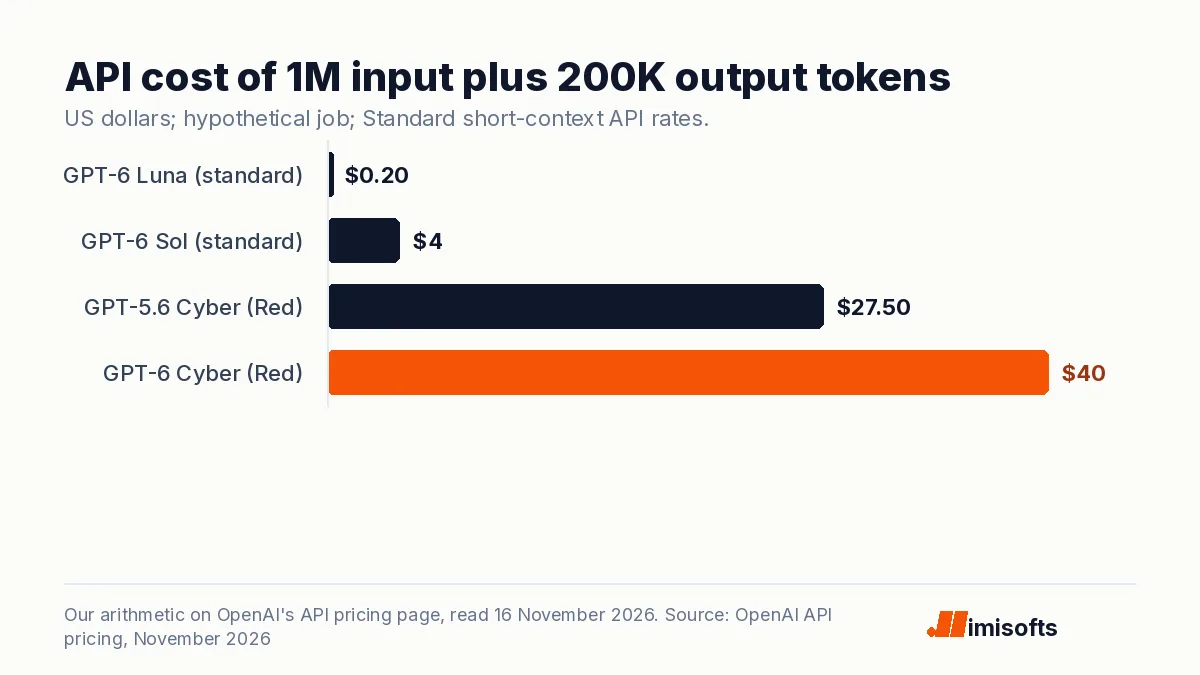
| API, gpt-6-luna (standard rate) | $0.10 | $0.50 | $0.20 |
| API, gpt-6-sol (standard rate) | $2.00 | $10.00 | $4.00 |
| API, gpt-5.6-cyber (Red) | $12.50 | $75.00 | $27.50 |
| API, gpt-6-cyber (Red, separate approval) | $20.00 | $100.00 | $40.00 |
OpenAI lists no Blue API rate; in credits, Blue bills at GPT-5.6 Sol rates. The API rates are Standard, short-context prices from the API pricing page, which lists GPT-6 Cyber and GPT-5.6 Cyber under a Daybreak category and no separate Blue rate. The credit rates come from the ChatGPT Learn pricing page, which says Blue is billed at GPT-5.6 Sol credit rates and gives no dollar price per credit; that depends on your plan or agreement. The last column is our arithmetic for a hypothetical job, not a measured scan; OpenAI does not say how many tokens a scan uses. The same job costs 10 times as much on GPT-6 Cyber as on GPT-6 Sol.
Three billing rules are easy to miss. First, Defense Factory repository scans and continuous monitoring are billed by token usage at your plan's rates and are not covered by the plan's included allowance, per the Defense Factory FAQ; it mentions free scanning credits that do not expire but not how many. Second, the plan table on that ChatGPT Learn pricing page lists Codex Security for connected GitHub repositories under Enterprise and Education only, not Plus, Pro or Business. Third, the CLI's cost limit flag is an estimate, not a hard cap, per the CLI FAQ.
If you protect essential services, there may be a subsidized route. The Frontline Defenders pledge of $1 billion, starting with the US, covers subsidized Daybreak access, training and support for utilities, state and local governments, community and regional banks, nonprofits and open-source maintainers, and OpenAI said in September it was targeting the money to be used over six months. You register interest in access credits with a short form; OpenAI says that does not promise eligibility, funding or a timeline.
What it means for a company without a security team
Daybreak is built for people who already do security work. The help pages assume an admin who can configure API projects and workspace roles, and code you own in a repository. If your business runs on a hosted store or site builder with no code of its own, the scanning tools have little to work on.
For a small or mid-size company with its own software, the realistic options are:
- Start without Daybreak. The Codex Security plugin and CLI run on code you own with standard safeguards. The CLI docs say some cybersecurity requests and protected findings need Trusted Access, and the plugin shows an advisory when access is not granted but still runs the scan.
- Use a partner. OpenAI's partner locator listed 10 Daybreak partners when we checked, among them large consultancies such as Accenture, EY, IBM Consulting and PwC, and security firms Bishop Fox and SpecterOps.
- Apply for the subsidy if you are a community bank, nonprofit, utility, local government body or open-source project.
- Apply for Blue yourself only if one person will own the process, keep the hardware keys safe and review every patch.
The rules also limit what an agency or software vendor can do. Daybreak is for systems you own or are explicitly authorized to test, and it may not be shared, resold or embedded for clients, external users or customer-facing traffic; for customer-facing work OpenAI points to its partner program. For a sense of what these models find, one of the PHP flaws in our PHP2Shell guide was found with GPT-5.6 Sol.
Limits and the human review it still needs
- Not every refusal goes away. Daybreak reduces some refusals; model-level refusals, usage policies and other safeguards still apply, even on Red.
- Scans vary and can miss things. OpenAI says AI-assisted scans can return different findings with the same settings, and a scan with no findings can still miss vulnerabilities.
- A patch is not a fix until someone checks it. OpenAI's FAQ says a proposed patch, draft pull request or status change alone does not verify a fix.
- Your code goes to the model. A local scan can send relevant code and prompts to the configured model provider, and Daybreak approval does not include Zero Data Retention by default.
- The CLI acts with your permissions. It runs with your operating-system permissions, does not pause for approval, and its logs can contain source code or credentials.
OpenAI's own figures make the case for review. Describing the internal sprint behind its Defense Factory approach, OpenAI reports that 37% of findings were duplicates, 19.5% were reproduced at runtime, the false-positive rate after dynamic validation was 0.81%, and the rolled-back fix rate was 0.53%. It says people review consequential changes and independently verify deployed fixes. In its GPT-6 Cyber post, OpenAI recommends sandboxing, action review and human oversight for high-risk work.
What to do this week
- List the code you own, where it lives and who approves merges.
- Run one Codex Security scan on one repository or folder, and read the coverage notes before the findings.
- Decide whether you need Blue. If so, get two FIDO2 keys first and store recovery keys offline.
- If you run essential services, a nonprofit or an open-source project, register interest in the subsidy.
- Set a token budget, since Defense Factory scans bill outside included allowances.
- Name the person who reviews each patch before merge.
imisofts is a Dubai-based agency. Our cybersecurity services cover risk assessments, vulnerability assessment and patching, and monitoring; for a team looking at Daybreak, we can help scope a first scan of code you own and set up a review step before patches merge. If you want someone to build tooling on the OpenAI API around your own systems, you can hire an AI engineer. Daybreak approval is OpenAI's decision, not ours.
Frequently Asked Questions
Daybreak is OpenAI's cybersecurity program. It combines approval-based access to OpenAI models for security work (Daybreak Blue for defense, Daybreak Red for authorized offensive testing), the Codex Security plugin, CLI and SDK, the Daybreak Defense Factory and Daybreak Red Team agent products, a partner network, and a $1 billion subsidy for frontline defenders.
Organizations apply through OpenAI's organization request form; individuals start at chatgpt.com/cyber. Individuals need an eligible paid plan, Advanced Account Security, at least one physical FIDO2 security key and identity verification, and must be at least 18. OpenAI reviews every request, approval is not automatic, and after approval an admin still has to switch Daybreak on.
Not through an application. OpenAI's Help Center says Daybreak Red is currently available only to approved business and enterprise organizations. Individuals can apply for Daybreak Blue, and Blue approval does not include Red. GPT-6 Cyber needs a further, separate approval on top of Red.
We found no published fee for Daybreak access. Usage is billed by the token: on the API, GPT-6 Cyber lists at $20 per 1 million input tokens and $100 per 1 million output tokens, and GPT-6 Sol at $2 and $10. In ChatGPT and Codex credits, Blue is 100 credits per 1 million input tokens and Red is 312.5. Red Team and Defense Factory have no public price.
Both were shown at OpenAI's Cyber at the Frontier event on 12 November 2026. Red Team, in early access, uses a team of agents to test web applications, validate reported vulnerabilities and check that patches stop the exploit. Defense Factory scans a connected GitHub repository, imports findings from tools such as Snyk, Endor Labs and Wiz, and prepares patches that engineers review before merge.
Only on systems it is explicitly authorized to test, and it cannot pass Daybreak access on. OpenAI's rules bar sharing, reselling or embedding Daybreak for third-party customers, external users or customer-facing traffic, and point companies that want to offer Daybreak-powered products or services to the Daybreak partner program.