October 8, 2026. OpenAI replaced its five numbered API usage tiers with three named ones on October 6. Build now opens at $5 in total credit purchases with a $500 monthly usage limit, Launch at $100 with $5,000, and Grow at $500 with $200,000, a ceiling that used to take $1,000. A $5 OpenAI account now gets 5,000 requests a minute on GPT-6.1 Sol, ten times the old Tier 1 rate, according to OpenAI's rate limits guide and the archived version it replaced. Below: what each tier unlocks, which accounts actually gain, and what agencies running client automations should change this week.
Key numbers
| Item | Number |
|---|---|
| Build tier threshold ($500 monthly usage limit) | $5 in total credit purchases |
| Launch tier threshold ($5,000 monthly usage limit) | $100 |
| Grow tier threshold ($200,000 a month; old Tier 5 needed $1,000) | $500 |
| Free tier monthly usage limit (allowed geographies only) | $100 |
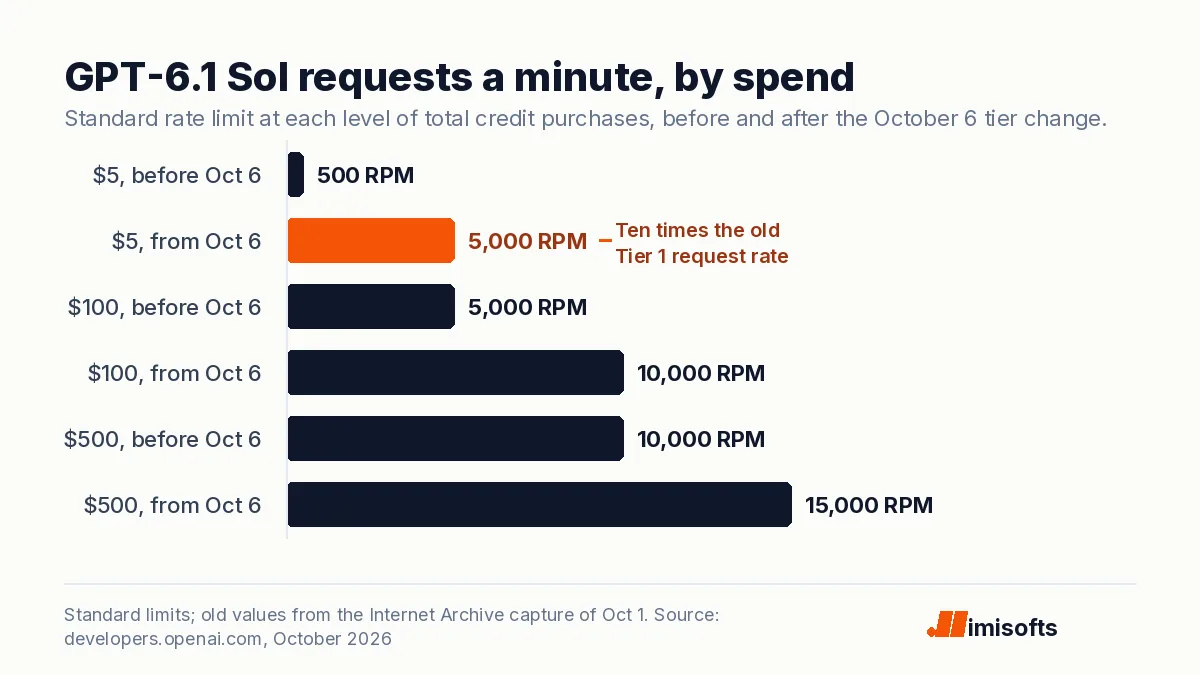
| GPT-6.1 Sol on Build, per minute (old Tier 1: 500 and 500K) | 5,000 requests, 1M tokens |
| GPT-6.1 Sol on Launch, per minute | 10,000 requests, 4M tokens |
| GPT-6.1 Sol on Grow, per minute | 15,000 requests, 40M tokens |
| GPT-6 Luna on Grow, per minute | 30,000 requests, 180M tokens |
| GPT-Live 1 concurrent sessions (Build, Launch, Grow; old Tier 1 was 25) | 50 / 300 / 500 |
| GPT-Live 1 price (billed per second, backend model extra) | $0.05 a minute |
| Ramp-rate rule of thumb above 1M input tokens a minute | 50% every 15 minutes |
| Date of the change | October 6, 2026 |
Tiers and limits read on 8 October 2026 from OpenAI's rate limits guide, changelog and model pages; old values from Internet Archive captures of 22 September and 1 October 2026.
What changed on October 6
- Five paid tiers became three. OpenAI's API changelog says it simplified API usage tiers "from five to three: Build, Launch, and Grow," and that organizations upgrade automatically as total credit purchases reach each minimum. Paid organizations were moved with no action needed, per OpenAI's developer forum announcement.
- The thresholds fell. In the Internet Archive's October 1 capture of the same guide, $5 bought Tier 1 with a $100 monthly limit, $100 bought Tier 3 with $1,000, $250 bought Tier 4 with $5,000, and Tier 5's $200,000 needed $1,000. Now $5 buys $500 a month, $100 buys $5,000 and $500 buys $200,000.
- Rate limits are printed per tier. On Build, the Astra, Sol and Terra models get 5,000 requests per minute (RPM) and 1,000,000 tokens per minute (TPM). Launch gets 10,000 RPM and 4,000,000 TPM, and Grow 15,000 RPM and 40,000,000 TPM. GPT-6 Luna, the cheapest of the three flagship models, runs 5,000, 10,000 and 30,000 RPM with 2,000,000, 10,000,000 and 180,000,000 TPM.
- Voice sessions rose. GPT-Live 1, OpenAI's full-duplex voice model at $0.05 a minute, now allows 50 concurrent sessions on Build, 300 on Launch and 500 on Grow, up from 25 for a $5 account, 200 for $100 and 300 for $500 before the change.
- The free tier stayed put. It keeps a $100 monthly limit for users in an allowed geography and still cannot call GPT-6.1 Sol or GPT-Live.
The independent outlet MIXED compared the live guide with the archived one and reported the same old and new thresholds.
Same spend, before and after
The clearest way to read the change is by how much an organization has bought in total. Three of the six spend bands gain. The other three land exactly where they were, because their old tier already matched the new one.
| Total credit purchases | Tier before, tier now | Monthly usage limit | GPT-6.1 Sol per minute | GPT-Live calls at once |
|---|---|---|---|---|
| $5 to under $50 | Tier 1, now Build | $100, now $500 | 500 requests and 500K tokens, now 5,000 and 1M | 25, now 50 |
| $50 to under $100 | Tier 2, now Build | $500, unchanged | 5,000 and 1M, unchanged | 50, unchanged |
| $100 to under $250 | Tier 3, now Launch | $1,000, now $5,000 | 5,000 and 2M, now 10,000 and 4M | 200, now 300 |
| $250 to under $500 | Tier 4, now Launch | $5,000, unchanged | 10,000 and 4M, unchanged | 300, unchanged |
| $500 to under $1,000 | Tier 4, now Grow | $5,000, now $200,000 | 10,000 and 4M, now 15,000 and 40M | 300, now 500 |
| $1,000 or more | Tier 5, now Grow | $200,000, unchanged | 15,000 and 40M, unchanged | 500, unchanged |
Old figures: Internet Archive captures of OpenAI's rate limits guide and GPT-6.1 Sol model page (October 1, 2026) and GPT-Live 1 model page (September 22, 2026). New figures: the live pages, read October 8, 2026.
Two patterns fall out. The change is mostly a gift to new and small accounts: an organization that tops up $5 gets ten times the request rate it had a week ago, and $100 now buys the $5,000 monthly limit that used to take $250. And the $500 band is the biggest single jump. An account with $500 of purchases sat at Tier 4 until it reached $1,000; it now gets Grow's 40 million tokens a minute, ten times its old token rate, and a monthly limit 40 times higher.
What it means for operators running n8n or GoHighLevel
Most agency automations call OpenAI one record at a time: an n8n workflow, a Make scenario or a GoHighLevel workflow sends a request per contact, row or message. At the old Tier 1, 500 requests a minute on GPT-6.1 Sol was the wall that turned a 10,000-row enrichment run into a stream of 429 errors. On Build it is 5,000. Four practical consequences:
- Per-client accounts got cheaper to bring up. Tiers and rate limits are set per organization, with project limits inside it, not per user. If each client pays OpenAI from its own organization, reaching production limits now takes $100 of credit, which is prepaid usage rather than a fee, instead of $250.
- Shared accounts share everything. If an agency runs every client through one organization, all those workflows draw on one tier's limits and one monthly usage limit. Put heavy clients in their own projects with their own limits so one bulk job cannot starve the rest.
- The usage limit is no longer a safety net. OpenAI says the monthly usage limit is separate from the spend limits you set, and it rose fivefold for the smallest accounts. Set a hard spend limit on each project, which makes requests return a 429 error at your cap, and a spend alert below it.
- Retries should follow OpenAI's guidance. Treat the Retry-After header as a minimum wait, back off with jitter, cap the attempts and never retry quota or billing errors. In n8n, a node's Retry On Fail setting with a wait between tries covers simple flows; our n8n developers build the rest.
AI voice agents can take more calls at once
For an AI receptionist on GPT-Live, concurrency is the number that binds, because every live call holds a session for its whole length. A $5 account now holds 50 calls at once, double the old Tier 1; $100 holds 300 and $500 holds 500. Sessions bill at $0.05 a minute, by the second, plus whatever backend model and tools the agent calls. That puts a 50-call surge, the kind an HVAC or plumbing company can see in a storm, within the smallest paid tier, which matters for emergency call flows for HVAC and plumbing. If you would rather buy than build, our guide to AI answering services for HVAC compares the packaged options.
What the new tiers do not change
A tier changes limits, not prices: a GPT-6.1 Sol token costs the same on Build as on Grow. Prompts over 272,000 input tokens still bill the whole request at the long-context rate, which we covered in OpenAI's 272K long-context pricing. The standard limits above are separate from the Ultrafast processing limits. And a 429 with the code slow_down can still appear below your RPM and TPM when traffic jumps too fast. OpenAI's rule of thumb, once traffic reaches 1 million input tokens a minute, is to grow by no more than 50% every 15 minutes. A bulk job that goes from zero to full speed at 9 a.m. is exactly that pattern, so stagger it or move it to the Batch API, which OpenAI prices at half the standard rate.
What to do this week
- Open Settings, then Organization, then Limits in the OpenAI dashboard and check which tier each organization landed on and its per-model limits.
- If an organization sits just under $100 or $500 in total purchases, a credit top-up moves it up at once; OpenAI's guide points to Upgrade tier in the Usage Tiers section.
- Set a hard spend limit and a spend alert on every client project.
- Update retry logic in every workflow that calls OpenAI: honor Retry-After, add jitter, cap attempts, and stop on quota and billing errors.
- For voice agents, size peak concurrency against 50, 300 or 500 sessions and load test before the busy season.
If you want this set up properly across client accounts, our AI automation team builds and maintains these workflows for agencies and small businesses, and you can hire an AI engineer for a one-off audit of your OpenAI setup.
Frequently Asked Questions
Since October 6, 2026 there are three paid tiers plus Free. Build needs $5 in total credit purchases and allows $500 of usage a month, Launch needs $100 and allows $5,000, and Grow needs $500 and allows $200,000. Free allows $100 a month for users in an allowed geography.
Reach $500 in total API credit purchases. OpenAI upgrades the organization automatically when its purchases cross the threshold, and its rate limits guide points to an Upgrade tier option in the Usage Tiers section of the organization's limits page. The old top tier, Tier 5, needed $1,000.
On GPT-6.1 Sol and the other Astra, Sol and Terra models, 5,000 requests and 1,000,000 tokens per minute. GPT-6 Luna gets 5,000 requests and 2,000,000 tokens per minute, and GPT-Live 1 allows 50 concurrent voice sessions. The old Tier 1 allowed 500 requests and 500,000 tokens a minute on Sol and 25 GPT-Live sessions.
No. OpenAI moved paid organizations to their new tier automatically. Organizations with $5 to under $50, $100 to under $250 or $500 to under $1,000 in total purchases got higher limits; those with $50 to under $100, $250 to under $500 or $1,000 or more kept the same limits under a new name. Check Settings, Organization, Limits to confirm.
No. OpenAI sets an approved monthly usage limit for each organization by tier, and it is separate from the spend limits you configure. A spend alert only sends a notification, while a hard spend limit makes affected requests return a 429 error once the organization or project reaches the amount you set.
OpenAI returns a 429 with the code slow_down when traffic rises too quickly, even within your requests and tokens per minute. Follow the Retry-After header when it is present, then ramp up gradually; OpenAI suggests growing by no more than 50% every 15 minutes once traffic reaches 1 million input tokens a minute.