Short answer. Nod is a free, open source personal agent that n8n Labs released as a research preview on 10 November 2026. It is a separate app, not part of n8n: it runs on your Mac, Windows PC or own server, works in your apps and on websites from its own sandboxed computer, and asks before sending, paying or deleting anything you did not request. The app costs nothing; you pay your AI model provider, and Nod sets a $200 monthly spending limit at setup and checks in with you when a task passes $5.
On 16 November 2026 we read n8n's launch post, the Nod website and docs, the Nod Terms of Use, the GitHub releases (the latest that day was v0.8.2) and n8n's pricing page. This guide rests on those documents, not on our own testing. We build n8n workflows for clients, so we have a stake in the Nod versus n8n question.
Key numbers
| Item | Number |
|---|---|
| Price of the Nod app (open source under Apache 2.0; model fees billed by your provider) | $0 |
| Default monthly spending limit (set at the end of setup; any amount from $1 up) | $200 |
| Task check-in amount (Nod stops before its next step and asks) | $5 |
| Example single request in Nod's docs (5,210 input and 180 output tokens, Claude Sonnet 5.5) | $0.02 |
| Context a local model needs (plus tool calling) | 64,000 tokens |
| Errands finished in n8n's tests (226 errands, three attempts each, simulated, GPT-6.1 Sol) | 98% |
| Test runs with an action beyond permission (October 2026 task suite, simulated accounts) | 0 of 678 |
| Mac download, app and runtime (macOS 14 or later) | About 1.8 GB |
| Free disk for a Windows local assistant (plus WSL 2; Windows 11 in preview) | 20 GB |
| n8n Starter, billed annually (2,500 workflow executions; $24 billed monthly) | $20 a month |
Nod's website, launch post, docs and GitHub releases, and n8n's pricing page, all read on 16 November 2026.
What Nod is
Nod comes from n8n Labs, a small team inside n8n that tries ideas outside the core product. The launch post describes it as a personal agent with its own computer and browser: you say what you need, and it works in your connected apps and on websites until the job is done. That computer is a sandbox running locally, which lets Nod handle websites that have no integration at all.
It is open source under the Apache 2.0 licence, with the code on GitHub under n8n GmbH's copyright. You talk to it in the app or on Telegram or WhatsApp while it runs jobs in the background, some on a schedule. The homepage calls it a research preview and notes that most n8n Labs ideas get shelved, so treat it as an experiment.
How Nod differs from n8n
n8n itself, per its documentation, is a workflow automation tool under a fair-code licence that mixes business process automation with AI features. You design workflows, n8n runs them as executions, and its cloud plans are priced by how many executions you run each month. The launch post calls that kind of work multiplayer: processes a team or business shares on one n8n instance. Nod is for a single player: one person, their own accounts and the jobs that are theirs alone.
Three points settle most confusion. You do not need n8n or an n8n account to use Nod. Nod is not the n8n AI Assistant. And the launch post says work on n8n and the n8n agent continues as planned.
The two can still work together. Connect your n8n instance and you can ask Nod to build an n8n workflow; per the Build with n8n docs, it builds the workflow in your n8n, tests it with sample data and leaves it as a draft until you tell it to publish. Nod never creates or reads n8n credentials; n8n asks you for those.
| Nod | n8n | |
|---|---|---|
| Built for | One person and their own jobs | Processes a team or business shares |
| Where it runs | Your Mac, Windows PC, Linux PC or your own server | n8n's cloud or your own server |
| Who plans each step | A model plans; a separate check approves actions | The workflow you design, which can include AI agent nodes |
| People per install | One owner | Unlimited users on every plan |
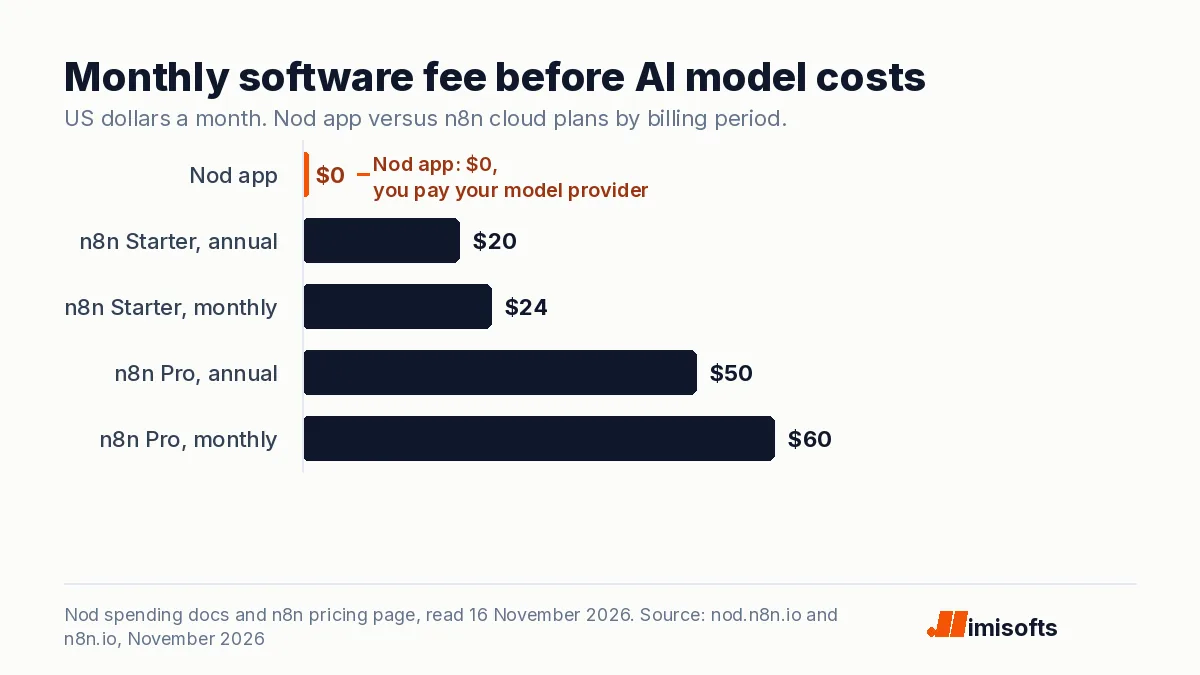
| Software price | Free; you pay your model provider | From $20 a month billed annually on n8n's cloud |
What Nod costs, and what n8n costs
The spending docs are plain: Nod itself does not charge you, and your model provider bills you for the requests Nod makes. You have three ways to pay for the model.
- An API key from OpenAI, Anthropic, Google, OpenRouter, Amazon Bedrock or one of the 30+ providers the homepage lists. Nod estimates each request's cost from the model's API price and counts it toward your monthly limit. Free models and OpenAI-compatible servers show no price. Your provider's bill is the final word.
- A ChatGPT Plus or Pro plan, by signing in. That usage comes out of your plan and does not count toward Nod's monthly limit.
- A local model through Ollama, LM Studio, vLLM or llama.cpp, which costs nothing per request. The homepage says it needs tool calling and a 64,000-token context, and that small models are less reliable at the safety check.
For scale, an example in Nod's privacy docs shows one Gmail reply using Claude Sonnet 5.5 with 5,210 input tokens and 180 output tokens, logged at $0.02. That is one illustrative request, not a monthly figure. Every scheduled check calls your model again, and the launch post admits some early testers found tasks cost more than they expected before a later release brought costs down.
Nod ships with four spending controls:
- A $200 monthly limit, set at the end of setup and changeable to any amount from $1 up. At the limit, schedules, tasks and background work stop until you raise or remove it.
- A $5 task check-in: once a task's spending since your last message passes $5, Nod stops before its next step and asks whether to continue.
- A separate $5 monthly allowance for automatic preparation, the work Nod starts on its own, which is off by default for new profiles.
- A Usage page logging every model call with its estimated cost, and every app action.
For a shared business process, compare n8n's pricing page: it charges by monthly workflow executions, with unlimited users and workflows on every plan, and lists a self-hosted Community Edition on GitHub.
| Option | Monthly fee | What you get |
|---|---|---|
| Nod app | $0 | One owner; model costs billed by your provider |
| n8n Starter, billed annually | $20 | 2,500 workflow executions, hosted by n8n |
| n8n Starter, billed monthly | $24 | The same plan |
| n8n Pro, billed annually | $50 | 10,000 workflow executions, hosted by n8n |
| n8n Pro, billed monthly | $60 | The same plan |
Over a year, Starter costs $240 billed annually or $288 billed monthly, a gap of about 17%, the saving n8n shows for annual billing.
What Nod runs on and how to install it
The install guide lists these requirements:
- Mac: macOS 14 or later, on Apple silicon or Intel. The app and its runtime are about a 1.8 GB download.
- Windows: Windows 11 x64, in preview. A local assistant needs WSL 2 with hardware virtualization and at least 20 GB of free disk; the download is about 2.1 GB, and SmartScreen can still warn about a new release.
- Linux: x64 only, as a Flatpak preview, with a desktop secret store such as GNOME Keyring or KWallet.
- Your own server: Linux, or a Mac with Docker Desktop. The self-hosting guide suggests starting with 2 CPU cores, 8 GB of memory and 50 GB of disk, and says one server belongs to one person.
The homepage puts setup at about ten minutes:
- Download the installer from Nod's GitHub releases, open it and approve it.
- Choose Get started for a local setup.
- Connect a model: an API key, your ChatGPT plan or a local model server.
- Connect apps such as Gmail, Calendar, Drive, Slack and Notion, reviewing each permission screen, and save any website logins Nod may use.
- Ask for something in the app or on Telegram.
The jobs Nod is built to do
n8n's examples are errands that eat an afternoon of tabs, logins and forms:
- A morning call brief.
- A draft reply to a question you left unanswered.
- Friendly reminders on an unpaid invoice, asking you before a second nudge.
- Cancelling a subscription, turning down the offers to stay and asking for a refund.
- Signing in to supplier portals each month to download invoices and file them for your accountant.
- Pulling weekly numbers from a dashboard with no export into your report.
- Watching a client's pricing page or a product price and speaking up only when it changes.
It also keeps notes you can see, edit or forget, and once you connect Gmail it checks how you write so drafts sound like you.
How Nod decides what it may do
The model plans the work but does not have the final say. The Trust and Vault docs describe a separate check that sees your words and the proposed action, never the pages or emails Nod read. Reads and drafts run. Sending an email, adding an event or deleting files runs only if it matches your request; otherwise Nod asks. Every payment waits for you to approve it with your card's security code, which Nod never saves.
Saved logins and cards sit in an encrypted Vault on your machine, and Nod enters them on websites through private forms the model cannot read. Provider API keys never enter the sandbox, the browser or the model's context, per the models docs.
n8n published its own results on an evaluation page, run with GPT-6.1 Sol on simulated accounts and websites in October 2026. Nod finished 98% of 226 errands, each tried three times (678 runs). In 0 of those 678 runs did it take an action beyond the simulated user's permission. It scored 93.2% on 500 LongMemEval-S memory questions, and 0 of 216 attempts to plant false memories through attack emails worked. The page itself warns that a zero in a test sample is not proof of zero risk in real use.
Limits and security risks to weigh
An agent that reads your inbox and signs in to your accounts carries more risk than a chat window. n8n's pages list the main limits:
- The permission check is a model. The security model page says the checker can be wrong in every mode and no checker is immune to prompt injection. The Terms of Use, updated 11 November 2026, add that Nod is provided as is, that its approval decision may not always be correct, and that you are responsible for your instructions and for reviewing what it does.
- A signed-in Nod can act anywhere on that site. Vault does not review each click, and a deceptive site can mislabel a button.
- Secrets are not sealed off. The model can type any value it knows into a page, including a password you pasted into chat, and there is no hardware-backed key service.
- Some data leaves your machine. Your model provider receives the conversation, what Nod reads and screenshots. By default, app requests and results pass through n8n's hosted connection service and Composio, whose default project for Nod has Zero Data Retention turned on. Basic usage data goes to n8n by default; you can switch it off. The apps docs add that some app grants cover a whole mailbox.
- Uninstalling keeps your data. Use Remove all data in Settings first if you want it gone.
- Practical limits. Nod stops when your laptop sleeps, each install has one owner, and it cannot make phone calls yet; hosting, calls and a team version are listed as coming next.
For IT teams, n8n publishes a security review guide and aims to acknowledge a reported vulnerability within three business days.
When a business should use n8n workflows instead
Nod has one owner, needs your computer awake or a dedicated server, and plans its steps with a model. That suits one person's errands. It is a poor fit when:
- Several people depend on the same process, such as lead routing or order sync.
- The job must run around the clock, whether or not anyone's laptop is open.
- You need the same steps every time, written down, so a colleague can check and change them.
- The process handles customer records in volume, where a model's judgement on each action adds risk and model spend.
For those, an n8n workflow is the better tool: it runs on n8n's cloud or your own server, any number of users can work on it, and cloud plans charge by executions, not seats. A sensible split for a small firm is Nod for the owner's personal admin and n8n for the processes the business runs on. If you want those workflows built for you, you can hire an n8n developer from our team.
What to do this week
- Sort your list: personal errands are Nod candidates; anything others rely on is an n8n candidate.
- If you try Nod, start with read and draft jobs, such as a call brief, before letting it send or pay.
- Lower the $200 monthly limit to a test budget and keep the $5 check-in.
- Connect the fewest apps you can, and never paste passwords or card numbers into chat.
- Check Usage after each job for what Nod did and what it cost.
- Have whoever handles IT read the security review guide before you connect work accounts.
How imisofts can help
imisofts is a Dubai agency that builds AI automation and n8n workflows for businesses. We can help you sort which jobs belong with a personal agent like Nod and which belong in a shared n8n workflow, then build, test and document the workflows. Our AI automation services page lists what we cover.
Frequently Asked Questions
Nod is a free, open source personal agent from n8n Labs, released as a research preview on 10 November 2026. It runs on your Mac, Windows PC or own server, works in your apps and on websites from its own sandboxed computer and browser, and asks before actions your request does not cover.
The app is free under the Apache 2.0 licence. You pay your model provider for the requests Nod makes, use your ChatGPT Plus or Pro plan, or run a local model, which costs nothing per request. Nod sets a $200 monthly limit at setup and checks in when a task passes $5.
No. Nod is its own app and does not need an n8n account, and it is not the n8n AI Assistant. If you do use n8n, you can connect your instance and ask Nod to build and test workflows, which stay drafts until you tell it to publish them.
It has safeguards: a separate check approves actions, saved logins and cards stay in an encrypted Vault the model cannot read, and every payment needs your approval. n8n also says the checker is a model that can be wrong and that no checker is immune to prompt injection, so start with read and draft jobs and limited app access.
No. On a laptop, Nod stops when the computer sleeps. To keep schedules running, n8n suggests an always-on Mac mini or your own server, and a managed hosted version is on its roadmap.
n8n says Nod does not change its direction and that work on n8n and the n8n agent continues as planned. Nod is built for one person's own jobs, while n8n runs processes a team or business shares.