Affiliate disclosure: some links in this article are partner links. If you start a paid plan through them, imisofts may earn a commission at no extra cost to you. We only recommend tools we actually use to run client campaigns.
Short answer. When Instantly emails go to spam, the cause is usually one of nine settings, not the tool. Instantly's own campaign options guide recommends 30 campaign emails a day per sending account (20 on its AirMail accounts), and the common causes are inboxes pushed past that, open tracking on a shared tracking domain, HTML and links in the first email, or missing DMARC. Check placement first with an inbox placement test, then work through the settings below in order. Gmail asks bulk senders to keep the user-reported spam rate below 0.1% and never reach 0.3%, and Outlook has required SPF, DKIM and DMARC from domains sending more than 5,000 emails a day since 5 May 2025.
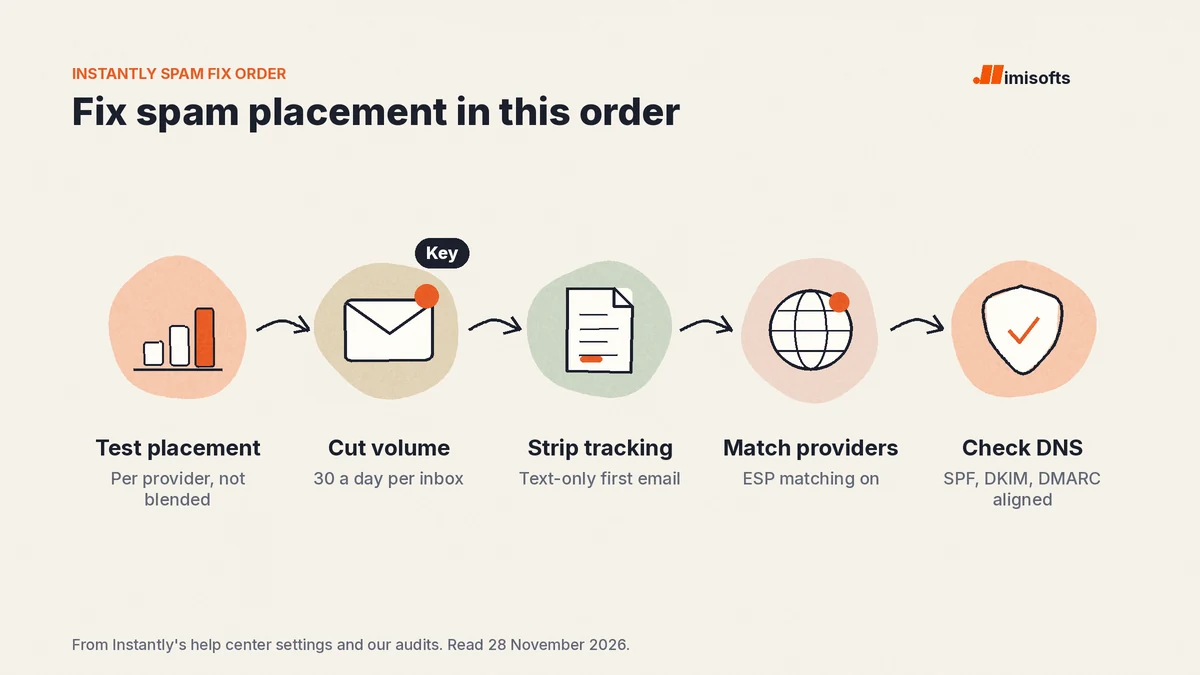
Below: how to confirm where your emails land, the nine settings with where to find each one in Instantly, the mailbox provider rules that apply, how many inboxes your volume needs, and what to do when settings are not enough. We are an Instantly affiliate and earn a commission if you sign up through our links; the fixes below work the same on any plan.
Key numbers
| Item | Number |
|---|---|
| Instantly recommended campaign volume (help center, campaign options) | 30 emails a day per inbox |
| AirMail cap (Instantly's own sending infrastructure) | 20 emails a day per inbox |
| Starting volume for new inboxes (Instantly slow ramp guidance) | 10 to 15 a day |
| Gmail spam rate (and never 0.3% or higher; personal Gmail accounts) | below 0.1% |
| Gmail bulk sender threshold (to personal Gmail, per primary domain; permanent) | about 5,000 a day |
| Outlook enforcement start (domains over 5,000 a day need SPF, DKIM, DMARC) | 5 May 2025 |
| Bounce line we hold new domains to (verify every list before upload) | 1% |
| Inboxes for 1,000 emails a day (at 30 a day, 7 domains at 5 inboxes each) | 34 |
Instantly help center (campaign options, account limits, Advanced Deliverability, inbox placement tests) and pricing file; Google sender guidelines FAQ; Microsoft Tech Community and support pages; read 28 November 2026.
Confirm where the emails land first
Low open rates do not prove spam placement, especially if you have open tracking switched off. Measure instead. Instantly's inbox placement tests live under Email Accounts, then Deliverability Tests, then "Run new test". You pick the sending accounts and either an existing campaign's copy or new copy, and the test reports the share landing in the inbox, spam and promotions or updates folders. Spintax and variables are not supported in these tests, so test a plain version of your copy.
Read the result per provider, never as one blended number. Instantly's own course material makes the point: strong placement at Google with poor placement at Microsoft points to a Microsoft-specific problem. Also remember what seed tests are. Seed inboxes do not behave like real people, so a test is one signal next to your reply rate, bounce rate and Google Postmaster Tools, not a verdict.
Done for you by imisofts
Need your cold email infrastructure set up properly?
We buy and configure the domains and inboxes, set SPF, DKIM and DMARC, and warm everything up, so sending starts in about 14 days.
The nine settings to check, in order
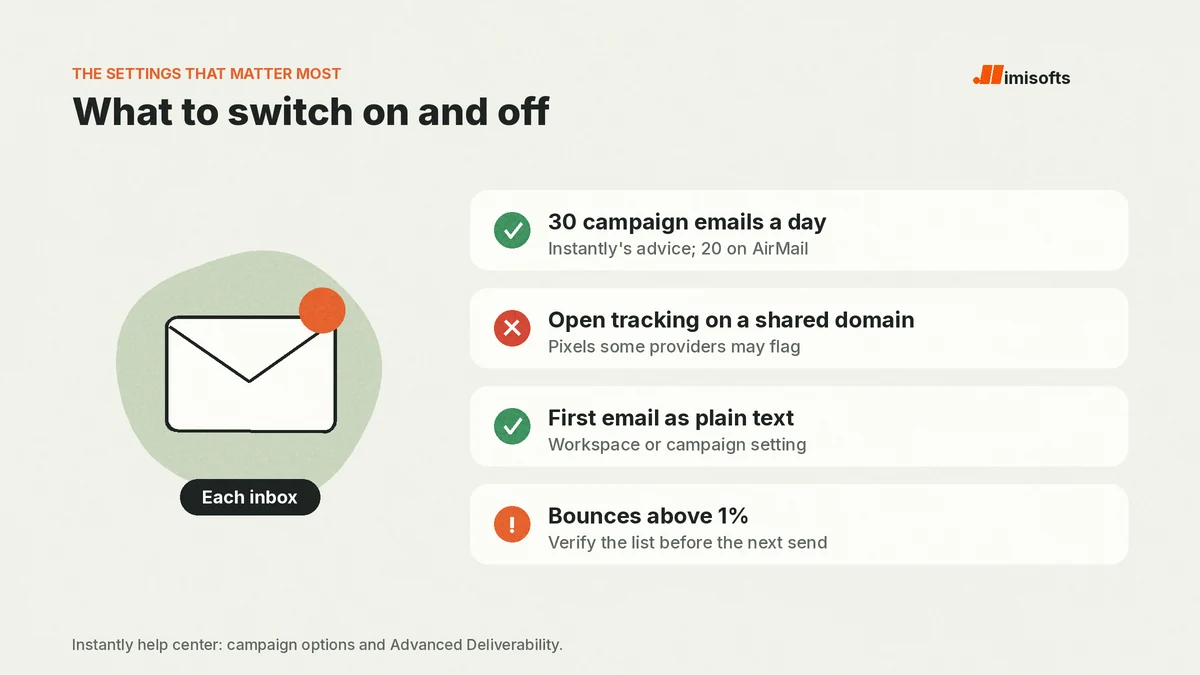
| # | Setting | Where in Instantly | What we set |
|---|---|---|---|
| 1 | Daily limit per inbox | Email Accounts, the account, Settings, "Daily Campaign limit" | 30 (20 on AirMail), lower on new inboxes |
| 2 | Campaign daily limit | Campaign, Options, Daily limit | Number of inboxes times 30 |
| 3 | Campaign slow ramp | Account settings | On for new inboxes; start at 10 to 15 a day |
| 4 | Warmup during campaigns | Account warmup settings | Keep it running beside the campaign |
| 5 | Open tracking | Advanced Deliverability, "Disable Open Tracking", or per campaign | Off, at least on step 1 |
| 6 | First email as text only | Campaign Options, Delivery optimization, or the workspace setting | On |
| 7 | ESP matching | Advanced Deliverability, "Enable ESP Matching" | On if you send from both Google and Microsoft |
| 8 | Tracking domain | Account settings, custom tracking domain | Your own CNAME if you keep link tracking |
| 9 | Bounce protection and list quality | Lead verification before upload | Verified lists only; bounces at or below 1% |
1 and 2: volume per inbox. Instantly separates the two limits in its account and campaign limits article: the campaign limit is the total across every inbox in the campaign, and the account limit caps each inbox. Its own example is 10 inboxes at 30 each for a 300-a-day campaign. If the campaign limit is set to 500 with 10 inboxes, something has to give, and it is usually reputation.
3 and 4: ramp and warmup. Instantly's blog says its slow ramp guide recommends starting new inboxes at 10 to 15 sends a day and that the campaign slow ramp adds 2 a day automatically. It also suggests about 10 warmup emails on top of 30 campaign emails, 40 in total per inbox. Switching warmup off once campaigns start removes the positive engagement that offsets cold sends. Our Instantly warmup settings post has the exact values we use.
5 and 6: tracking and HTML. Instantly's Advanced Deliverability settings describe open tracking pixels as something "some email providers may flag", and offer "Always Send First Email as Text-Only" to make the first touch look like a normal email. Its Delivery optimization option goes further: it removes HTML styling and also disables open tracking. You lose open rates; you keep the inbox. Judge campaigns on replies.
7: ESP matching. With it on, Instantly pairs the sender's provider with the recipient's, Gmail to Gmail and Outlook to Outlook. It only helps if your pool contains both kinds of inbox.
8: tracking domain. If you need link tracking, use your own tracking domain through a CNAME rather than the shared default, so another sender's reputation does not ride on your links. Our tracking domain guide walks through the record.
9: bounces. Every plan includes Instantly's reputation protection and bounce detection, but it can only react after a bounce. Instantly's own DFY material talks about keeping bounces "at or below 1 percent" with warmup and verified data; we hold new domains to the same line and verify every list before upload.
The mailbox provider rules that apply
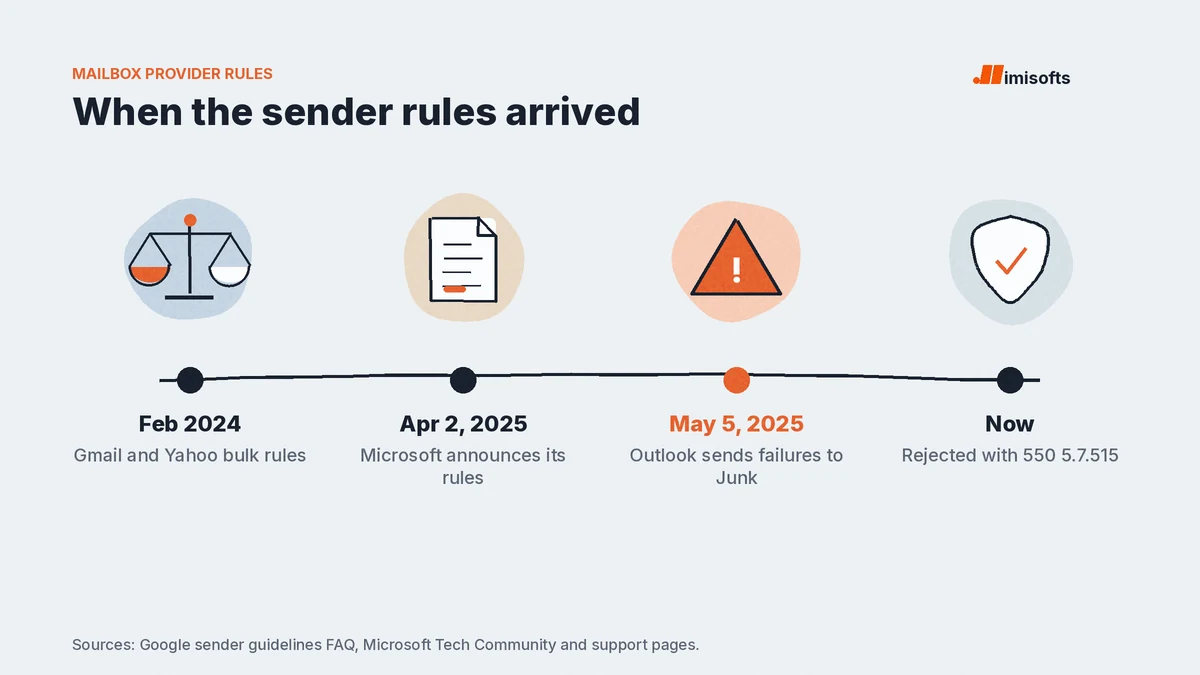
Gmail. Google's sender guidelines FAQ defines a bulk sender as anyone sending close to 5,000 messages or more to personal Gmail accounts in 24 hours, counted across the same primary domain, and says a sender who meets that once is a bulk sender permanently. Bulk senders need DMARC and one-click unsubscribe on marketing mail, and every sender should keep the spam rate below 0.1% and prevent it from ever reaching 0.3%. One detail cold emailers miss: Google says the sender guidelines do not apply to messages sent to Google Workspace accounts, only to personal Gmail. Business recipients on Workspace are still filtered; the published thresholds just are not the rule there.
Outlook. Microsoft announced on 2 April 2025 that domains sending more than 5,000 emails a day to Outlook.com, Hotmail and Live addresses must pass SPF, DKIM and DMARC (at least p=none, aligned with SPF or DKIM). Enforcement started on 5 May 2025 with non-compliant mail routed to Junk, and Microsoft's support page now documents rejections with "550 5.7.515 Access denied". Like Google's rules, these cover Microsoft's consumer mailboxes, not Microsoft 365 business tenants.
A cold email programme spread across many small domains rarely reaches 5,000 a day from one domain. Set up SPF, DKIM and DMARC on every sending domain anyway: business filters check the same records. Our SPF, DKIM and DMARC setup guide has the records.
How many inboxes your volume needs
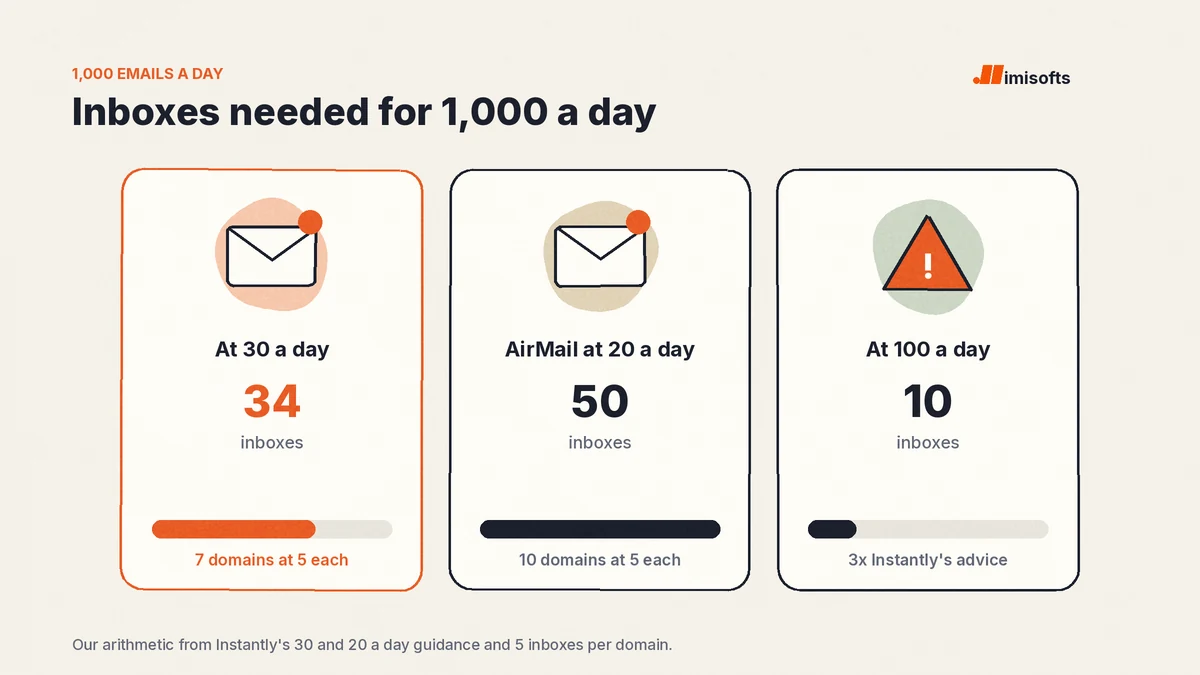
Many spam problems are a capacity problem in disguise: too few inboxes asked to carry too much. Using Instantly's 30-a-day guidance and its limit of 5 inboxes per done-for-you domain:
| Daily volume | Inboxes at 30 a day | Domains at 5 inboxes each | AirMail inboxes at 20 a day |
|---|---|---|---|
| 300 a day | 10 | 2 | 15 |
| 1,000 a day | 34 | 7 | 50 |
| 5,682 a day (Hypergrowth's 125,000 a month over 22 sending days) | 190 | 38 | 285 |
If your current setup sends 1,000 a day from 10 inboxes, you are at 100 per inbox, more than three times Instantly's own recommendation, and no setting in the list above will fix that.
When the settings are not enough
If placement stays poor after all nine checks, the problem is usually reputation that has already been spent:
- Retire burned domains. A domain with a high spam rate in Google Postmaster Tools recovers slowly. Pause it, keep warmup running, and move volume to fresh, warmed domains rather than pushing through.
- Check the copy. Instantly's Growth plan includes an AI Spam Words Checker; our list of spam trigger words covers the usual offenders.
- Use the higher-tier tools if you are already paying for them. Instantly's pricing file lists a Deliverability AI Agent and AI blocklist triggers on Hypergrowth ($107 a month) and SISR, dedicated or private server and IP rotation, on Light Speed ($358 a month).
- Rebuild the layer. Sometimes the fastest fix is new domains, correct DNS and two weeks of warmup, done properly once.
That last option is what our cold email infrastructure service does. We build, authenticate and warm the domains and inboxes from $2,497 one time, wired into Instantly with sane limits and seed placement testing, or keep them monitored and compliant from $1,997 a month. For our wider checklist, see cold emails going to spam. And if you are still choosing a sequencer, Instantly's free trial (partner link) includes the placement tests described above.
Frequently Asked Questions
Usually one of a few settings: more than about 30 campaign emails a day per inbox, open tracking on a shared tracking domain, HTML and links in the first email, warmup switched off during campaigns, unverified lists with bounces above 1%, or missing SPF, DKIM and DMARC. Run an inbox placement test first to see which providers are affected.
Instantly's campaign options guide recommends 30 campaign emails a day per sending account, and caps its AirMail accounts at 20. New inboxes should start lower, around 10 to 15 a day, with the campaign slow ramp switched on.
For cold email, we do, at least on the first step. Instantly's Advanced Deliverability settings note that tracking pixels can be flagged by some email providers, and its Delivery optimization option disables open tracking and removes HTML. Measure campaigns by replies instead.
It can, and we keep it on. Instantly's blog suggests about 10 warmup emails on top of 30 campaign emails a day per inbox, so warmup keeps adding positive engagement while the campaign sends.
An Advanced Deliverability setting that pairs the sending inbox's provider with the recipient's, for example Gmail to Gmail and Outlook to Outlook. It only helps when your sending pool includes both Google and Microsoft inboxes.
Google says its sender guidelines apply to messages sent to personal Gmail accounts, not to Google Workspace accounts. Business filters still judge your mail, so authenticate every domain and keep complaint and bounce rates low anyway.