You cannot edit a Google AI Overview or a ChatGPT answer about your business. Google offers a thumbs-down button and a Report a problem link, and OpenAI takes correction requests through a privacy portal meant for “people whose personal data appears in ChatGPT responses.” What you can change is the page an answer was built from, and, when the false claim sits on no page at all, the written record of what you reported, which is what a federal judge in Chicago weighed on 14 September 2026.
The instinct is to treat a wrong AI answer like a wrong listing: find the page that said it and get it changed. In the two court cases I read this month, the answers said things the pages they cited did not, and the reports filed did not stop the answers. They built a record, and in Chicago that record mattered.
Use the report button to build a record, not to fix the answer.
Key numbers
| Item | Number |
|---|---|
| Keene v. Google ruling, Northern District of Illinois (motion to dismiss denied in part) | 14 Sep 2026 |
| Complaints Keene sent Google before he sued (from 27 May 2025) | 3 |
| Days from his first complaint to that ruling | 475 |
| False AI Overviews that survived dismissal | 2 of 4 |
| Munich ruling, Landgericht München I (case 26 O 869/26, not final) | 28 May 2026 |
| Most a German court can fine per breach of an order | EUR 250,000 |
| Delaware ruling denying Google’s motion to dismiss (claim over Google’s AI) | 24 Jul 2026 |
| Walters v. OpenAI, summary judgment for OpenAI | 19 May 2025 |
| Search providers listed in ChatGPT’s search help (Microsoft and Shopify) | 2 |
| Bing Places for Business listing | Free |
| Locations our own listings gave, July 2026 audit (and 2 headcounts) | 3 |
Read on 8 October 2026: the Keene v. Google opinion of 14 September 2026, beck-aktuell and dpa reports of the Munich ruling, section 890 of the German Code of Civil Procedure, Google Search Help and Search Central, OpenAI’s privacy policy, privacy portal and help center, Bing Places for Business, and our own July 2026 listing audit.
The mistake: treating the report button as an edit button
Google is plain about what the button is for. Its help page says AI Overviews “can and will make mistakes” and that feedback and human reviews help it “evaluate and improve the quality” of results. A report carries your latest query and its results. Nothing on the page says the reported answer will change, or when.
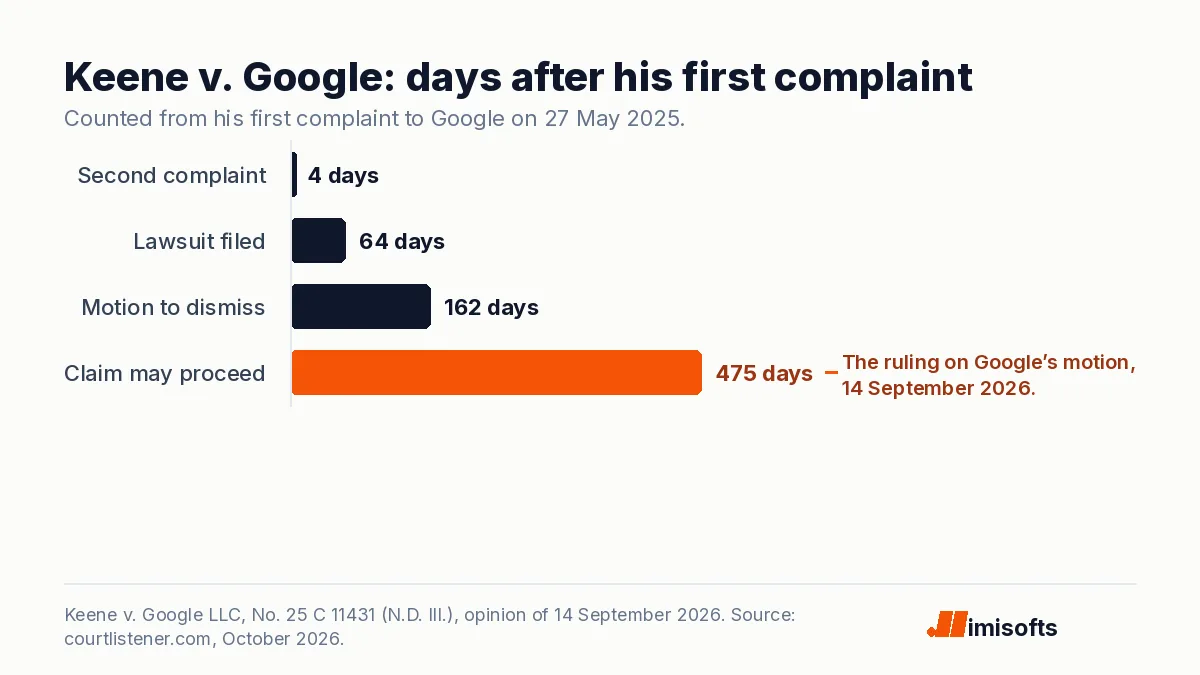
The author James Keene saw what that means. He complained to Google on 27 May 2025, again four days later and again after 27 June; he says Google apologized each time and called the statements errors made by its AI. He alleges the false overviews, three of which said he was serving a life sentence, kept appearing through at least late June, a month after his first complaint.
Click thumbs down, pick a category, wait for the answer to change.
Google’s help page says reports help it improve results. It names no fix and no date.
Fix the pages that are wrong, make your business hard to mistake for another, log every report.
Three jobs you control, whichever assistant got it wrong.
What Google and OpenAI offer a business
OpenAI’s privacy policy tells users not to rely on the factual accuracy of its models’ output. People can request a correction or removal of inaccurate information about themselves through privacy.openai.com or [email protected], which OpenAI “will consider” based on applicable law and the technical capabilities of its models. The portal’s one request type aimed at answers is “Remove my personal data from ChatGPT responses.” Removal takes a claim out; it does not put the right fact in.
For a business, OpenAI’s help page points at the sources. ChatGPT search sometimes sends rewritten queries to partner search providers, and the page links the privacy policies of two, Microsoft and Shopify. It may also use “trusted third-party providers” for nearby business listings.
Google’s guidance for site owners agrees. AI Overviews and AI Mode can run “multiple related searches” to build a response, and its best-practice list for AI features includes making sure your structured data matches the visible text on the page and that your Business Profile information is up to date.
When the cited page never said it
If the wrong fact lives on a page, fix the page and you remove what the answer was built from. But Keene’s four overviews each cited a Wikipedia page that, according to the court’s summary of his allegations, did not contain the false statements.
In Munich, a search for a publishing house’s name plus the German word for fraud scheme returned an AI Overview crediting it with disreputable business practices, subscription traps and links to other companies. According to dpa’s report of the ruling, the AI mixed in information about other companies and drew connections that did not exist even in the sources Google linked. No page edit reaches that. When a model merges you with another business, you control two things: how hard you are to confuse, and how well you document what you reported.
I have seen the milder version on my own company. In July our own site and the directories that list us gave three different locations and two different headcounts; one stale address sat in a directory’s back end, invisible on its public profile, while a sister site republished it onto its best-agency lists. In September, when I put buyer questions about my services to four assistants, the answers that named agencies were built from directories and best-of lists, not the agencies’ own sites. That part of the record you can fix.
What the courts did with the reports
Courts have started treating these answers as the vendor’s own words. I am not a lawyer; this is what the rulings say, not advice.
In Munich, the publisher first sent Google a cease-and-desist letter and complained through Google’s online form; the content kept appearing, so it went to court. On 28 May 2026 the Landgericht München I, case 26 O 869/26, held that an AI Overview is Google’s own statement, not a list of other people’s results, and barred most of the claims. Under German procedure law each breach of such an order can cost up to EUR 250,000. The ruling is not final; dpa reported in June that Google could still appeal.
Keene sued Google on 30 July 2025, 64 days after his first complaint. Google moved to dismiss on 5 November, 162 days in, arguing among other things that its disclaimer and the cited source meant the overviews were not statements of fact. On 14 September 2026, 475 days after that first complaint, Judge Thomas Durkin of the Northern District of Illinois let the claim go forward on two of the four overviews, writing that “the mere act of providing a citation to an assertion does not convert that assertion from fact to opinion.”
Keene had to plead that Google knew the statements were false or recklessly ignored whether they were, and the judge found his complaints did that at this stage: they plausibly reached the people responsible for the overviews, who took no corrective action. A Delaware court refused to dismiss a defamation claim over statements from Google’s AI on 24 July 2026. On 19 May 2025, by contrast, a Georgia court granted OpenAI summary judgment in Walters, partly because a reader in that user’s position, warned that the output could be wrong, could not have taken it as fact. None of these is a verdict, and the law is still moving.
Four moves for this week
Ask what your buyers ask, and save it
Search your business name in Google, ChatGPT, Copilot and Perplexity, alone and with words like reviews, price, hours, scam and near me. Screenshot every answer with the date and the sources it cites. That file is your baseline and, if it comes to it, your evidence.
Fix every wrong fact that sits on a page
Start with your own site, then your Google Business Profile and Bing Places for Business, where Microsoft lists you for free. Then the directories, including what sits in their back ends. If the phone is how you sell, check the number first: for an HVAC or plumbing company, a wrong number in an AI answer sends the emergency call to someone else, and no emergency call flow for HVAC and plumbing can answer a call that never reaches you.
Make your business hard to mistake for another
Use one legal name, one address, one founder name and one founding year on your site, your profiles and every directory, and link them to each other in your structured data, which Google’s guidance asks you to keep matching the visible text. In Munich, the AI mixed two publishers up with other companies. The same consistency helps you get recommended, as I explain in how to get ChatGPT to recommend your business.
Report in writing and keep the record
Use thumbs down and Report a problem with a specific description, and use the vendor’s privacy request route for anything that names a person. Log the date, the query, the screenshot and every reply. In Keene, the judge relied on the dated complaints to find, at this stage, that Google plausibly knew. If the statement is defamatory and survives your reports, take that file to a lawyer.
The bottom line
An AI answer about your business is a listing you cannot edit. Check it monthly, fix the facts at their source, make yourself hard to confuse with anyone else, and file every report as if a judge may read it, because in Chicago one did. An AI assistant sent me a paying client this year, so I treat these answers as part of the sales pipeline. This cleanup is part of our AI search optimization work.