October 28, 2026. Since October 26, 2026, new Gemini API projects on the paid tier store Generate Content API requests by default, prompt and response included, and those logs expire and are marked for deletion after 55 days unless you shorten the window to 7, 14 or 28 days or turn storage off. Projects created before October 26 keep their old setting, which is off unless someone enabled logging in Google AI Studio. For a store or agency sending customer emails, orders or call notes through a new Gemini project, that is a stored copy of the data to account for.
Key numbers
| Item | Number |
|---|---|
| Storage on by default for new paid projects | October 26, 2026 |
| Default log retention window | 55 days |
| Other retention windows | 7, 14 or 28 days |
| Logs saved to a dataset | do not expire |
| Grounding with Google Search storage | 30 days |
| Python SDK needed for store=false (JavaScript @google/genai 2.31.0 or later) | google-genai 2.33.0 or later |
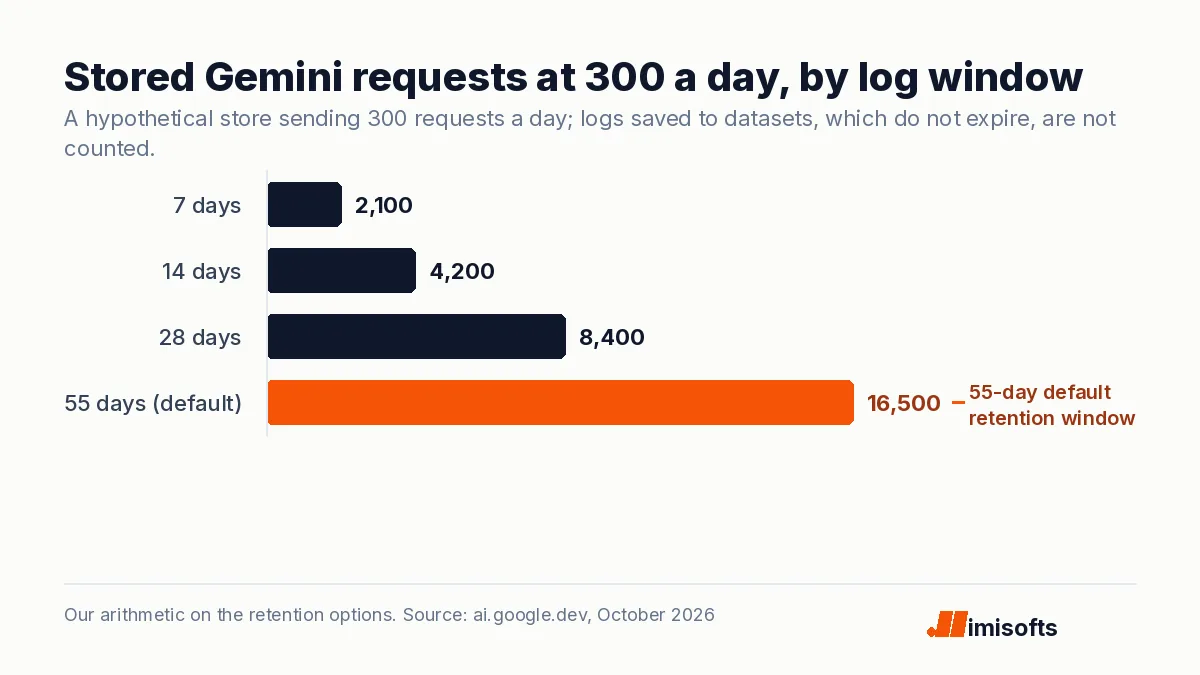
| Hypothetical 300 requests a day, default window (2,100 at 7 days) | 16,500 |
Read on 28 October 2026 from the Gemini API release notes, the Logs and datasets page and the Gemini API Additional Terms; the stored-request counts are our arithmetic.
What Google changed
- Storage on by default for new projects. The Gemini API release notes for October 26 say generateContent, streamGenerateContent and batchGenerateContent requests in new paid-tier projects are now stored by default (store=true), "matching the Interactions API".
- Existing projects are unchanged. The Logs and datasets page says older projects keep the Generate Content API at store=false unless logging was enabled in AI Studio.
- 55 days by default. The page says logs "will expire and be marked for deletion after a default retention window of 55 days", and the window can be set to 7, 14, 28 or 55 days. Logs saved to a dataset do not expire.
- Two ways out. Set store=false on a request, which overrides the project setting, or turn off Generate Content API logging in the Settings panel of the logs dashboard. The per-request flag needs google-genai 2.33.0 or later for Python, @google/genai 2.31.0 or later for JavaScript, google-genai 1.79.0 or later for Java and google.golang.org/genai 1.76.0 or later for Go.
What is stored, and what Google does with it
Google describes logging as a way to "observe, debug, and optionally share usage feedback with Google". In AI Studio you can "inspect the full prompt and response from Gemini, and the context from the previous turns", save logs to datasets, export datasets as CSV, JSONL or Google Sheets, and choose to share datasets with Google. Inputs containing videos, GIFs or PDFs, Imagen and Veo, Gemini embedding models, the Gemini Robotics model and Public Preview Agents are not logged. The page lists no fee for storage.
Google's Gemini API Additional Terms describe a further kind of logging. On paid services, Google says it does not use your prompts or responses to improve its products, and that it "logs prompts and responses for a limited period of time, solely for detecting and preventing violations of the Prohibited Use Policy to maintain the safety and security of the Services, and any required legal or regulatory disclosures." Grounding with Google Search stores prompts, contextual information and output for 30 days. On the unpaid tier, Google says it uses your content to improve its products and that you should not submit sensitive, confidential or personal information.
This is general information, not legal advice.
What it means for operators
In our view the risk is a new project nobody configured: a staff member's prototype, a vibe-coded app, a client build. For a hypothetical store sending 300 requests a day through Gemini, the default window keeps about 16,500 stored requests at any time; a 7-day window keeps 2,100.
- List every Gemini project created since October 26, plus older ones where someone enabled logging, and decide per project whether you want the logs for debugging.
- Shorten the window where you keep them, and set store=false in code for requests that carry customer data, so the choice survives a settings change.
- Check your privacy notice and client contracts for a stated retention period, and make sure 55 days fits it, remembering that datasets do not expire.
For a law firm, those logs may hold client-confidential material. If you are planning AI intake for a law firm or AI calling for a home services business, ask whoever builds it which projects hold the transcripts and for how long. Our AI automation team can review an existing Gemini integration. For related reading, see our pages on the Gemini API free tier limits and on whether the OpenAI API is HIPAA compliant.
Frequently Asked Questions
For paid-tier projects created on or after October 26, 2026, Generate Content API requests are stored by default as project logs, prompt and response included; older projects keep that storage off unless logging was enabled in AI Studio, and the Interactions API stores requests by default. Separately, Google's terms say it logs paid-tier prompts and responses for a limited period for abuse detection, and Grounding with Google Search stores prompts for 30 days.
Project logs expire after a default window of 55 days, and you can set a project to 7, 14, 28 or 55 days. Logs you save to a dataset do not expire.
Set store=false on each request, which overrides the project setting, or turn off Generate Content API logging in the Settings panel of the Logs and Datasets dashboard. The per-request flag needs google-genai 2.33.0 or later for Python or @google/genai 2.31.0 or later for JavaScript. This covers project logs only, not the abuse logging described in Google's terms.
Google's Gemini API Additional Terms say that on paid services it does not use your prompts or responses to improve its products, unless you choose to share datasets with Google. On the unpaid tier it says it does, and that you should not submit sensitive, confidential or personal information.