October 1, 2026. OpenAI has put @ChatGPT inside Slack and Microsoft Teams for ChatGPT Business and Enterprise workspaces, announced at DevDay on September 29, and teammates who do not have their own ChatGPT license can use it in any channel where the organization has enabled it. A Business seat lists at $20 a month billed annually or $25 monthly, so a 20-person team that gives full seats to five power users pays $100 a month on annual billing instead of $400, and the other 15 can still work with ChatGPT in shared channels. What @ChatGPT can see and change is set by the admin's connections, and it asks before it acts in a connected tool.
Key numbers
| Item | Number |
|---|---|
| ChatGPT Business Standard seat, billed annually | $20 a month |
| ChatGPT Business Standard seat, billed monthly | $25 a month |
| ChatGPT Business Premium seat, billed annually (5 times Standard usage, no 5-hour limit) | $100 a month |
| ChatGPT Business Premium seat, billed monthly | $125 a month |
| Individual license needed in an enabled channel | No |
| Plans with @ChatGPT in Slack and Teams | Business, Enterprise and Edu |
| Announced (DevDay) | September 29, 2026 |
| Our example: 5 annual Standard seats instead of 20 (our arithmetic) | $100 instead of $400 a month |
Read on 1 October 2026 from OpenAI's DevDay recap, the @ChatGPT feature page, the ChatGPT Business release notes and the business pricing page.
What OpenAI launched
- Mentions in channels, threads and DMs. OpenAI's DevDay recap says you can mention @ChatGPT in a channel, thread or direct message, and teammates can add context and refine the result in the same conversation without an individual ChatGPT license.
- No seat needed in enabled channels. The feature page answers the question directly: team members without an individual license can use @ChatGPT in enabled channels.
- Admins decide what it reaches. The Business release notes say the organization must install and enable @ChatGPT first, and administrators configure its instructions and connections. It does not inherit anyone's personal accounts; a user can connect their own account to give it extra access, such as a private document.
- It sees less than you might expect. It works from the conversation and the company sources an admin connected, not your entire channel history, private conversations or personal ChatGPT history. Its replies are visible to everyone who can see the conversation.
- Actions need approval, and work can repeat. It can update a connected tool, such as a project tracker, after you approve the change, and teams can turn routine work like a weekly status update into a recurring task that runs on a schedule or watches connected tools for changes.
Engadget's DevDay coverage reported the Slack and Teams launch alongside ChatGPT Space, the new shared hub for teams and their agents.
What the seats cost
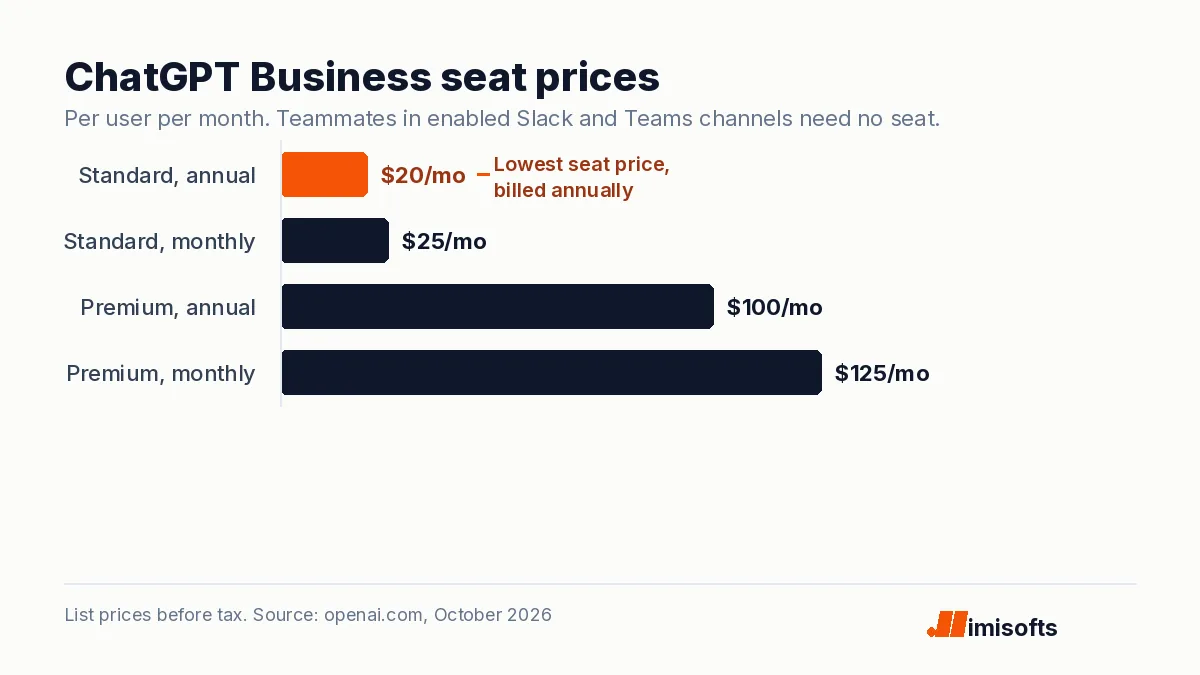
OpenAI's business pricing page lists two seat types. A Standard seat is $20 per user per month billed annually or $25 billed monthly. A Premium seat is $100 or $125 and carries five times the usage of Standard with no five-hour limit. The new part is who needs one: a seat is now for the people who work in ChatGPT itself, not for everyone who wants an answer in a Slack thread. OpenAI's pages do not say how requests from unlicensed teammates count against the workspace's usage, so check the admin console's spend view in the first month.
What it means for operators
For an agency or a small team, this moves ChatGPT from a tool some people open to a teammate everyone can tag. Three rules keep it useful and safe:
- Connect the least you need. Give @ChatGPT read access to the docs and trackers a channel actually uses, and decide separately which tools it may write to. Our note on client data in ChatGPT covers what to keep out.
- Treat shared channels as public. Replies are visible to everyone in the conversation, and linked files keep their own permissions, so think twice before enabling it in channels you share with clients.
- Move only the simple automations. A weekly digest or status update can live in a recurring team task. Multi-step workflows across your CRM and billing still belong in a proper automation, which our AI automation team and AI engineers build.
One gap to note: @ChatGPT lives in text channels. A customer who phones the business still needs a person or a voice agent to answer, which is a separate, per-minute stack; our page on after-hours call answering for home services covers what that costs.
Frequently Asked Questions
No. OpenAI says team members without an individual ChatGPT license can use @ChatGPT in channels where the organization has enabled it. The organization still needs a ChatGPT Business, Enterprise or Edu plan, and an admin must install and enable @ChatGPT.
OpenAI's DevDay recap lists Business and Enterprise plans, and the feature page also lists Edu. A Business Standard seat is $20 per user per month billed annually or $25 monthly, and a Premium seat is $100 or $125.
No. OpenAI says it uses the conversation it is in and the company sources an admin has connected, and it does not automatically have access to your entire channel history, private conversations or personal ChatGPT history.
Yes, when a connected tool supports the action and the configured account has permission, for example updating a project tracker. OpenAI says it asks for approval before taking action in a connected tool.