Short answer. "Error in message stream" means the reply ChatGPT was sending you, piece by piece, broke off before it finished. OpenAI's help pages do not list this exact message, but for failed or stuck replies they say to wait 30 to 60 seconds, click Regenerate, start a new chat and check status.openai.com, which logged a rise in ChatGPT conversation errors for 52 minutes on 9 November 2026. If the error follows you to other browsers, devices and networks, OpenAI asks for a HAR file and a support ticket.
We read OpenAI's Help Center, status page and API docs on 16 November 2026. Anything OpenAI does not say is labeled as our suggestion or a likely cause.
Key numbers
| Item | Number |
|---|---|
| Wait before regenerating a stuck reply (OpenAI Help Center troubleshooting sequence) | 30 to 60 seconds |
| ChatGPT conversation errors on 9 Nov 2026 (10:16 to 11:08 a.m. PT, OpenAI status page) | 52 minutes |
| ChatGPT uptime, 18 Aug to 16 Nov 2026 (16 components; aggregate across tiers and models) | 99.26% |
| Days with degraded ChatGPT performance (same window; partial outage on 10 days) | 46 |
| June 2025 Error in message stream incident (11:50 a.m. to 12:15 p.m. PDT, fixed by a rollback) | 25 minutes |
| Python SDK automatic retries (connection errors, 408, 409, 429 and 500-level errors) | 2 |
| Python SDK default request timeout (timed-out requests are also retried twice) | 10 minutes |
| Responses API WebSocket connection limit (then open a new connection) | 60 minutes |
| HAR file attachment limit for support (share a view-only cloud link above that) | 25 MB |
| Port for ChatGPT WebSocket traffic (wss://ws.chatgpt.com, per OpenAI's network guide) | TCP 443 |
OpenAI Help Center, status.openai.com, OpenAI API docs and the openai-python README, all read on 16 November 2026.
What Error in message stream means
ChatGPT shows its answer while it is still being written, rather than all at once. OpenAI's streaming guide for developers describes the same idea: streaming lets an app show the start of an answer while the model keeps generating the rest. The error appears when that flow stops before the answer is done. In short, the reply broke off before it finished; wait 30 to 60 seconds, then click Regenerate.
OpenAI has used the exact phrase itself. A status page incident titled "ChatGPT errors (Error in message stream)" says users saw more of these errors from 11:50 a.m. PDT on 11 June 2025; OpenAI rolled back a change and recovered at 12:15 p.m., 25 minutes later. The ChatGPT release notes for 27 February 2026 also list a bug fix for increased message streaming errors in GPT-5.2 Thinking. In both cases the fix was on OpenAI's side.
The other side is your connection. OpenAI's network guide says some ChatGPT features use secure WebSocket connections, and that a network which blocks that traffic can make features stall, disconnect or fail to stream updates.
Two likely causes we cannot confirm from OpenAI's pages are long reasoning runs and long chats. On OpenAI's community forum, users reported in September 2026 that short requests worked while complex, high-reasoning requests ran for several minutes and then failed with this error (one thread, another). Treat that as a pattern users report, not an OpenAI finding. OpenAI does say to start a new chat when a conversation is long or has many turns.
10 fixes in order, quickest first
These steps are based on OpenAI's sequence for a reply that hangs or fails, with the status check moved up, from its troubleshooting article, plus checks from two other Help Center pages. Stop when one works; none of them costs anything.
- Wait, then regenerate. Give it 30 to 60 seconds. If nothing moves, click Stop generating, then Regenerate. OpenAI says a failed response may be a one-time error.
- Check the status page. Open status.openai.com. If ChatGPT shows an open incident, the fix is on OpenAI's side; wait for the resolved notice.
- Start a new chat. Copy your prompt, open a new chat and send it again. OpenAI suggests this when a conversation is long or has many turns.
- Hard refresh, restart or sign in again. Press Cmd or Ctrl, Shift and R together in the browser, or reload the desktop app or restart the phone app. If that fails, sign out of ChatGPT and back in.
- Try a different model. OpenAI's slow response guide says to switch models and start a brand-new chat to see whether the problem is tied to one model or to your whole account.
- Open a private window with extensions off. OpenAI names privacy and security tools, and extensions that block scripts or ads, as ones that can interfere.
- Turn off VPN, proxy and secure DNS. OpenAI gives Web Protect as an example of a security filter to switch off while you test.
- Clear ChatGPT's cookies and site data. Clear the site data for ChatGPT, not only the cache, then sign in again.
- Change browser, device or network. OpenAI's network guide suggests a phone hotspot as the test network.
- Collect evidence and contact support. See the support section below.
On the Android app, OpenAI's troubleshooting article points to reinstalling the app if tools keep freezing or returning errors.
Outage or your setup: how to tell
OpenAI's network guide suggests two checks. Is it only your machine, or others on your network too? And does the error go away when you switch from office WiFi to a phone hotspot? If others see it on every network, look at the status page. If only your office network fails, it is likely a network filter.
A green status page does not rule out an OpenAI problem. Each page we read on OpenAI's status site carries a note that availability is reported in aggregate across tiers, models and error types, and that one customer's availability can vary by plan, model and features. So if the error only happens on one model, try another before you blame your browser. On 16 November 2026 the page read fully operational.
Between 9 and 16 November 2026, no incident was titled "Error in message stream", but three touched ChatGPT replies or the API:
- Higher ChatGPT conversation errors on 9 November, open from 10:16 to 11:08 a.m. PT, 52 minutes from first update to resolved. The first update already said a fix had been applied, so the errors may have started earlier.
- Higher error rates on the API the same day, 3:08 to 3:50 p.m. PT, across 14 API components.
- An outage of logins, sign-ups and some ChatGPT features on 11 November, 12:43 to 12:52 p.m. PT, which also covered errors when creating conversations through the API.
OpenAI did not post causes for these, and the pages do not say whether users saw this exact message during them.
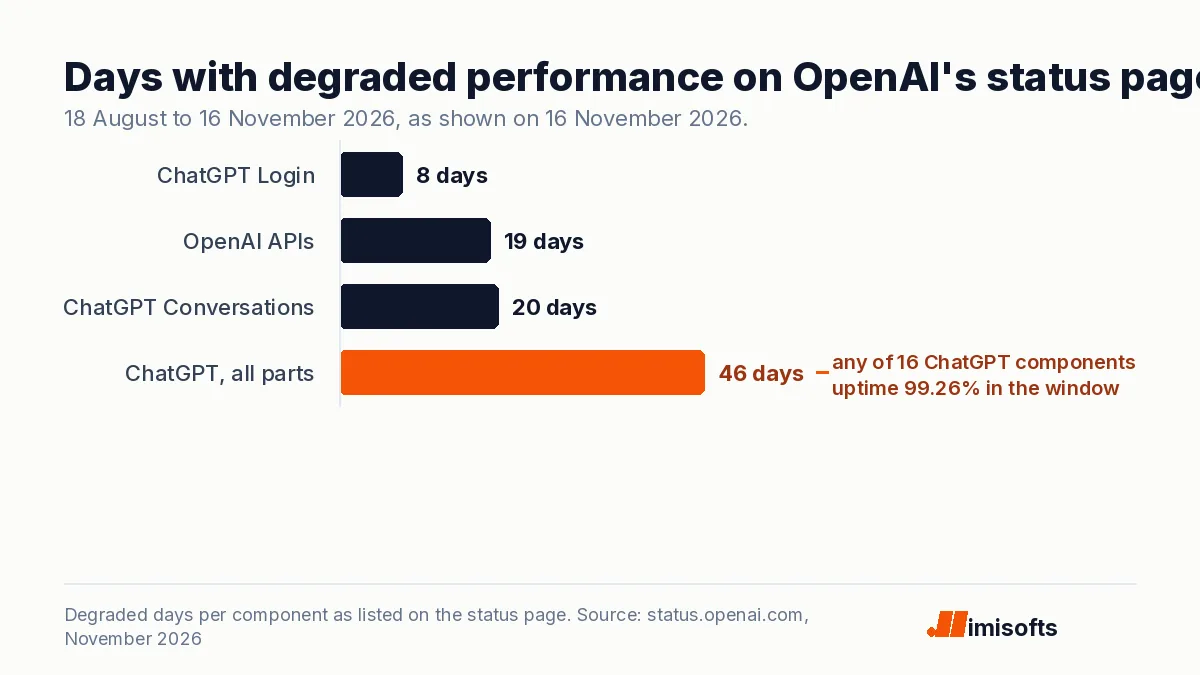
Over a longer window, partial problems are common. The status page showed these figures for 18 August to 16 November 2026:
| Component | Uptime | Full outage days | Partial outage days | Degraded days |
|---|---|---|---|---|
| ChatGPT, all 16 components | 99.26% | 1 | 10 | 46 |
| ChatGPT Conversations | 99.95% | None listed | 2 | 20 |
| ChatGPT Login | 99.93% | None listed | 5 | 8 |
| OpenAI APIs, all 14 components | 99.97% | None listed | 2 | 19 |
OpenAI's status page logged degraded ChatGPT performance on 46 days in that window, about half of it, counting any of its 16 components. That is why the status page is step 2, not step 10. If your team relies on ChatGPT, use the Subscribe to updates button on the status page.
Company networks, VPNs and long replies
If the error hits everyone in an office but not on a phone hotspot, send IT OpenAI's network recommendations. The page asks admins to allow WebSocket traffic over TCP port 443, to let the "Upgrade: websocket" handshake through, and to allow wss://ws.chatgpt.com, which ChatGPT uses for conversation updates and notifications. It also lists domains to allowlist, including *.chatgpt.com, *.openai.com and *.oaistatic.com.
The same page warns that TLS inspection, SSL decryption, web filtering and proxies can block, rewrite or close the long-running connection early. When sessions connect and later stall or disconnect, it tells admins to check idle timeouts and frame or message size limits. It names common filtering tools, including Zscaler Internet Access, Cisco Umbrella and Fortiguard URL Filtering. In our view, a proxy idle timeout that cuts a slow reply is a likely cause of this error on office networks; OpenAI's page does not say so directly.
On the macOS desktop app, SSL inspection can block access, and OpenAI's network page suggests using ChatGPT on the web as a workaround.
When to contact OpenAI support
If the error follows you across browsers, devices and networks, OpenAI asks for a HAR file and browser console errors with timestamps, the model you used, and the conversation URL or ID. Its support article explains the HAR steps: open developer tools (Ctrl+Shift+I, or Cmd+Option+I on a Mac), go to the Network tab, tick Preserve log, reproduce the error and export the sanitized HAR.
Two cautions from the same page. HAR files can contain personal data, and the desktop app has no developer tools, so record the HAR in a browser. Files over the 25 MB attachment limit can be shared as a view-only cloud link. Start a chat from the bubble at the bottom right of help.openai.com, and never share a password or one-time code.
Stream errors in the OpenAI API: retries and timeouts
In the API, the same kind of failure can show up as a dropped stream, a timeout or a server error.
- Listen for the error event. With stream=true, the Responses API sends typed events over server-sent events. The streaming guide lists response.created, response.output_text.delta, response.completed and error as the common ones. We treat a stream that ends without response.completed as failed.
- Retry the right errors only. The error codes guide says a 500 is an issue on OpenAI's servers (retry after a brief wait) and a 503 with code server_is_overloaded means the model is temporarily overloaded (follow Retry-After, then retry). Retrying billing, spend or quota errors will not restore access.
- Back off with jitter. The rate limits guide says to treat Retry-After as a minimum plus a small random delay, use exponential backoff with jitter when the header is missing, cap attempts and total retry time, and defer the request if the server asks for a longer wait than you allow. Failed requests count toward your per-minute limit, so nonstop resending makes things worse.
- Know your SDK defaults. The official Python SDK retries connection errors, 408, 409, 429 and 500-level errors 2 times by default with a short exponential backoff, and times out requests after 10 minutes; timed-out requests are also retried twice. If you write your own retry loop, OpenAI says to turn SDK retries off, so nested loops do not multiply requests.
- Use background mode for long jobs. OpenAI's background mode guide says reasoning models can take several minutes and that background=true runs long tasks without timeout or connection worries. Set background and stream together, save each event's sequence_number as a cursor, and resume with starting_after if the stream drops. OpenAI notes the trade-off: a slower time to first token.
- WebSocket mode has a clock. In the Responses API WebSocket mode, a connection that hits the 60-minute limit returns websocket_connection_limit_reached; open a new connection and continue.
When an error persists, OpenAI support wants the model, the error message and code, the request data and headers, and the timestamp with time zone. Log request IDs too; the support article asks for them on API issues.
How a business avoids being stuck when ChatGPT fails
If your team runs daily work through ChatGPT, a 52-minute incident in a US workday, like the one on 9 November, can stop work. Our suggestions, built on the OpenAI facts above:
- Name who watches status. Subscribe one person or a team channel to status.openai.com updates, so staff stop troubleshooting laptops during a real incident.
- Keep a second way in. OpenAI itself points macOS app users to the web version when the app is blocked. Make sure people can use both, plus a second network such as a phone hotspot.
- Keep prompts and drafts outside the chat. Saved prompts in a shared doc turn step 3 (new chat, resend) into a few seconds of work.
- Break up long jobs. If a task runs for minutes before it fails, split it into smaller requests or use a lower reasoning setting, since users report that long, high-reasoning runs fail more.
- Apply OpenAI's network list once. Have IT allow the domains and WebSocket traffic before the next error, not during it.
- Move repeat work to automations. Daily tasks that run through the API can retry, back off, run in background mode, switch to another model or provider when one fails, and alert a person.
- Write a manual fallback. For the few tasks that cannot wait, write down what the team does by hand during an outage.
How imisofts can help
imisofts builds AI automations and agents for businesses, including n8n workflows and CRM integrations; see our AI automation services. If your product or workflows call the OpenAI API and you want retries, timeouts, background mode and a fallback path added, you can hire an AI engineer from our team. We do not run ChatGPT and cannot fix incidents on OpenAI's side.
What to do this week
- Bookmark status.openai.com and subscribe to updates.
- Next time the error appears, run the 10 steps in order and note which one worked.
- Test your office network against a phone hotspot. If only the office fails, send IT OpenAI's network page.
- Save your most used prompts outside ChatGPT.
- If you use the API, check your SDK's retry and timeout settings, and move any job that runs for minutes to background mode.
Sources (all read 16 November 2026): OpenAI Help Center articles on error messages, network setup, slow responses and support; the ChatGPT release notes; OpenAI Status and the incident pages linked above; OpenAI API docs on error codes, rate limits, streaming and background mode; the openai-python README. Forum posts are user reports, used as context only.
Frequently Asked Questions
It means the reply ChatGPT was streaming to you stopped before it finished. OpenAI's help pages do not define the exact message, but OpenAI used the name for a status incident on 11 June 2025 that a rollback fixed in 25 minutes, and its 27 February 2026 release notes list a fix for increased message streaming errors in GPT-5.2 Thinking.
Not always. Check status.openai.com first. On 16 November 2026 it read fully operational, but it had listed a rise in ChatGPT conversation errors for 52 minutes on 9 November. OpenAI notes its availability figures are aggregate, so one model or plan can have problems while the page looks green.
If it repeats in one chat, OpenAI suggests starting a new chat, especially when the conversation is long, and trying another model to see whether the problem is tied to one model. If it repeats everywhere, test another browser, device and network, since VPNs, proxies and security filters can interrupt the connection. Users on OpenAI's forum also report it on long, high-reasoning requests, which is a likely cause rather than a confirmed one.
OpenAI's steps for stuck or failed replies apply to the app too: wait 30 to 60 seconds, regenerate, start a new chat, restart the app, sign out and back in, and try a different network or device. For the Android app, OpenAI points to reinstalling if tools keep freezing or returning errors.
A HAR file and browser console errors with timestamps, the model you used, and the conversation URL or ID. Record the HAR in a browser, because the desktop app has no developer tools, and share a view-only cloud link if the file is over the 25 MB attachment limit. Never share passwords or one-time codes.
Listen for the error event when streaming, retry 500 and 503 errors with exponential backoff and jitter while respecting Retry-After, and do not retry billing or quota errors. The Python SDK retries 2 times by default and times out after 10 minutes. For jobs that run for minutes, OpenAI's background mode avoids timeouts and lets you resume a dropped stream with starting_after.