November 12, 2026. Adobe used its MAX conference in Miami Beach on November 10 to put AI agents into Firefly and Creative Cloud, preview a local MCP connection that lets outside AI agents edit native Photoshop and Premiere files, and announce a wider partnership with Google that will bring Acrobat to Gmail and Google Drive, with no date given. Paid Firefly plans start at $9.99 a month for 2,000 credits, which by Adobe's figures works out to up to 400 images or 20 five-second videos.
Key numbers
| Item | Number |
|---|---|
| Announcement date (Adobe MAX, Miami Beach) | November 10, 2026 |
| Firefly Standard (2,000 credits) | $9.99 a month |
| Firefly Pro ($9.99 for 6 months, offer ends Dec 6) | $19.99 a month |
| Firefly Pro Plus ($19.99 for 6 months) | $49.99 a month |
| Credits per image (our arithmetic: 2,000 credits / 400 images) | 5 |
| Credits per 5-second video (our arithmetic: 2,000 / 20) | 100 |
| Apps with expanded AI Assistants (beta) (Illustrator, Premiere, InDesign, After Effects, Frame.io) | 5 |
| Apps in the local MCP preview (Photoshop, Illustrator, Premiere, After Effects) | 4 |
Adobe releases of November 10, 2026 and Adobe's Firefly plans page; read 12 November 2026.
What Adobe announced at MAX 2026
Adobe published the news in three releases on November 10: its main MAX announcement, a Firefly release and a joint Adobe and Google release. The main changes:
- Creative Agent in more apps: the agent behind the Firefly AI Assistant (beta) now powers expanded AI Assistants (beta) in five apps: Illustrator, Premiere, InDesign, After Effects and Frame.io. Adobe says pros can "direct and execute complex, multi-step tasks in their own words."
- Plan Mode and Model Selector: in Firefly you can review, edit and approve the agent's plan before it starts, or let it run on its own, and pick the AI model yourself or leave it on Auto-Select.
- Always-on agents (preview): agents that keep doing recurring work, such as organizing incoming assets, checking quality and preparing content for different channels, in the background.
- Local MCP integrations (preview): a connection that lets "the third-party agents they already use" change native Photoshop, Illustrator, Premiere and After Effects files, with layers, sequences and compositions staying editable.
- New Firefly tools: Firefly Video, Firefly Design (beta), image edits called Edit Object, Edit Text, Relight and Retouch, a gallery of Quick Actions such as Remove Object, Thumbnail Generator and Build Product Ad, Firefly Graph (beta) for custom, repeatable workflows, and Firefly Builder (private beta), which turns a prompt into a website, presentation or app prototype.
- More outside models in Firefly: recent image and video model additions Adobe names include Dreamina Seedance 2.5, Kling 4.0, GPT Image 2.6 Sunburst and Flare, and Nano Banana 2.1.
- Creative Cloud features: Generative Restyle and Relight in Photoshop, Color Mode in Premiere, Open Eyes (beta) in Lightroom and Co-editing (beta) in InDesign, plus two Topaz Labs models, Wonder 4 and Image HDR.
Only some of this ships now. Adobe says "Edit Text, Retouch, Relight and Quick Actions are generally available in Firefly today," other new tools are in beta, and Firefly Builder is a private beta with a waitlist. The local MCP integrations and always-on agents are labeled preview.
The Adobe and Google deal
The partnership puts Adobe tools inside Google products and Google models inside Adobe tools. Per the joint release:
- Acrobat "will be available in Google Workspace through Google Drive and Gmail," shown as a suggested app with an "Edit with" option in file previews.
- Adobe will add Acrobat and more creative tools to its connectors in Gemini and Gemini Enterprise, and bring its creative tools to AI Mode in Google Search.
- Gemini models will help power AI features in Acrobat.
- Google DeepMind and Adobe are exploring a customized Google image model for Photoshop that "could enable near-real-time edits."
Neither company gave a date for the Workspace or AI Mode pieces. Adobe says its customers can already use Google models including Gemini Omni, Veo and Nano Banana. Related: our page on Google's connected apps platform.
What Firefly costs
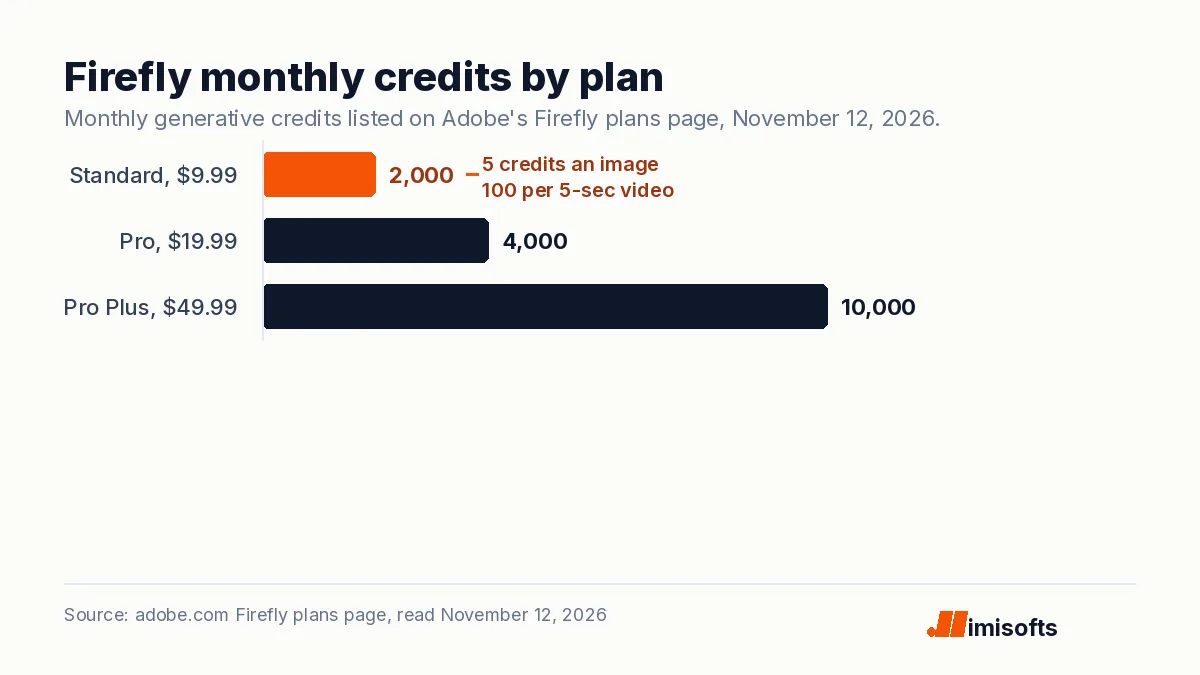
Adobe's Firefly plans page listed these US prices when we read it on November 12, 2026. The Pro and Pro Plus discounts run for the first 6 months and the offer "Ends Dec 6."
| Plan | Monthly price | Credits a month | Up to (images / 5-second videos) |
|---|---|---|---|
| Firefly Free | $0 | Limited daily generations | Limited |
| Firefly Standard | $9.99 | 2,000 | 400 / 20 |
| Firefly Pro | $19.99 ($9.99 for 6 months) | 4,000 | 800 / 40 |
| Firefly Pro Plus | $49.99 ($19.99 for 6 months) | 10,000 | 2,000 / 100 |
The arithmetic on Adobe's own figures: an image uses 5 credits and a five-second video uses 100, on every paid plan. At regular prices that is about 2.5 cents an image and about 50 cents per five-second video. With the 6-month discount, a first year of Pro costs $179.88 instead of $239.88, and Pro Plus costs $419.88 instead of $599.88. Pro adds unlimited image generations on select models for the first year, and Pro Plus adds unlimited images on all models at 1K and 2K, unlimited video on select models and Firefly Graph (beta).
What it means for small teams
Three practical points, as we read the releases:
- The agent can sit in tools you already pay for. If your team edits in Photoshop or Premiere, the local MCP preview means the AI assistant you use for other work may be able to make those edits directly. Adobe's VP Deepa Subramaniam told TechCrunch "We are still figuring out where and when and how to draw the line." We would expect the feature set to change.
- Budget by credits, not seats. Video is 20 times more expensive than an image in credits, so a team that makes only short ad clips will hit the Standard cap at 20 five-second videos a month. For image prices from one of Firefly's partner models, see our GPT-Image-2.6 pricing page.
- Google Workspace users get Acrobat closer. Once it ships, Acrobat will appear as a suggested app in Gmail and Drive, with an "Edit with" option in file previews. No date has been given.
We suggest deciding what an agent may change and who checks its output before you turn one loose on client files. If you want help setting those rules and review steps, see our AI automation agency page. For how businesses approach visibility in AI answers, including Google's AI Mode, see AI search optimization. If you are pricing a customer-facing assistant instead, see AI chatbot for business cost.
What to watch next
MAX runs November 10 to 12. Watch for dates on Acrobat in Google Workspace and Adobe in AI Mode, the end of the local MCP preview, and Firefly Builder leaving private beta. The main release quotes Anil Chakravarthy as Adobe's "President and incoming Chief Executive Officer."
Frequently Asked Questions
On November 10, 2026 Adobe expanded its Creative Agent across Firefly and Creative Cloud apps, previewed local MCP integrations so outside agents can edit Photoshop, Illustrator, Premiere and After Effects files, added new Firefly tools such as Firefly Builder (private beta) and Firefly Graph (beta), and announced a wider Google partnership that will bring Acrobat to Gmail and Google Drive.
Adobe's plans page listed Firefly Standard at $9.99 a month for 2,000 credits, Firefly Pro at $19.99 a month for 4,000 credits and Firefly Pro Plus at $49.99 a month for 10,000 credits on November 12, 2026. Pro and Pro Plus were discounted to $9.99 and $19.99 for the first 6 months, an offer Adobe says ends December 6. A free plan has limited daily generations.
Adobe's plans page says 2,000 credits generate "up to 400 images and 20 five-second videos." Read as alternatives, an image uses 5 credits and a five-second video uses 100. At regular prices that works out to about 2.5 cents an image and about 50 cents per five-second video.
Adobe and Google have not given a date. The November 10, 2026 joint release says Acrobat will be available through Google Drive and Gmail as a suggested app with an Edit with option in file previews.